
Use Alpine for modal visibility
Choose the correct model-binding timing
Limit NavbarComposer execution
Avoid unnecessary full-list reloads after saving
Keep public component state small
Livewire allows developers to build interactive pages using PHP and Blade. When an interaction requires server processing, Livewire sends a request, restores the component’s state, executes the action, and renders updated HTML.
Slow loading can happen when simple interactions trigger unnecessary requests, each request repeats expensive queries, or components exchange more data than they need.
The goal of Livewire hygiene is to reduce unnecessary work while preserving validation, permissions, and existing functionality.
The examples below are illustrative, not findings from HolidayLandmark’s actual code. They use Livewire 3 syntax. Check your version first:
composer show livewire/livewire
Binding behavior differs between versions. For example, Livewire 3 uses wire:model.blur for a request on blur; Livewire 4 uses wire:model.blur.live. Laravel Livewire
- Use Alpine for modal visibility
What: Opening or closing a modal often changes only its visibility.
Why it becomes slow: A Livewire action used solely to toggle visibility adds a server round trip. The user waits for the response before seeing the modal.
When to optimize: When the modal’s content is already available and opening it does not require authorization or fresh data.
Where to inspect: Blade templates, modal components, and methods such as openModal() or closeModal().
Before: server-controlled visibility
// Livewire component
public bool $showModal = false;

public function openModal(): void
{
    $this->showModal = true;
}

<button wire:click="openModal">
    Open details
</button>

@if ($showModal)
    <div role="dialog" aria-modal="true">
        <p>Details already available on this page.</p>

        <button wire:click="$set('showModal', false)">
            Close
        </button>
    </div>
@endif
Opening and closing both involve Livewire requests.
Solution: browser-controlled visibility
<div x-data="{ open: false }">
    <button type="button" @click="open = true">
        Open details
    </button>

    <div
        x-show="open"
        x-cloak
        @keydown.escape.window="open = false"
        role="dialog"
        aria-modal="true"
    >
        <p>Details already available on this page.</p>

        <button type="button" @click="open = false">
            Close
        </button>
    </div>
</div>
Add this once to your stylesheet:
[x-cloak] {
    display: none !important;
}
Why this works: Alpine updates visibility directly in the browser. Livewire supports Alpine for local interface interactions. Laravel Livewire
Preserve: Accessible focus management, validation messages, form reset behavior, and server-side authorization. An edit modal that loads a selected record still needs that loading step.
Check: Opening and closing a display-only modal should produce no Livewire request.
- Choose the correct model-binding timing
What: Model bindings control when input values synchronize with the component.
Why it becomes slow: Using .live on every field can trigger requests while the user types, even when the server only needs the values on submission.
When to optimize: Forms containing ordinary text fields, descriptions, or other inputs without immediate server dependencies.
Where to inspect: wire:model attributes and component methods such as updated() or updatedSearch().
Before: live updates for every field
<form wire:submit="save">
    <input wire:model.live="title">

    <textarea wire:model.live="description"></textarea>

    <button type="submit">Save</button>
</form>
Solution: synchronize ordinary fields on submission
<form wire:submit="save">
    <input wire:model="title">

    <textarea wire:model="description"></textarea>

    <button
        type="submit"
        wire:loading.attr="disabled"
        wire:target="save"
    >
        Save
    </button>
</form>
In Livewire 3, plain wire:model synchronizes with the next action, such as submitting the form. Use .blur when a field needs server processing after losing focus, or debounced .live for interactive search. Laravel Livewire
{{-- Livewire 3: update when leaving the field --}}
<input wire:model.blur="email">

{{-- Search: update after a pause in typing --}}
<input wire:model.live.debounce.500ms="search">
Why this works: The server processes input when it is useful rather than repeatedly during typing.
Preserve: Country-to-city dependencies, calculated prices, and required immediate feedback. Changing bindings does not automatically add validation; keep the relevant validation logic.
Check: Type into a normal form field and confirm no request occurs until submission.
- Limit NavbarComposer execution
What: A view composer prepares data whenever its registered views render.
Why it becomes slow: Registering an expensive composer for every view can repeat database queries or service calls across layouts, partials, and component rendering.
When to optimize: When a navbar composer is registered broadly but its data is needed only in the header.
Where to inspect: Service providers, composer registration, and the composer’s compose() method.
Before: registered for every view
use App\View\Composers\NavbarComposer;
use Illuminate\Support\Facades\View;

View::composer('*', NavbarComposer::class);

public function compose(\Illuminate\View\View $view): void
{
    $count = auth()->check()
        ? auth()->user()
            ->unreadNotifications()
            ->count()
        : 0;

    $view->with('unreadCount', $count);
}
Solution: register only for the actual header view
View::composer(
    'partials.navbar',
    NavbarComposer::class
);

{{-- resources/views/partials/navbar.blade.php --}}
<nav>
    Notifications: {{ $unreadCount }}
</nav>
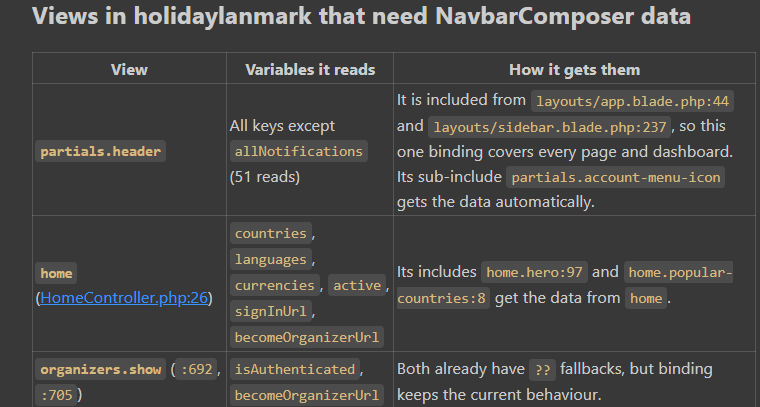
Why this works: Views that do not need navbar data no longer execute its preparation logic.
Preserve: All header variants that require the data. If navbar information must change after an action, keep its refresh mechanism.
Check: Measure composer executions, database queries, and downstream calls before and after. Scoping does not guarantee only one execution if the header itself renders multiple times.
Prompt
Limit NavbarComposer to views that need its data, remove per-render cache-hit logs and the unused allNotifications key, and prevent it from overwriting unrelated view variables.
Run LocalizedTextComposer only on layouts.app after checking footer inheritance; verify all affected pages and preserve existing functionality and UX.
// Before: every view
View::composer('*', NavbarComposer::class);

// After: only views that need its data
View::composer(
    ['partials.header', 'home', 'organizers.show'],
    NavbarComposer::class
);
- Avoid unnecessary full-list reloads after saving
What: A small edit should not always fetch every record again.
Why it becomes slow: Saving one row and reloading an entire list repeats database work and increases the data processed by the component.
When to optimize: When the saved field does not affect filtering, ordering, totals, or pagination membership.
Where to inspect: Save/update methods, refresh events, list-loading methods, and Blade row keys.
Before: reload every trip
public function updateName(int $id): void
{
    $data = $this->validate([
        'name' => ['required', 'string', 'max:255'],
    ]);

    $trip = Trip::findOrFail($id);
    $this->authorize('update', $trip);

    $trip->update($data);

    $this->trips = Trip::query()->get()->toArray();
}
Solution: update the affected loaded row
This example assumes $trips contains a bounded list sorted by ID, with no name-based filter.
public function updateName(int $id): void
{
    $data = $this->validate([
        'name' => ['required', 'string', 'max:255'],
    ]);

    $trip = Trip::findOrFail($id);
    $this->authorize('update', $trip);

    $trip->update($data);
    $trip->refresh();

    foreach ($this->trips as $index => $row) {
        if ((int) $row['id'] === $id) {
            $this->trips[$index]['name'] = $trip->name;
            break;
        }
    }
}

@foreach ($trips as $trip)
    <div wire:key="trip-{{ $trip['id'] }}">
        {{ $trip['name'] }}
    </div>
@endforeach
Why this works: It avoids a full-list database fetch. Livewire still renders the component; this is not a guarantee that only one row is processed or transmitted.
Preserve: Reload the current page when an edit changes sort position, filter membership, totals, or relationships.
Check: Confirm the displayed value matches the database and list behavior remains correct.
-
Keep public component state small
What: Public properties hold state that Livewire manages across requests.
Why it becomes slow: Large public arrays increase serialization, hydration, and network payload work.
When to optimize: Components storing all records, full API responses, nested relationships, or unnecessary columns.
Where to inspect: Public properties, mount(), data-loading methods, and response sizes.
Before: every record in public state
public array $trips = [];

public function mount(): void
{
    $this->trips = Trip::query()
        ->with(['organizer', 'bookings'])
        ->get()
        ->toArray();
}
Solution: query only the required page and columns
use Livewire\Component;
use Livewire\WithPagination;

class TripList extends Component
{
    use WithPagination;

    public function render()
    {
        // Illustrative ownership scope:
        // replace with your actual access-control scope.
        $trips = Trip::query()
            ->where('organizer_id', auth()->id())
            ->select(['id', 'name', 'status'])
            ->orderByDesc('id')
            ->paginate(20);

        return view('livewire.trip-list', [
            'trips' => $trips,
        ]);
    }
}

<div>
    @foreach ($trips as $trip)
        <div wire:key="trip-{{ $trip->id }}">
            {{ $trip->name }} — {{ $trip->status }}
        </div>
    @endforeach

    {{ $trips->links() }}
</div>
Why this works: The full dataset is no longer stored in a public array. The view receives a bounded page with only the columns it needs.
Livewire public properties are accessible through browser-side state, so they should not contain secrets or unnecessary sensitive data. Laravel Livewire
Preserve: Access-control scopes, search, pagination, relationships needed by the view, and editable form state.
Check: Compare request and response sizes, query time, and pagination behavior. Pagination still performs database work; reducing state does not eliminate queries.
Before applying these changes, record request counts, payload sizes, and response times for the same user actions. Apply one approved change at a time and repeat those measurements to establish whether it helped.
| Priority | Original point | Kya pehle karna hai | Expected impact |
|---|---|---|---|
| P1 | #1 Server tuning | OPcache sizing → config:cache + route:cache → log level |
Poore application par benefit, kyunki har request ka overhead kam hota hai. |
| P2 | #2 Auth caching | Profile-user lookup cache; non-retryable 4xx retries band | Almost har authenticated click faster, repeated auth calls kam. |
| P3 | #3 Remove HTTP N+1 | Per-row API calls ko batch karo; unused calls hatao | Lists aur dashboards par major improvement, especially zyada records hone par. |
| P4 | #5 Queue + worker | Email, notifications aur FCM background mein bhejo | Invite, role-change aur payment saves faster; user ko background work ka wait nahi. |
| P5 | #7 Livewire hygiene | Unnecessary requests hatao; single row update; smaller payloads | Daily UI interactions faster—typing, modal open/close aur saves. |
| P6 | #4 Reference-data caching | Countries, currencies, languages etc. cache with invalidation | Forms aur repeated page loads faster, API/DB load kam. |
| P7 | #8 Concurrency + transport | Independent calls pool karo; FPM sizing aur timeouts tune karo | Multiple services wale pages aur concurrent traffic par benefit. |
| P8 | #6 Image pipeline | Resize, stable previews, efficient uploads, asset caching | Image-heavy pages aur uploads par major benefit; agar yahi main complaint hai toh P4 tak lao. |
| P9 | #9 Database/growth hygiene | Missing indexes, query fixes, limits; connection pooling where needed | Large data/traffic par benefit; slow query confirmed ho toh uska fix turant higher priority par lao. |



Top comments (0)