
access-denied-for-user-rootlocalhost-using-password
access-denied-for-user-rootlocalhost-using-password
managing-mariadb-root-password-and-connection-behavior-in-xampp-ubuntu
how to reset sql password
creating a new user to avoid error access-denied-for-user-rootlocalhost-using-password
Problem:When I try to login I get an error:
SQLSTATE[HY000] [1045] Access denied
 for user 'root'@'localhost' (using password: YES)

check .env file and use user name and pwd and open phpmyadmin is open or not using below screenshot
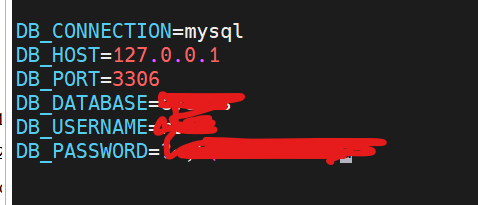
follow the steps
how to reset sql password
reset-the-mysql-root-password
linuxhow-do-i-set-mysql-environment-variable
reset-the-mysql-root-password
creating a new user to avoid error access-denied-for-user-rootlocalhost-using-password
how-to-install-and-implement-traccar-for-self-hosted-gps-tracking-to-get-imei-or-serial-number
Now on production server, run your exact commands to create DB + user + permissions.
sudo mysql
CREATE DATABASE IF NOT EXISTS traccar CHARACTER SET utf8mb4 COLLATE utf8mb4_unicode_ci;

DROP USER IF EXISTS 'traccar'@'localhost';
CREATE USER 'traccar'@'localhost' IDENTIFIED BY 'cotocus@123';

GRANT ALL PRIVILEGES ON traccar.* TO 'traccar'@'localhost';
FLUSH PRIVILEGES;
EXIT;
Confirm the new MySQL user login (your exact check)
Run this from production server:
mysql -u traccar -p -h 127.0.0.1 -P 3306 traccar
When asked for password, enter:
cotocus@123



Top comments (0)