
Why Rust Backend Needs Layers
Architecture Diagram (Request Flow)
Folder Structure (Practical Example)
Complete Layer Mapping (Very Simple Table)
Final Summary (How to Remember)
When you build a Rust backend (Actix-Web + DB), the biggest confusion for many developers is:
Where routes are defined

Where controller logic lives

Where SQL/database code should go

How everything connects in one clean flow
A good folder structure solves all of this. It keeps your code scalable, readable, and easy to maintain.
Why Rust Backend Needs Layers
In a production backend, you don’t want to mix everything in one file.
A layered structure gives you:
Separation of concerns: HTTP logic stays in handlers, SQL stays in DB layer
Scalability: more features → add new module file, not “mess up” existing code
Testability: you can test DB functions separately from handlers
Maintainability: code is predictable for any new developer joining
Most Rust Actix backends follow a flow like:
main.rs starts the server + registers routes + adds middleware
handlers/ contains controller functions for each route
db/ contains query/repository functions that talk to database
models.rs contains structs used across layers
config.rs loads .env and creates typed config
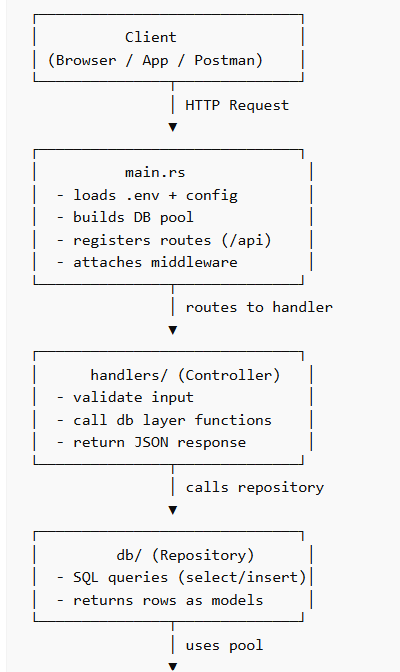
Architecture Diagram (Request Flow)
┌──────────────────────────────┐
│ Client │
│ (Browser / App / Postman) │
└───────────────┬──────────────┘
│ HTTP Request
▼
┌──────────────────────────────┐
│ main.rs │
│ - loads .env + config │
│ - builds DB pool │
│ - registers routes (/api) │
│ - attaches middleware │
└───────────────┬──────────────┘
│ routes to handler
▼
┌──────────────────────────────┐
│ handlers/ (Controller) │
│ - validate input │
│ - call db layer functions │
│ - return JSON response │
└───────────────┬──────────────┘
│ calls repository
▼
┌──────────────────────────────┐
│ db/ (Repository) │
│ - SQL queries (select/insert)│
│ - returns rows as models │
└───────────────┬──────────────┘
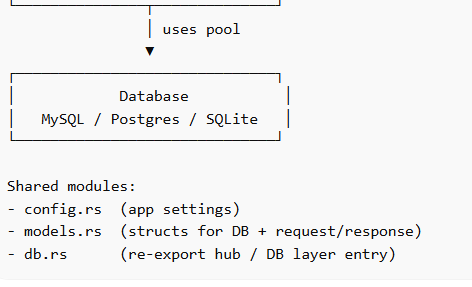
│ uses pool
▼
┌──────────────────────────────┐
│ Database │
│ MySQL / Postgres / SQLite │
└──────────────────────────────┘
Shared modules:
- config.rs  (app settings)
- models.rs  (structs for DB + request/response)
- db.rs      (re-export hub / DB layer entry)
Folder Structure (Practical Example)
src/
  main.rs
  config.rs
  models.rs
  handlers.rs
  handlers/
    auth.rs
    shop.rs
    vehicle.rs
  db.rs
  db/
    common.rs
    shop.rs
    vehicle.rs
Each Layer Purpose + Coding Example
Below is how each layer works with small realistic code examples.
Layer A — main.rs (Application Entry + Wiring)
Purpose
main.rs is responsible for:
loading .env

initializing config

connecting database

creating shared state (AppState)

registering routes

attaching middleware (CORS, sessions)

serving static files
Example (short and clear)
mod config;
mod db;
mod handlers;
mod models;

use actix_web::{App, HttpServer, web};
use dotenvy::dotenv;
use config::AppConfig;
use db::{init_pool, state_data, AppState};

#[actix_web::main]
async fn main() -> std::io::Result<()> {
    dotenv().ok();

    let cfg = AppConfig::from_env();
    let pool = init_pool(&cfg.database_url).await.expect("DB failed");

    let state = state_data(AppState {
        pool,
        app_name: cfg.app_name.clone(),
    });

    HttpServer::new(move || {
        App::new()
            .app_data(state.clone())
            .service(
                web::scope("/api")
                    .route("/shops", web::get().to(handlers::list_shops_handler))
            )
    })
    .bind(cfg.bind_addr)?
    .run()
    .await
}
Layer B — handlers/ (Controller Layer)
Purpose
Handlers are like controllers:
receive request

validate input

call DB layer functions

return JSON/HTTP responses
Example handler (handlers/shop.rs)
use actix_web::{web, HttpResponse, Responder};
use crate::db;
use crate::db::AppState;

pub async fn list_shops_handler(state: web::Data<AppState>) -> impl Responder {
    match db::list_shops(&state.pool).await {
        Ok(rows) => HttpResponse::Ok().json(rows),
        Err(e) => HttpResponse::InternalServerError().body(e.to_string()),
    }
}
✅ Notice: handler is NOT writing SQL.
It just calls db::list_shops().
Layer C — db/ (Repository / Query Layer)
Purpose
This is the real DB layer:
executes SQL

maps rows into Rust structs

returns results back to handlers
Example DB function (db/shop.rs)
use sqlx::{MySqlPool};
use crate::models::Shop;

pub async fn list_shops(pool: &MySqlPool) -> Result<Vec<Shop>, sqlx::Error> {
    let rows = sqlx::query_as!(
        Shop,
        r#"SELECT id, name, city FROM shops ORDER BY id DESC"#
    )
    .fetch_all(pool)
    .await?;

    Ok(rows)
}
✅ Here SQL stays in DB layer.
Handlers stay clean.
Layer D — db.rs (DB Layer Entry / Re-export Hub)
Purpose
db.rs acts as a single entry point for all DB functions.
It connects to submodules and re-exports functions so you can call:
db::list_shops() instead of db::shop::list_shops()
Example (db.rs)
pub mod common;
pub mod shop;

pub use common::{init_pool, state_data, AppState};
pub use shop::{list_shops};
This is basically a Facade pattern for DB layer.
Layer E — models.rs (Structs / Data Contracts)
Purpose
Models define structure for:
database row mapping

JSON response

request body validation structs
Example model
use serde::{Serialize, Deserialize};

#[derive(Debug, Serialize, Deserialize)]
pub struct Shop {
    pub id: i32,
    pub name: String,
    pub city: String,
}
Now DB queries can map into Shop, and handlers can return it as JSON.
Layer F — config.rs (Configuration Loader)
Purpose
Loads env variables and creates typed config
Example
use std::env;

pub struct AppConfig {
    pub database_url: String,
    pub bind_addr: String,
    pub app_name: String,
}

impl AppConfig {
    pub fn from_env() -> Self {
        Self {
            database_url: env::var("DATABASE_URL").expect("DATABASE_URL missing"),
            bind_addr: env::var("BIND_ADDR").unwrap_or_else(|_| "127.0.0.1:8080".into()),
            app_name: env::var("APP_NAME").unwrap_or_else(|_| "Rust API".into()),
        }
    }
}
Complete Layer Mapping (Very Simple Table)
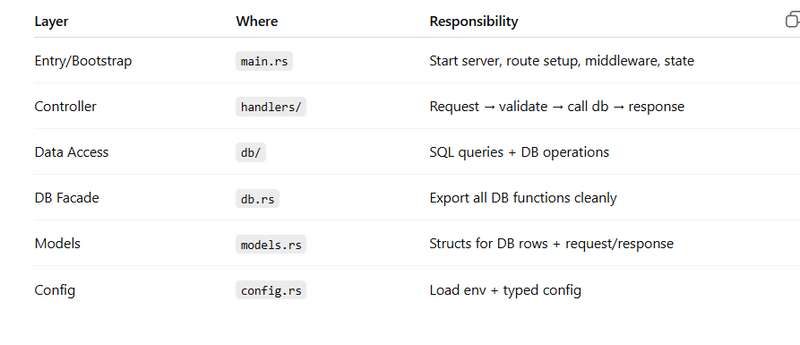
Final Summary (How to Remember)
Just remember this one line:
main.rs wires everything, handlers control requests, db executes SQL.
Flow:
Request → main.rs routes → handlers/ → db/ → database → response



Top comments (0)