
Why main.rs is so important
Purpose + Layer Architecture Diagram
Code Walkthrough: Explain Each Part of Your main.rs
Module wiring (connect project layers)
How Rust Module System Works (Important)
How db.rs Connects to db Folder
Imports (what features your server will use)
Actix runtime macro (async main support)
Load environment variables
Create upload folders (file system boot step)
Initialize configuration from environment
Database connection + Pool creation
Startup normalization tasks (safe cleanup at boot)
Build shared application state (DB pool + app_name)
Session key setup (secure cookie signing)
Create the server (App factory per worker)
Configure CORS (frontend access)
Build Actix App + inject state + attach middleware
Register routes (API endpoints)
Serve static files (/uploads)
Bind + run server (final start)
Mini Coding Example: One Complete “Layer Flow” (main.rs → handler → db)
Final Takeaway
main.rs is the boot file of your Rust backend. In an Actix-Web project, it works like the “control room” where you:
load environment variables (.env)

initialize configuration

connect to database (create pool)

prepare shared app state

attach middleware (CORS, sessions)

register routes (/api/...)

serve static files (/uploads)

start the HTTP server
If handlers are the “controllers,” then main.rs is the “application bootstrap + router + server starter.”
Why main.rs is so important
In Rust (especially backend), the app is usually designed in layers:
Bootstrap Layer (main.rs) – starts everything
Controller Layer (handlers) – HTTP request/response logic
Data Layer (db) – queries + database logic
Models Layer (models) – structs shared across layers
Config Layer (config) – typed settings from env
The goal: keep each responsibility separated so the project stays clean even when it grows.
Purpose + Layer Architecture Diagram
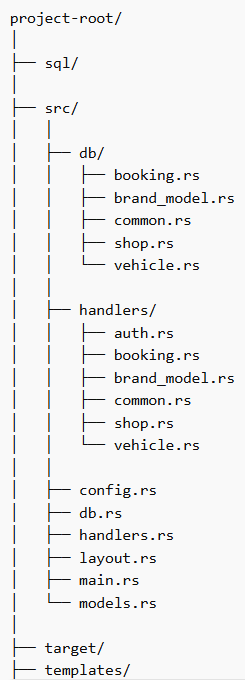
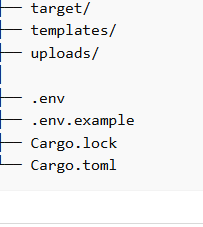
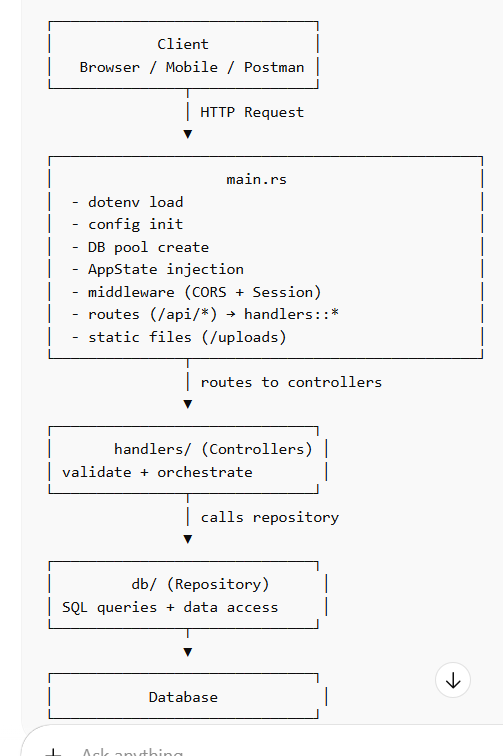
Code Walkthrough: Explain Each Part of Your main.rs
Below I’m explaining your exact code section by section and mapping it to the purpose.
A) Module wiring (connect project layers)
mod config;
mod db;
mod handlers;
mod layout;
mod models;
Role: This connects your folder structure to Rust compiler.
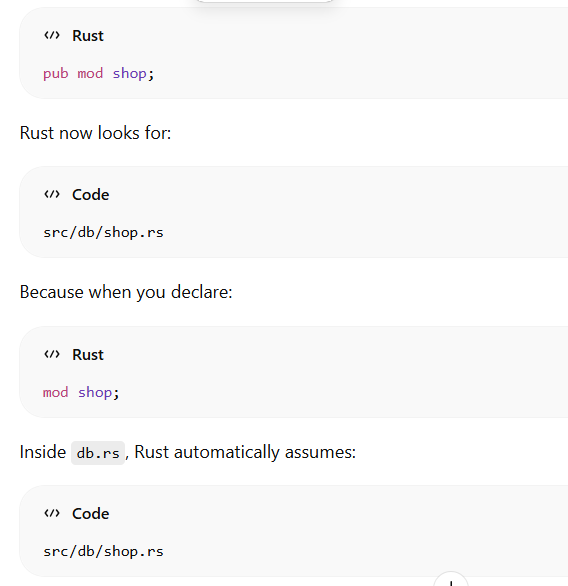
mod db; loads src/db.rs (and inside it, src/db/*)

mod handlers; loads src/handlers.rs (and/or src/handlers/*)

mod models; loads shared structs

mod config; loads typed config
layout is commonly used for SSR templates/layout helpers
This is the first “wiring step” in Rust.
How Rust Module System Works (Important)
How db.rs Connects to db Folder
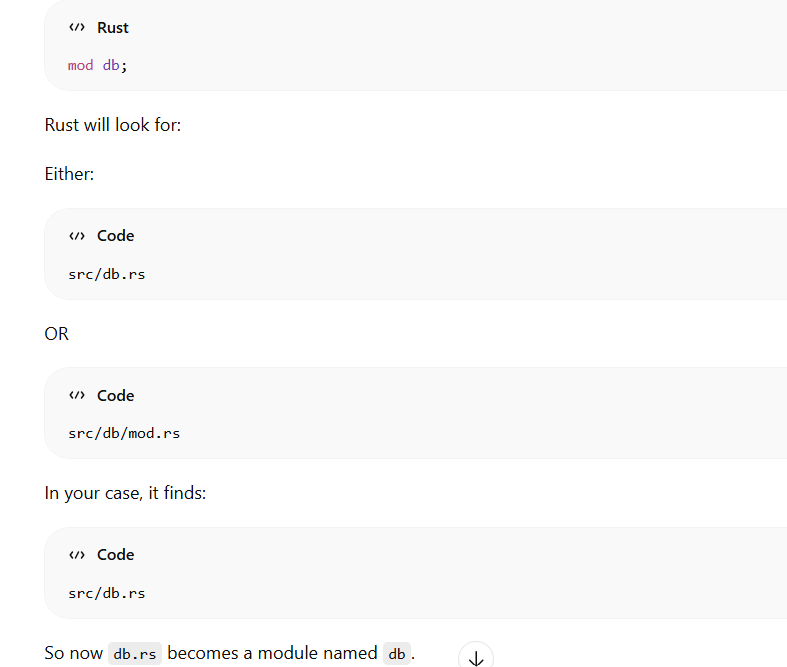
B) Imports (what features your server will use)
use actix_cors::Cors;
use actix_files::Files;
use actix_session::{storage::CookieSessionStore, SessionMiddleware};
use actix_web::{
    cookie::{Key, SameSite},
    web, App, HttpServer,
};
use config::AppConfig;
use db::{init_pool, normalize_brand_model_rows, normalize_shop_rows, state_data, AppState};
use dotenvy::dotenv;
Role (why each is needed):
Cors → allow your frontend domains to call your API
Files → serve static /uploads URLs
SessionMiddleware + CookieSessionStore → login session using cookies
Key + SameSite → cookie signing + cookie policy
web → scopes (/api), route mapping, shared state
App / HttpServer → create Actix app + run server
AppConfig → read config from env
init_pool → connect DB
normalize_* → startup data cleanup tasks
state_data + AppState → share DB pool with handlers
dotenv → load .env
C) Actix runtime macro (async main support)
#[actix_web::main]
async fn main() -> std::io::Result<()> {
Role: #[actix_web::main] is an attribute macro that:
starts Actix/Tokio runtime

allows async fn main()

allows .await inside main
Without this, async fn main() won’t run.
D) Load environment variables
dotenv().ok();
Role: Loads .env file values into std::env.
Now DATABASE_URL, SESSION_KEY, etc. can be read.
This matches: ✅ Environment Loading
E) Create upload folders (file system boot step)
std::fs::create_dir_all("uploads/brand_models")?;
std::fs::create_dir_all("uploads/insurance")?;
std::fs::create_dir_all("uploads/pollution")?;
std::fs::create_dir_all("uploads/rc_document")?;
Role: Ensures directories exist before uploads happen.
If they don’t exist and you upload a file, your upload handler would fail.
Matches: ✅ Creates upload folders
F) Initialize configuration from environment
let cfg = AppConfig::from_env();
Role: Reads env vars and builds a typed config object (AppConfig).
Typical values:
cfg.database_url

cfg.bind_addr

cfg.app_name
Matches: ✅ Initialize configuration
G) Database connection + Pool creation
let pool = init_pool(&cfg.database_url)
    .await
    .expect("Database connection failed");
Role: Creates a DB connection pool.
Pool = reusable database connections
Helps performance (no reconnect on every request)
Shared across handlers using AppState
Matches: ✅ Connect to database / ✅ Build DB pool
H) Startup normalization tasks (safe cleanup at boot)
if let Err(err) = normalize_brand_model_rows(&pool).await {
    eprintln!("[startup] normalize_brand_model_rows failed: {err}");
}
if let Err(err) = normalize_shop_rows(&pool).await {
    eprintln!("[startup] normalize_shop_rows failed: {err}");
}
Role: Runs startup tasks that may:
fix bad/empty data

normalize columns (case/spacing)

ensure consistent rows
Important: you do not stop server if these fail—only print error.
So server still boots.
I) Build shared application state (DB pool + app_name)
let state = state_data(AppState {
    pool,
    app_name: cfg.app_name.clone(),
});
Role: This creates a shared state container that will be injected into all handlers.
AppState holds pool + other shared values

state_data(...) likely wraps into web::Data<AppState>

Later used in handlers as: state: web::Data<AppState>

This is how handlers get DB pool without global variables.
J) Session key setup (secure cookie signing)
let session_key = std::env::var("SESSION_KEY")
    .unwrap_or_else(|_| "rust-crud-dev-session-key-please-change".to_string());
let mut session_key_bytes = session_key.into_bytes();
if session_key_bytes.len() < 32 {
    session_key_bytes.resize(32, b'0');
}
let key = Key::derive_from(&session_key_bytes);
Role:
Reads SESSION_KEY

Ensures minimum length (32 bytes)

Creates Key to sign session cookies (prevents tampering)
In production:
you must set a strong random SESSION_KEY

do not keep dev fallback key
Matches: ✅ Middleware setup (Session)
K) Create the server (App factory per worker)
HttpServer::new(move || {
Role: Starts Actix server.
The closure builds an App instance for each worker thread.
move allows using state and key inside.
Matches: ✅ Start HTTP server
L) Configure CORS (frontend access)
let cors = Cors::default()
    .allowed_origin("http://localhost:5173")
    .allowed_origin("http://127.0.0.1:5173")
    ...
    .allow_any_header()
    .allow_any_method()
    .supports_credentials();
Role:
Allows React/Vite origins to call your API

supports_credentials() is critical because you are using cookie-based sessions

allow_any_method() enables GET/POST/PUT/DELETE etc.
Matches: ✅ Middleware setup (CORS)
M) Build Actix App + inject state + attach middleware
App::new()
    .app_data(state.clone())
    .wrap(cors)
    .wrap(
        SessionMiddleware::builder(CookieSessionStore::default(), key.clone())
            .cookie_secure(false)
            .cookie_same_site(SameSite::Lax)
            .build(),
    )
Role:
app_data(state.clone()) → makes AppState available to all handlers

.wrap(cors) → adds CORS middleware

.wrap(SessionMiddleware...) → adds session middleware
Details:
cookie_secure(false) → development mode (HTTP).
In production (HTTPS), set true.

SameSite::Lax → safer cookie behavior while still allowing common flows

Matches: ✅ Attach middleware
N) Register routes (API endpoints)
.service(
    web::scope("/api")
        .route("/login", web::post().to(handlers::login))
        .route("/logout", web::post().to(handlers::logout))
        .route("/me", web::get().to(handlers::me))
        ...
)
Role:
web::scope("/api") means all routes start with /api

Each .route() maps a URL + HTTP method to a handler function
Example mapping:
POST /api/login → handlers::login

GET /api/shops → handlers::list_shops_handler

POST /api/bookings/offline → handlers::save_offline_booking_handler
Matches: ✅ Register routes
O) Serve static files (/uploads)
.service(Files::new("/uploads", "./uploads"))
Role: Makes uploaded files publicly accessible.
Example:
stored path: ./uploads/insurance/a.pdf

URL: /uploads/insurance/a.pdf
Matches: ✅ Serve static files
P) Bind + run server (final start)
})
.bind(cfg.bind_addr)?
.run()
.await
Role:
.bind(cfg.bind_addr) binds to your host/port (example 127.0.0.1:8080)

.run().await keeps server running

Matches: ✅ Start HTTP server
4)
Mini Coding Example: One Complete “Layer Flow” (main.rs → handler → db)
This small example shows how your wiring becomes real.
Route in main.rs
web::scope("/api")
    .route("/shops", web::get().to(handlers::list_shops_handler))
Handler (controller)
pub async fn list_shops_handler(state: web::Data<AppState>) -> impl Responder {
    let shops = db::list_shops(&state.pool).await;
    HttpResponse::Ok().json(shops)
}
DB layer function (repository)
pub async fn list_shops(pool: &MySqlPool) -> Result<Vec<Shop>, sqlx::Error> {
    sqlx::query_as!(Shop, "SELECT id, name FROM shops")
        .fetch_all(pool)
        .await
}
This is the exact layered design your main.rs enables.
Final Takeaway
main.rs is not where your business logic belongs.
It is where you assemble the whole application:
env → config → db → state → middleware → routes → server
That’s why main.rs is called Bootstrap + Composition Root in backend architecture.
If you want, I can rewrite this into a ready-to-publish SEO blog format with headings, beginner-friendly language, and a “common mistakes in main.rs” section (like cookie_secure(false) in production, CORS credential issues, etc.).



Top comments (0)