
Introduction
Why Password Hashing is Mandatory
What Hashing Does
Why Use Argon2?
Add Required Dependencies
Create Hashing Utility Functions
Use Hashing in Registration
Use Verification in Login
What Happens Internally
Why Salt is Important?
Production Security Best Practices
Common Mistakes Developers Make
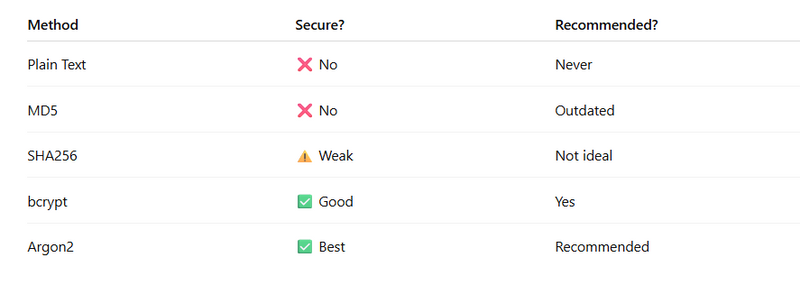
Security Comparison Table
Introduction
When building authentication systems, password security is the most critical part. Storing passwords in plain text is extremely dangerous. If your database is leaked, every user account becomes compromised.
In this guide, we will implement:
Secure password hashing using Argon2

Password verification during login

Clean modular architecture

Production-ready security practices
This ensures your Actix-Web backend follows modern security standards.
2️⃣ Why Password Hashing is Mandatory
❌ What Happens If You Store Plain Passwords?
If your database is hacked:
Attackers see all user passwords

Users reuse passwords across platforms

Massive security breach happens
✅ What Hashing Does
Hashing converts a password into a secure, irreversible string.
Example:
Password:
123456
Hashed:
$argon2id$v=19$m=4096,t=3,p=1$...
Even if attackers see this hash, they cannot reverse it easily.
3️⃣ Why Use Argon2?
Argon2 is the recommended password hashing algorithm by modern security standards.
Why Argon2?
Memory-hard algorithm (resists GPU attacks)

Built-in salting

Adjustable security cost

Recommended by OWASP
4️⃣ Step 1: Add Required Dependencies
In Cargo.toml:
argon2 = "0.5"
rand = "0.8"
These crates help:
Generate salt

Hash passwords securely
5️⃣ Step 2: Create Hashing Utility Functions
Create file:
src/security/password.rs
🔹 Hash Password Function
use argon2::{
    password_hash::{SaltString, PasswordHasher},
    Argon2,
};
use rand::rngs::OsRng;

pub fn hash_password(password: &str) -> Result<String, actix_web::Error> {
    let salt = SaltString::generate(&mut OsRng);
    let argon2 = Argon2::default();

    let password_hash = argon2
        .hash_password(password.as_bytes(), &salt)
        .map_err(actix_web::error::ErrorInternalServerError)?
        .to_string();

    Ok(password_hash)
}
🔹 Verify Password Function
use argon2::{
    password_hash::{PasswordHash, PasswordVerifier},
    Argon2,
};

pub fn verify_password(password: &str, hash: &str) -> bool {
    let parsed_hash = PasswordHash::new(hash);
    if parsed_hash.is_err() {
        return false;
    }

    Argon2::default()
        .verify_password(password.as_bytes(), &parsed_hash.unwrap())
        .is_ok()
}
6️⃣ Step 3: Use Hashing in Registration
Update register handler:
use crate::security::password::hash_password;

pub async fn register(
    body: web::Json<RegisterForm>,
    state: web::Data<AppState>,
) -> Result<HttpResponse> {

    let role = body.role.clone().unwrap_or_else(|| "viewer".to_string());

    // 🔐 Hash password before saving
    let password_hash = hash_password(&body.password)?;

    let id = create_user(
        &state.pool,
        &body.username,
        &password_hash,
        &role,
    )
    .await
    .map_err(error::ErrorInternalServerError)?;

    Ok(HttpResponse::Ok().json(ApiResponse {
        message: "User created securely".to_string(),
        data: id,
    }))
}
7️⃣ Step 4: Use Verification in Login
Update login handler:
use crate::security::password::verify_password;

let valid = verify_password(&body.password, &user.password);

if valid {
    session.insert("user_id", user.id)?;
}
Now password comparison is secure.
8️⃣ What Happens Internally?
When user registers:
Password converted to hash

Salt automatically added

Only hash stored in DB
When user logs in:
Input password hashed again

Compared with stored hash

If match → login success
9️⃣ Why Salt is Important?
Salt ensures:
Same password produces different hashes

Rainbow table attacks fail

Prevents duplicate password detection
Argon2 automatically generates salt using:
SaltString::generate(&mut OsRng);
🔟 Production Security Best Practices
1️⃣ Never Log Password
Do not print password in console logs.
2️⃣ Use Environment Variables
Never hardcode security parameters.
3️⃣ Limit Login Attempts
Add rate limiting to prevent brute force attacks.
4️⃣ Enforce Password Strength
Validate:
Minimum 8 characters
At least 1 number
At least 1 special character
1️⃣1️⃣ Common Mistakes Developers Make
❌ Comparing plain password with DB hash
❌ Storing plain password accidentally
❌ Reusing same salt
❌ Not handling hashing errors
❌ Using weak hashing like MD5 or SHA1



Top comments (0)