
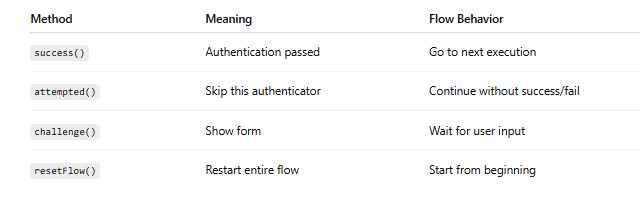
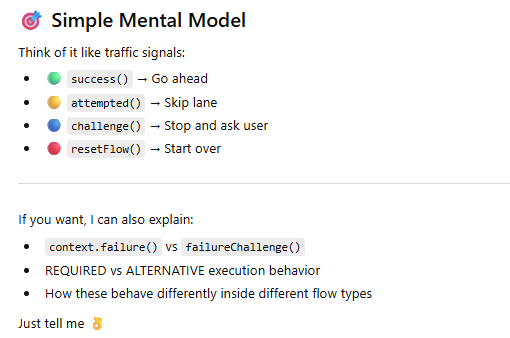
1️⃣ context.success()
✅ Purpose:
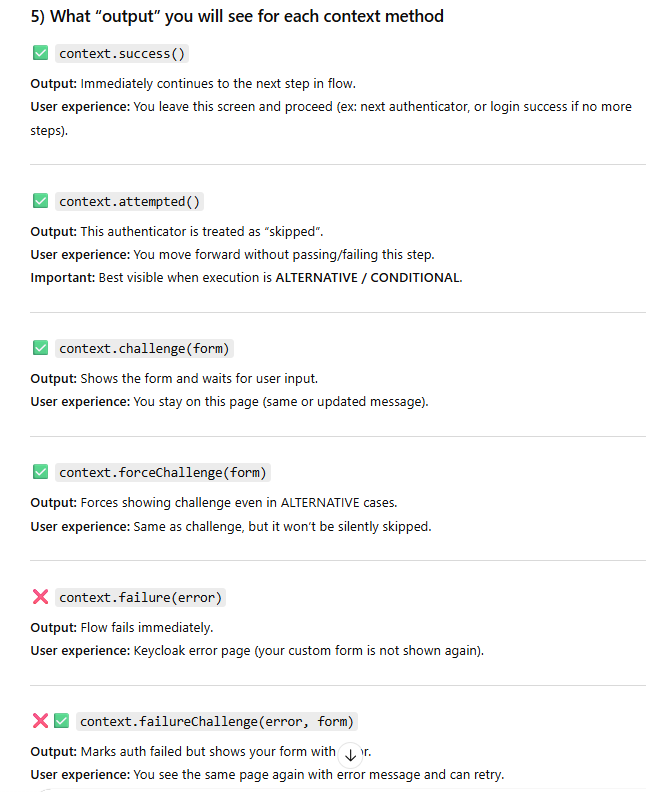
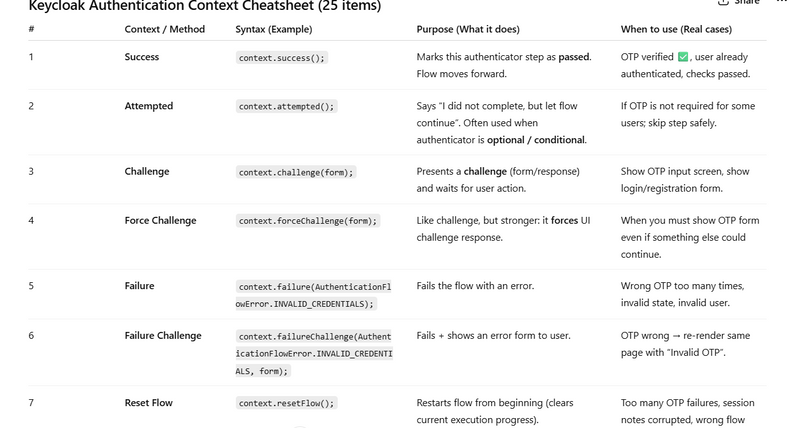
Marks the current authenticator as successfully completed and moves to the next execution in the flow.
📌 When to Use:
OTP verified successfully
User validation successful
Custom check passed
💻 Example:
public void authenticate(AuthenticationFlowContext context) {

    UserModel user = context.getUser();

    if (user != null) {
        // Everything OK
        context.success();   // Move to next step
        return;
    }

    context.failure(AuthenticationFlowError.UNKNOWN_USER);
}
🔎 What Happens:
Flow continues to next execution in the authentication flow.
2️⃣ context.attempted()
✅ Purpose:
Tells Keycloak:
"I did not authenticate, but I also did not fail. Just skip me."
It skips this execution and continues with the next one.
📌 When to Use:
Optional authenticator
Condition not matched
Flow mode is different (like OTP mode vs Register mode)
💻 Example (like your OTP gating logic):
public void authenticate(AuthenticationFlowContext context) {

    String flowMode = context.getAuthenticationSession()
                             .getAuthNote("FLOW_MODE");

    if (!"otp".equals(flowMode)) {
        // Not OTP flow → skip this authenticator
        context.attempted();
        return;
    }

    // Continue OTP logic
    context.success();
}
🔎 What Happens:
Keycloak ignores this authenticator and moves ahead.
3️⃣ context.challenge(Response response)
✅ Purpose:
Shows a form or error page to the user.
It pauses the flow and waits for user input.
📌 When to Use:
Show login form
Show OTP form
Show validation error
Ask user for extra input
💻 Example:
public void authenticate(AuthenticationFlowContext context) {

    LoginFormsProvider form = context.form();

    Response challenge = form
            .setAttribute("message", "Enter OTP")
            .createForm("otp-form.ftl");

    context.challenge(challenge);   // Show form
}
🔎 What Happens:
User sees otp-form.ftl.
Flow continues only after action() method is triggered.
4️⃣ context.resetFlow()
✅ Purpose:
Restarts the entire authentication flow from the beginning.
📌 When to Use:
After too many OTP failures
Session corruption
Want to restart login process
💻 Example:
public void action(AuthenticationFlowContext context) {

    String otp = context.getHttpRequest()
                        .getDecodedFormParameters()
                        .getFirst("otp");

    if (!isValidOtp(otp)) {

        int attempts = getAttempts(context);

        if (attempts > 3) {
            context.resetFlow();   // Restart login completely
            return;
        }

        Response challenge = context.form()
                .setError("Invalid OTP")
                .createForm("otp-form.ftl");

        context.challenge(challenge);
        return;
    }

    context.success();
}
🔎 What Happens:
User is sent back to first step of flow (like username/password screen).
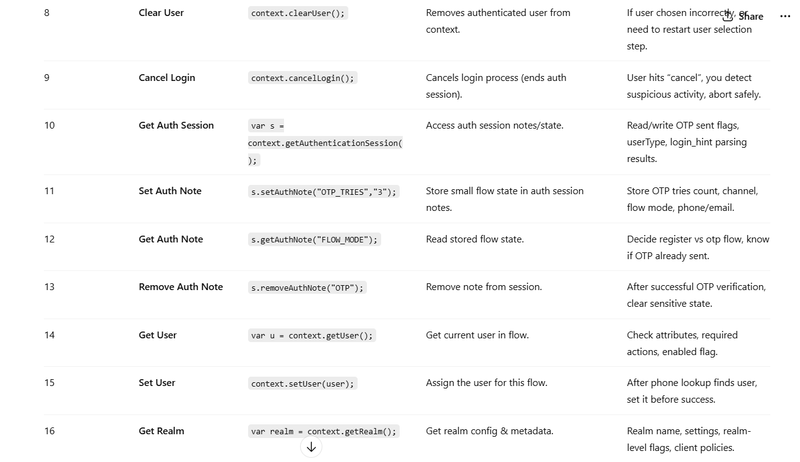
Quick Comparison Table
context.failure()
✅ Purpose:
Marks the authenticator as failed immediately and stops the flow.
It does NOT automatically show a form.
📌 When to Use:
Fatal error

Security violation

Invalid credentials

User should not retry
💻 Example
public void authenticate(AuthenticationFlowContext context) {

    UserModel user = context.getUser();

    if (user == null) {
        context.failure(AuthenticationFlowError.UNKNOWN_USER);
        return;
    }

    context.success();
}
🔎 What Happens:
Flow stops immediately

Keycloak shows default error page

User is not shown your custom form
2️⃣ context.failureChallenge()
✅ Purpose:
Marks the authentication as failed BUT also shows a form (challenge page).
This allows user to retry.
📌 When to Use:
Wrong OTP

Invalid form input

Password incorrect

Validation error
context.forceChallenge()
✅ Purpose
Forces a challenge even if execution is ALTERNATIVE.
Normally:
ALTERNATIVE execution may skip if not required.
forceChallenge() ensures form is shown.
💻 Example
Response challenge = context.form()
.createForm("custom-login.ftl");
context.forceChallenge(challenge);
📌 When to Use
You want to guarantee form display
Even if flow execution is optional
🔹 2️⃣ context.cancelLogin()
✅ Purpose
Cancels login completely and returns to client.
💻 Example
context.cancelLogin();
📌 Use Case
User clicks cancel button
External validation fails
Business rule violation
🔹 3️⃣ context.getUser()
✅ Purpose
Get current authenticated user (if available).
UserModel user = context.getUser();
If null → user not yet identified.
🔹 4️⃣ context.setUser(UserModel user)
✅ Purpose
Set authenticated user manually.
Used in:
Custom username lookup
Phone login
Email login
💻 Example
UserModel user = context.getSession()
        .users()
        .getUserByUsername(context.getRealm(), username);

if (user != null) {
    context.setUser(user);
    context.success();
}
🔹 5️⃣ context.getAuthenticationSession()
✅ Purpose
Access authentication session notes.
Used heavily in custom flows like yours.
AuthenticationSessionModel session =
        context.getAuthenticationSession();

String flowMode = session.getAuthNote("FLOW_MODE");
🔹 6️⃣ context.getHttpRequest()
✅ Purpose
Get form data.
String email = context.getHttpRequest()
        .getDecodedFormParameters()
        .getFirst("email");
Used inside action() method.
🔹 7️⃣ context.getSession()
✅ Purpose
Get KeycloakSession object.
Used to access:
User storage
Realm
Clients
Providers
KeycloakSession kcSession = context.getSession();
🔹 8️⃣ context.getRealm()
✅ Purpose
Get current realm.
RealmModel realm = context.getRealm();
🔹 9️⃣ context.getExecution()
✅ Purpose
Get current authenticator execution model.
Used when checking requirement:
AuthenticationExecutionModel exec =
        context.getExecution();

AuthenticationExecutionModel.Requirement requirement =
        exec.getRequirement();
🔹 🔟 context.getFlowPath()
Used internally to understand where you are in flow.
🔹 1️⃣1️⃣ context.getEvent()
Used to log events.
context.getEvent()
        .user(context.getUser())
        .success();


Or:

context.getEvent()
        .error("invalid_otp");
Very useful for audit logging.
🔹 1️⃣2️⃣ context.getForm()
Shortcut for creating forms.
LoginFormsProvider form = context.form();
🧠 Complete Practical Example
Here is a real mini authenticator:
public void action(AuthenticationFlowContext context) {

    String email = context.getHttpRequest()
            .getDecodedFormParameters()
            .getFirst("email");

    UserModel user = context.getSession()
            .users()
            .getUserByEmail(context.getRealm(), email);

    if (user == null) {

        Response challenge = context.form()
                .setError("User not found")
                .createForm("email-login.ftl");

        context.failureChallenge(
                AuthenticationFlowError.UNKNOWN_USER,
                challenge
        );
        return;
    }

    context.setUser(user);

    context.getEvent().user(user).success();

    context.success();
}
🎯 Most Commonly Used Context Methods in Real Projects
For your kind of OTP + Register custom flow, most important are:
success()

attempted()

challenge()

failureChallenge()

resetFlow()

setUser()

getAuthenticationSession()

getHttpRequest()

getEvent()
Demo authenticator (FULL Java code)
DemoContextAuthenticator.java
package com.example.keycloak.auth;

import jakarta.ws.rs.core.MultivaluedMap;
import jakarta.ws.rs.core.Response;

import org.keycloak.authentication.AuthenticationFlowContext;
import org.keycloak.authentication.AuthenticationFlowError;
import org.keycloak.authentication.Authenticator;
import org.keycloak.forms.login.LoginFormsProvider;
import org.keycloak.models.KeycloakSession;
import org.keycloak.models.RealmModel;
import org.keycloak.models.UserModel;

public class DemoContextAuthenticator implements Authenticator {

    // Session note keys (just for demo)
    private static final String NOTE_LAST_ACTION = "DEMO_LAST_ACTION";

    @Override
    public void authenticate(AuthenticationFlowContext context) {
        // Show the demo form on first entry
        Response form = context.form()
                .setAttribute("title", "Keycloak Context Demo")
                .setAttribute("message", "Choose an action to see what each context method does.")
                .createForm("demo-context.ftl");

        // CHALLENGE: show form and wait for action()
        context.challenge(form);
    }

    @Override
    public void action(AuthenticationFlowContext context) {
        MultivaluedMap<String, String> formData =
                context.getHttpRequest().getDecodedFormParameters();

        String action = safe(formData.getFirst("demo_action"), "challenge");

        // store last action (so you can see resetFlow behavior)
        context.getAuthenticationSession().setAuthNote(NOTE_LAST_ACTION, action);

        switch (action) {
            case "success": {
                // ✅ OUTPUT: flow continues to next execution
                context.success();
                return;
            }

            case "attempted": {
                // ✅ OUTPUT: this authenticator is skipped and flow continues
                // NOTE: This makes sense mainly when this execution is ALTERNATIVE/CONDITIONAL
                context.attempted();
                return;
            }

            case "challenge": {
                // ✅ OUTPUT: shows SAME form again (like “stay on screen”)
                Response form = context.form()
                        .setAttribute("title", "Challenge")
                        .setAttribute("message", "You triggered context.challenge(). Same page shown again.")
                        .createForm("demo-context.ftl");
                context.challenge(form);
                return;
            }

            case "forceChallenge": {
                // ✅ OUTPUT: forces showing the form even if ALTERNATIVE
                Response form = context.form()
                        .setAttribute("title", "Force Challenge")
                        .setAttribute("message", "You triggered context.forceChallenge(). Form forced.")
                        .createForm("demo-context.ftl");
                context.forceChallenge(form);
                return;
            }

            case "failure": {
                // ✅ OUTPUT: flow fails immediately, Keycloak shows error (no custom form)
                context.failure(AuthenticationFlowError.INVALID_USER);
                return;
            }

            case "failureChallenge": {
                // ✅ OUTPUT: shows custom error on form and allows retry
                Response form = context.form()
                        .setError("failureChallenge: Invalid input. Please try again.")
                        .setAttribute("title", "Failure Challenge")
                        .setAttribute("message", "Flow marked failed but you can retry on same screen.")
                        .createForm("demo-context.ftl");

                context.failureChallenge(AuthenticationFlowError.INVALID_CREDENTIALS, form);
                return;
            }

            case "resetFlow": {
                // ✅ OUTPUT: restarts entire flow from beginning (back to first step)
                context.resetFlow();
                return;
            }

            case "cancelLogin": {
                // ✅ OUTPUT: cancels login and returns to client (usually back to app)
                context.cancelLogin();
                return;
            }

            default: {
                // fallback: just show challenge
                Response form = context.form()
                        .setAttribute("title", "Unknown Action")
                        .setAttribute("message", "Unknown action. Showing challenge again.")
                        .createForm("demo-context.ftl");
                context.challenge(form);
            }
        }
    }

    private static String safe(String v, String def) {
        if (v == null) return def;
        v = v.trim();
        return v.isEmpty() ? def : v;
    }

    @Override
    public boolean requiresUser() {
        return false; // demo does not require pre-known user
    }

    @Override
    public boolean configuredFor(KeycloakSession session, RealmModel realm, UserModel user) {
        return true;
    }

    @Override
    public void setRequiredActions(KeycloakSession session, RealmModel realm, UserModel user) {
        // none
    }

    @Override
    public void close() {
        // none
    }
}
2) Factory (FULL Java code)
DemoContextAuthenticatorFactory.java
package com.example.keycloak.auth;

import org.keycloak.Config;
import org.keycloak.authentication.Authenticator;
import org.keycloak.authentication.AuthenticatorFactory;
import org.keycloak.models.KeycloakSession;
import org.keycloak.models.KeycloakSessionFactory;

public class DemoContextAuthenticatorFactory implements AuthenticatorFactory {

    public static final String PROVIDER_ID = "demo-context-authenticator";

    @Override
    public String getId() {
        return PROVIDER_ID;
    }

    @Override
    public String getDisplayType() {
        return "Demo: Context Methods";
    }

    @Override
    public String getHelpText() {
        return "Demo authenticator to test context.success/attempted/challenge/forceChallenge/failure/failureChallenge/resetFlow/cancelLogin.";
    }

    @Override
    public Authenticator create(KeycloakSession session) {
        return new DemoContextAuthenticator();
    }

    @Override
    public void init(Config.Scope config) { }

    @Override
    public void postInit(KeycloakSessionFactory factory) { }

    @Override
    public void close() { }

    @Override
    public boolean isConfigurable() {
        return false;
    }
}
3) Theme template (FULL FTL)
Put in your theme:
themes//login/demo-context.ftl
<#import "template.ftl" as layout>
<@layout.registrationLayout displayInfo=false; section>
  <#if section == "form">

    <h2 style="margin:0 0 10px 0;">${title!"Keycloak Context Demo"}</h2>

    <p style="margin:0 0 14px 0;opacity:.9;">
      ${message!"Choose a context method to test."}
    </p>

    <#-- Keycloak error area (shows on failureChallenge etc.) -->
    <#if message?has_content && message?is_string == false>
      <div class="alert alert-error">${message.summary}</div>
    </#if>

    <form method="post" action="${url.loginAction}">
      <div style="display:flex; gap:10px; flex-wrap:wrap;">
        <button name="demo_action" value="success" type="submit">success()</button>
        <button name="demo_action" value="attempted" type="submit">attempted()</button>
        <button name="demo_action" value="challenge" type="submit">challenge()</button>
        <button name="demo_action" value="forceChallenge" type="submit">forceChallenge()</button>
        <button name="demo_action" value="failure" type="submit">failure()</button>
        <button name="demo_action" value="failureChallenge" type="submit">failureChallenge()</button>
        <button name="demo_action" value="resetFlow" type="submit">resetFlow()</button>
        <button name="demo_action" value="cancelLogin" type="submit">cancelLogin()</button>
      </div>
    </form>

    <hr style="margin:16px 0;opacity:.2;" />

    <p style="font-size:12px;opacity:.75;margin:0;">
      Tip: Place this authenticator in a Browser flow execution (prefer ALTERNATIVE) to see attempted() behavior clearly.
    </p>

  </#if>
</@layout.registrationLayout>
4) Register the SPI (services file)
Create:
src/main/resources/META-INF/services/org.keycloak.authentication.AuthenticatorFactory
Content:
com.example.keycloak.auth.DemoContextAuthenticatorFactory
1) context.setUser(user) + context.getUser()
Purpose: Identify who is logging in (email/phone/custom ID login).
UserModel user = context.getSession().users().getUserByEmail(context.getRealm(), email);
if (user == null) {
  context.failure(AuthenticationFlowError.UNKNOWN_USER);
  return;
}
context.setUser(user);               // ✅ user selected
UserModel u = context.getUser();     // ✅ now available
context.success();
Output: Flow continues with this user as the authenticated subject (later authenticators can use context.getUser()).
2) context.clearUser()
Purpose: Remove user from context (restart identification step cleanly).
context.clearUser();
Response form = context.form().setInfo("User cleared, enter email again").createForm("demo.ftl");
context.challenge(form);
Output: User is “unset”; downstream authenticators behave like “no user selected yet”.
3) context.getEvent() (audit logging)
Purpose: Add structured audit events for OTP failures/success.
context.getEvent()
  .detail("channel", "whatsapp")
  .detail("flow_mode", "otp")
  .success();
context.success();
Output: You’ll see event entries in Keycloak events (Admin console → Events) if enabled.
4) context.getAuthenticationSession() + setAuthNote/getAuthNote/removeAuthNote
Purpose: Store per-login temporary state (OTP sent flag, flow mode, user type).
AuthenticationSessionModel s = context.getAuthenticationSession();
s.setAuthNote("FLOW_MODE", "otp");
s.setAuthNote("OTP_SENT", "1");

String sent = s.getAuthNote("OTP_SENT"); // "1"
s.removeAuthNote("OTP_SENT");
Output: Notes persist across your authenticate() → action() steps until flow ends.
5) context.getHttpRequest() (read form params)
Purpose: Read submitted fields.
String otp = context.getHttpRequest()
  .getDecodedFormParameters()
  .getFirst("otp");
Output: Your authenticator can validate OTP and decide challenge/success/failure.
6) context.form() (LoginFormsProvider)
Purpose: Build a FreeMarker page with attributes/errors.
Response r = context.form()
  .setAttribute("title", "Enter OTP")
  .setError("OTP invalid")
  .createForm("otp.ftl");
context.challenge(r);
Output: User sees your custom page + your error message.
7) context.getExecution() (know REQUIRED / ALTERNATIVE)
Purpose: Change behavior depending on requirement.
var req = context.getExecution().getRequirement();
if (req == AuthenticationExecutionModel.Requirement.ALTERNATIVE) {
  context.attempted();   // skip if optional
  return;
}
context.failure(AuthenticationFlowError.INVALID_CREDENTIALS);
Output: In ALTERNATIVE it skips; in REQUIRED it fails the flow.
8) context.getRealm() and context.getSession() (services access)
Purpose: Access realm settings + Keycloak services/providers.
RealmModel realm = context.getRealm();
KeycloakSession ks = context.getSession();

int ttl = realm.getAccessTokenLifespan(); // example realm value
Output: Lets you use realm config and Keycloak APIs (users, providers, etc.).
9) context.getConnection() (IP address)
Purpose: Capture IP for logs / anti-abuse.
String ip = context.getConnection().getRemoteAddr();
context.getEvent().detail("ip", ip);
Output: IP recorded in event logs (and you can add rate-limits based on it).
10) context.getUriInfo() (base URI, query params)
Purpose: Read query params like login_hint, kc_locale, custom params.
String loginHint = context.getUriInfo().getQueryParameters().getFirst("login_hint");
context.getAuthenticationSession().setAuthNote("LOGIN_HINT", loginHint);
Output: You can route flows (register vs otp, renter vs partner) based on URL hints.
Bonus “context” you’ll use often (2 more)
11) context.getAuthenticatorConfig()
Read config values from your authenticator (Admin console → config).
var cfg = context.getAuthenticatorConfig();
String max = cfg.getConfig().getOrDefault("maxAttempts", "3");
Output: Your authenticator becomes configurable without code changes.
12) context.getUserSession() (sometimes null)
Useful after user session exists in certain flows.
var us = context.getUserSession();
Output: If available, you can attach notes/attributes; if not, it’s null.



Top comments (0)