
Why Session-Based Authentication in Rust?
Project Structure Overview
Enable Session Middleware in main.rs
Add Login Route in main.rs (Where login() is called)
Store User Data in Session After Login
Create Authentication Helper Functions
Protect Routes Using Session Check
Protect Entire Route Scope (Advanced Clean Method)
Role-Based Protection (Admin vs Viewer)
Secure Production Configuration
Testing Authentication Flow
Logout Clears Session
rust-objective-and-mcq
Why Session-Based Authentication in Rust?
In modern web applications, authentication is required to protect sensitive routes like dashboard, shops, bookings, and vehicles. Session-based authentication stores user identity securely on the server and prevents unauthorized access. Actix-Web provides actix-session middleware to handle this cleanly.
Project Structure Overview
Before writing authentication logic, we must organize the project correctly. A clean folder structure makes middleware, handlers, and DB logic easy to scale.
src/
  main.rs
  config.rs
  models.rs
  handlers.rs
  handlers/
    auth.rs
    shop.rs
    vehicle.rs
  db.rs
  db/
    common.rs
    shop.rs
    vehicle.rs
This separation ensures:
DB logic in db/

Route logic in handlers/

Shared utilities in common.rs

Server setup in main.rs
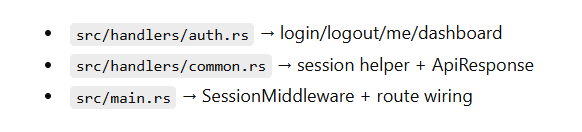
Step 3: Enable Session Middleware in main.rs
Sessions do not work automatically. We must configure SessionMiddleware with a secure key.
This middleware makes Session available in every handler and stores cookie session data securely using SESSION_KEY.
.wrap(
    SessionMiddleware::builder(CookieSessionStore::default(), key.clone())
        .cookie_secure(false)
        .cookie_same_site(SameSite::Lax)
        .build(),
)
This middleware:
Stores session data in cookies
Signs cookies using SESSION_KEY
Makes session available in every handler
Step 3: Add Login Route in main.rs (Where login() is called)
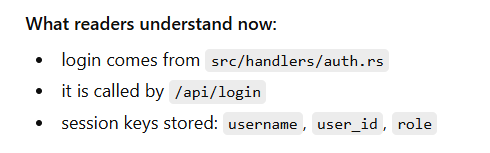
This is the line that connects your URL to the login() function. Without this route, your login() function exists but nobody can call it.
web::scope("/api")
    .route("/login", web::post().to(handlers::login))
So login endpoint becomes:
✅ POST /api/login
Step 4: Store User Data in Session After Login
Full auth.rs Login Code (Where session.insert comes from)
This is the complete function with session storage.
File: src/handlers/auth.rs
When login is successful, we store required fields in session:
session.insert("username", user.username.clone())?;
session.insert("user_id", user.id)?;
session.insert("role", user.role.clone())?;
Why this matters:
user_id is used for data filtering

role can protect admin-only routes

username is used for display
FULL CODE
use actix_session::Session;
use actix_web::{error, web, HttpResponse, Result};
use serde::Serialize;

use crate::db::{find_user_by_username, AppState};
use crate::models::{LoginForm, UserRole};
use super::common::ApiResponse;

#[derive(Serialize)]
struct AuthUser {
    username: String,
    role: String,
}

pub async fn login(
    body: web::Json<LoginForm>,
    state: web::Data<AppState>,
    session: Session,
) -> Result<HttpResponse> {
    println!("[login] attempt username={}", body.username);

    // 1) Find user
    let maybe_user = find_user_by_username(&state.pool, &body.username)
        .await
        .map_err(error::ErrorInternalServerError)?;

    // 2) Validate user + role
    if let Some(user) = maybe_user {
        let role = UserRole::from(user.role.as_str());
        let valid = user.password == body.password;

        println!(
            "[login] user_found username={} role={} valid={}",
            user.username, user.role, valid
        );

        // 3) Only allow admin/viewer (example)
        match (valid, role) {
            (true, UserRole::Admin) | (true, UserRole::Viewer) => {
                // ✅ 4) Store login info in session (THIS is the important part)
                session
                    .insert("username", user.username.clone())
                    .map_err(error::ErrorInternalServerError)?;
                session
                    .insert("user_id", user.id)
                    .map_err(error::ErrorInternalServerError)?;
                session
                    .insert("role", user.role.clone())
                    .map_err(error::ErrorInternalServerError)?;

                println!("[login] session_set username={}", user.username);

                // 5) Return API response
                let response = ApiResponse {
                    message: "Login successful".to_string(),
                    data: AuthUser {
                        username: user.username,
                        role: user.role,
                    },
                };
                return Ok(HttpResponse::Ok().json(response));
            }
            _ => {}
        }
    }

    println!("[login] unauthorized username={}", body.username);
    Err(error::ErrorUnauthorized("Invalid credentials"))
}
Step 5: Create Authentication Helper Functions
Instead of repeating validation logic everywhere, create reusable guard helpers.
pub fn ensure_login_user_id(session: &Session) -> Result<i64> {
    session_user_id(session)
        .ok_or_else(|| error::ErrorUnauthorized("Login required"))
}
This keeps handlers clean and readable.
Now we need a single helper to check login.
File: src/handlers/common.rs
use actix_session::Session;
use actix_web::{error, Result};
use serde::Serialize;

#[derive(Serialize)]
pub struct ApiResponse<T: Serialize> {
    pub message: String,
    pub data: T,
}

pub fn session_user_id(session: &Session) -> Option<i64> {
    session.get::<i64>("user_id").ok().flatten()
}

pub fn ensure_login_user_id(session: &Session) -> Result<i64> {
    session_user_id(session).ok_or_else(|| error::ErrorUnauthorized("Login required"))
}
This keeps protection logic consistent across all handlers.
Step 6: Protect Routes Using Session Check
Example: Protect Shop Listing Route
pub async fn list_shops_handler(
    state: web::Data<AppState>,
    session: Session,
) -> Result<HttpResponse> {

    let user_id = ensure_login_user_id(&session)?;

    let shops = list_shops_by_vendor(&state.pool, user_id as i32)
        .await?;

    Ok(HttpResponse::Ok().json(ApiResponse {
        message: "Shops fetched".to_string(),
        data: shops,
    }))
}
Now:
If user is not logged in → 401 Unauthorized

If logged in → Only their data is shown
FULL CODE
use actix_session::Session;
use actix_web::{error, web, HttpResponse, Result};

use crate::db::{list_shops_by_vendor, AppState};
use super::common::{ensure_login_user_id, ApiResponse};

pub async fn list_shops_handler(
    state: web::Data<AppState>,
    session: Session,
) -> Result<HttpResponse> {
    // ✅ Protect route
    let user_id = ensure_login_user_id(&session)?;

    let vendor_id =
        i32::try_from(user_id).map_err(|_| error::ErrorBadRequest("User id out of range"))?;

    let shops = list_shops_by_vendor(&state.pool, vendor_id)
        .await
        .map_err(error::ErrorInternalServerError)?;

    Ok(HttpResponse::Ok().json(ApiResponse {
        message: "Shops fetched".to_string(),
        data: shops,
    }))
}
Step 7: Protect Entire Route Scope (Advanced Clean Method)
Instead of protecting each route manually, you can protect route groups.
Example:
web::scope("/api")
    .route("/login", web::post().to(handlers::login))
    .service(
        web::scope("")
            .wrap(AuthMiddleware)
            .route("/shops", web::get().to(handlers::list_shops_handler))
    )
This prevents repeating session checks.
Step 8: Role-Based Protection (Admin vs Viewer)
Because you store role in session:
let role = session.get::<String>("role")?;
You can protect admin-only routes:
if role != "admin" {
    return Err(error::ErrorForbidden("Admin only"));
}
Now your system supports:
Vendor routes

Admin routes

Viewer routes
Step 9: Secure Production Configuration
In production:
Set .cookie_secure(true)

Use HTTPS

Set strong 32+ character SESSION_KEY

Enable proper CORS origins
Example:
.cookie_secure(true)
Step 10: Testing Authentication Flow
Login → /api/login

Check session → /api/me

Access protected route → /api/shops

Logout → /api/logout
Step 11: Logout Clears Session
File: src/handlers/auth.rs
pub async fn logout(session: Session) -> Result<HttpResponse> {
    session.purge();
    Ok(HttpResponse::Ok().json(ApiResponse {
        message: "Logged out".to_string(),
        data: true,
    }))
}
If session is cleared → protected routes return 401



Top comments (0)