
Clearing / zeroing gradients (what “clear grad” usually means)
Stopping gradients / turning off autograd (what your screenshot lists)
requires_grad_(False)
tensor.detach():
with torch.no_grad()
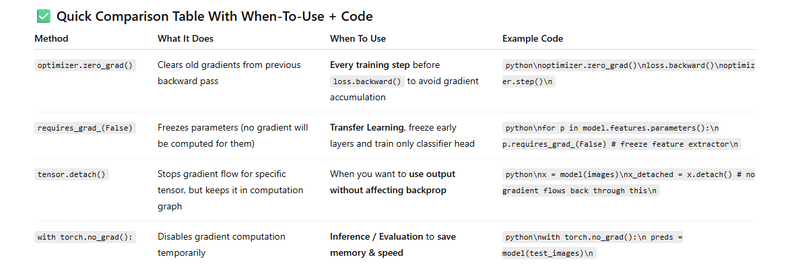
optimizer.zero_grad()
10 practical areas / use-cases where torch.no_grad() is required (or strongly recommended):
Clearing / zeroing gradients (what “clear grad” usually means)
In PyTorch, gradients accumulate into param.grad by default: each .backward() adds to the buffer.
If you don’t clear them before the next backward, you will effectively sum gradients from multiple batches → unstable updates.
Ways to clear:
optimizer.zero_grad(set_to_none=True) (recommended; sets param.grad=None, saving memory & a tiny compute)
model.zero_grad() (older common form; zeros tensors in-place)
Manually: for a single tensor p.grad = None or p.grad.zero_()
When needed: every iteration of your training loop before calling loss.backward().
Stopping gradients / turning off autograd (what your screenshot lists)
These do not “clear grads”; they prevent gradient tracking/propagation.
requires_grad_(False): permanently (until flipped back) marks a tensor/parameter as frozen; no grads will be computed for it.
Use when freezing layers (transfer learning) or for fixed embeddings, etc.
tensor.detach(): returns a view of the tensor without history; backprop stops at that boundary.
Use to truncate the graph (e.g., stop gradient into an input, copy targets from model outputs for bootstrapping, avoid accidental second-order graphs).
with torch.no_grad():: temporarily disables autograd inside the block; no graph is built, ops are faster & cheaper.
Use for inference, EMA updates, or metric computation.
Bonus: with torch.inference_mode(): even leaner than no_grad for inference (more aggressive), but cannot be nested with grad-enabled ops.
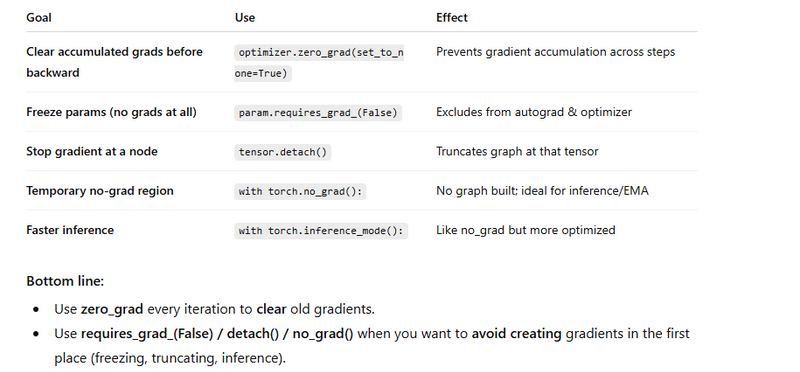
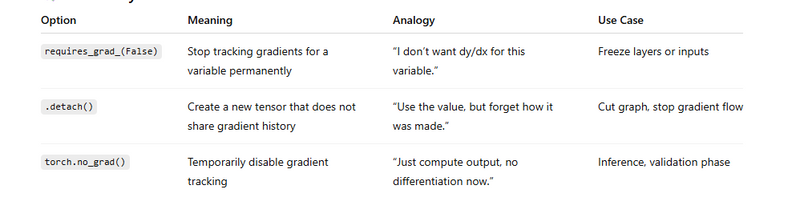
requires_grad_(False)
This means: "Don’t compute derivative for this variable anymore."
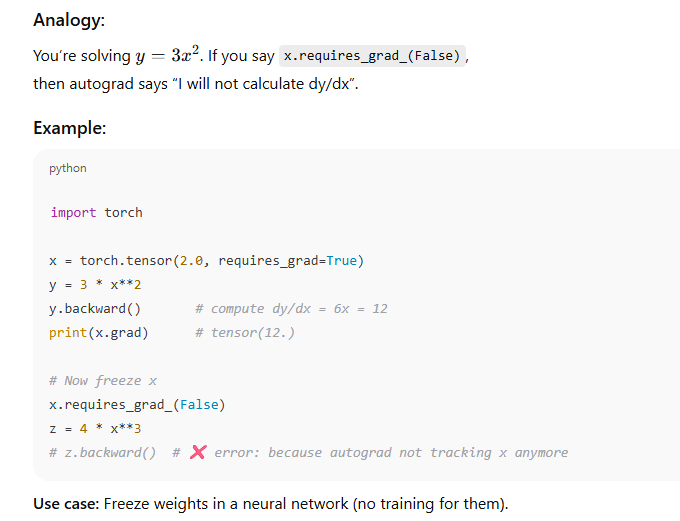
detach()
This means: “Make a new tensor that looks the same, but breaks the gradient chain.”
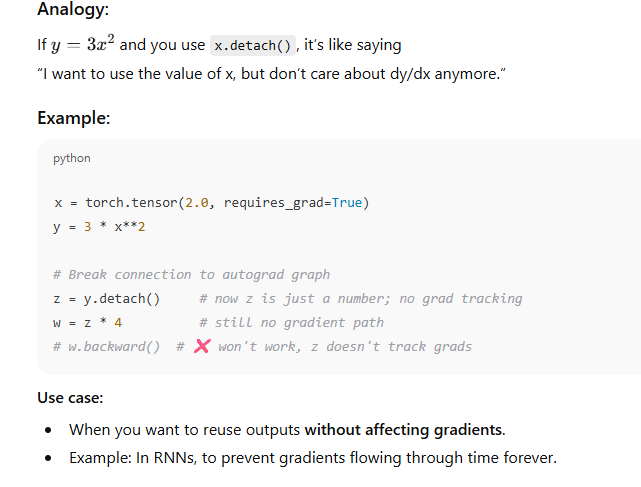
torch.no_grad()
This means: “Turn off autograd temporarily.”
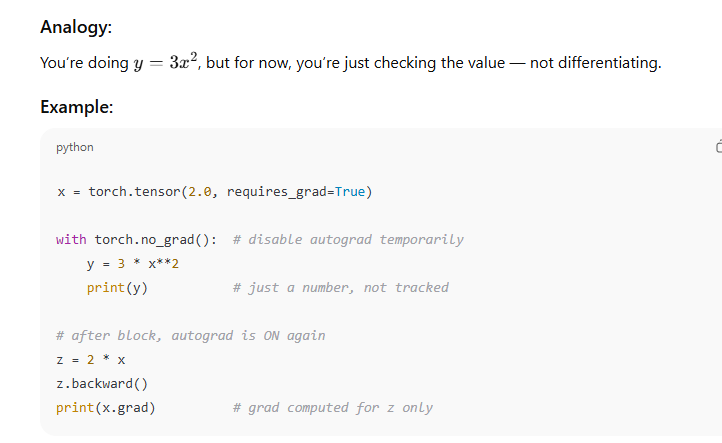
Use case:
During inference (testing), where we don’t need training.
It saves memory and computation time.
Correct training loop: clear grads each step
import torch
import torch.nn as nn
import torch.optim as optim

model = nn.Linear(10, 1)
opt = optim.Adam(model.parameters(), lr=1e-3)
loss_fn = nn.BCEWithLogitsLoss()

for xb, yb in loader:                      # your DataLoader
    opt.zero_grad(set_to_none=True)        # ← CLEAR accumulated grads (A)
    logits = model(xb)                     # forward (graph is recorded)
    loss = loss_fn(logits, yb.float())
    loss.backward()                        # compute grads
    opt.step()                             # update params

Alternatives to clear grads
# option 1: model.zero_grad()    # zeros existing tensors (older style)
# option 2: for p in model.parameters(): p.grad = None
# option 3: for p in model.parameters():
#              if p.grad is not None: p.grad.zero_()
2) Freeze some layers (no grads created)
# Freeze feature extractor; train only classifier head
for p in backbone.parameters():
    p.requires_grad_(False)                # ← stop creating grads for these params (B)

# Only the head’s params will appear in optimizer
opt = optim.SGD(head.parameters(), lr=1e-2)
3) Detach to stop gradient flow through a tensor
out = model(x)                 # requires grad
target = out.detach()          # ← gradient will not flow into 'out' via 'target'

loss = ((out - target)**2).mean()  # trivial example (bootstrapping style)
loss.backward()               # grads flow to 'out' path only, not to 'target'


Another common use—truncate BPTT in RNNs:

h = torch.zeros(batch, hidden)
for t in range(T):
    h = rnn_cell(x[:, t], h)
    if (t + 1) % trunc_k == 0:
        h = h.detach()        # ← cut graph to limit backprop length
4) no_grad / inference_mode for evaluation & EMA
# Evaluation: faster & memory-saving
model.eval()
with torch.no_grad():                     # ← no graph built inside
    for xb, yb in val_loader:
        preds = torch.sigmoid(model(xb))
        # compute metrics…

# EMA update: parameter averaging without tracking grads
with torch.no_grad():
    for p, p_ema in zip(model.parameters(), ema_model.parameters()):
        p_ema.mul_(0.999).add_(p, alpha=0.001)
10 practical areas / use-cases where torch.no_grad() is required (or strongly recommended):
- Model Evaluation / Inference
When you’re running your trained model on validation or test data:
model.eval()
with torch.no_grad():
    preds = model(x_val)
➡ Prevents storing intermediate gradients.
🧪 2. Validation Loop (During Training)
Inside your training epoch, when evaluating after each batch/epoch:
if step % eval_interval == 0:
    with torch.no_grad():
        val_loss = criterion(model(x_val), y_val)
➡ Keeps evaluation memory-efficient.
📊 3. Computing Accuracy or Metrics
When calculating accuracy, F1-score, confusion matrix, etc.:
with torch.no_grad():
    outputs = model(x_test)
    acc = (outputs.argmax(1) == y_test).float().mean()
🧍 4. Serving / Deployment (Prediction API)
In Flask/FastAPI or other inference servers:
@app.post("/predict")
def predict(data):
    with torch.no_grad():
        result = model(data)
➡ Prevents unnecessary gradient tracking in production.
🔁 5. Feature Extraction / Embedding Generation
Using pretrained networks (e.g., ResNet, BERT) for feature extraction:
with torch.no_grad():
    features = backbone(imgs)
🧩 6. Transfer Learning (Frozen Layers)
When you freeze base layers and train only a new head:
with torch.no_grad():
    base_output = base_model(x)
🎯 7. Teacher-Student / Knowledge Distillation (Teacher Forward Pass)
Teacher model shouldn’t track gradients:
with torch.no_grad():
    teacher_output = teacher_model(x)
📷 8. Image Generation or Translation
When using GAN generators for inference:
with torch.no_grad():
    fake_images = generator(noise)
📈 9. Validation in Reinforcement Learning / Simulation
During agent evaluation (no learning updates):
with torch.no_grad():
    action = policy_net(state)
🧮 10. Post-processing Outputs (e.g., Softmax, Argmax, Thresholding)
When computing softmax or argmax for predictions:
with torch.no_grad():
    probs = torch.softmax(logits, dim=1)
Real Life Clear Usage Examples
1) Training Loop (Use optimizer.zero_grad())
Gradients accumulate by default in PyTorch. So we clear them before computing new gradients.
for images, labels in train_loader:

    optimizer.zero_grad()        # 1. Clear previous gradients

    outputs = model(images)      # 2. Forward pass
    loss = criterion(outputs, labels)

    loss.backward()              # 3. Backprop compute gradients
    optimizer.step()             # 4. Update model weights
2) Transfer Learning (Use requires_grad_(False))
Freeze pretrained backbone, train only classifier.
# Freeze convolution layers
for param in model.features.parameters():
    param.requires_grad_(False)

# Only train classifier part
optimizer = torch.optim.Adam(model.classifier.parameters(), lr=1e-3)
3) Stop Gradient Flow in Middle (Use tensor.detach())
Useful in GANs or when reusing feature outputs.
features = model.encoder(images)
features_no_grad = features.detach()   # No gradient flows into encoder

# Use features for something else
result = another_network(features_no_grad)
4) Evaluation (Use with torch.no_grad())
We don’t train during inference, so no need to compute gradients.
model.eval()        # Set dropout/batchnorm to eval mode

with torch.no_grad():
    for images, labels in val_loader:
        outputs = model(images)
        # compute accuracy or metrics
This reduces memory usage and speeds up inference.



Top comments (0)