
What Are Push Notifications?
Role of Firebase Cloud Messaging (FCM)
Complete Implementation: Flutter + Laravel + FCM + MySQL
What Are Push Notifications?
Push notifications are messages sent from a server to a user’s device even when the app is not actively open. They are commonly used for:
Booking confirmations
Order status updates
Payment / recharge success messages
Reminders and alerts
Key characteristics:
Server-initiated: The server decides when to send.
Delivered via a push service: Google, Apple, etc.
Can wake the app or show messages in the notification tray.
For your use case (Flutter app + Laravel backend + MySQL bookings), push notifications are ideal for:
“Booking created successfully”
“Booking approved / vehicle ready”
“Booking cancelled”
Role of Firebase Cloud Messaging (FCM)
Firebase Cloud Messaging (FCM) is Google’s push notification service.
FCM’s responsibilities:
Generate device tokens
Each device/app installation gets a unique fcm_token.
You send this token to your backend (Laravel).
Deliver messages from your server to devices
Laravel sends a POST request to FCM with:
Target token(s)
Notification title + body
Optional data (e.g., booking_id)
Handle different app states
App in foreground: You can show a custom in-app notification.
Background / killed: System tray notification appears.
In your architecture:
Flutter app:
Gets FCM token and sends it to Laravel API.
Laravel backend (with MySQL):
Stores token in device_tokens table.
When createBooking() is called and booking is saved, it:
Looks up the user’s token(s).
Sends a request to FCM.
FCM delivers the push notification to the device.
Complete Implementation: Flutter + Laravel + FCM + MySQL
Laravel Setup
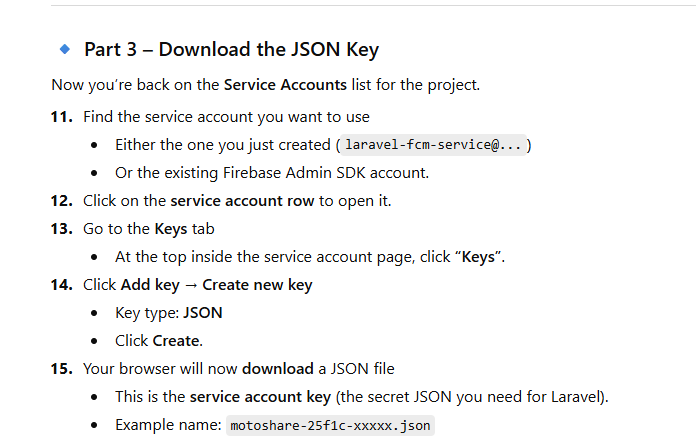
STEP 1 — Prerequisite (Service Account JSON)
Place your downloaded JSON here:
C:\myworkspace\motoshare-web\storage\fcm-service-account.json
✅ STEP 2 — Add in .env
FIREBASE_CREDENTIALS=storage/app/fcm-service-account.json
FIREBASE_PROJECT_ID=your-project-id
==============OR============================
FIREBASE_CREDENTIALS=fcm-service-account.json
FIREBASE_PROJECT_ID=motoshare-2f51c
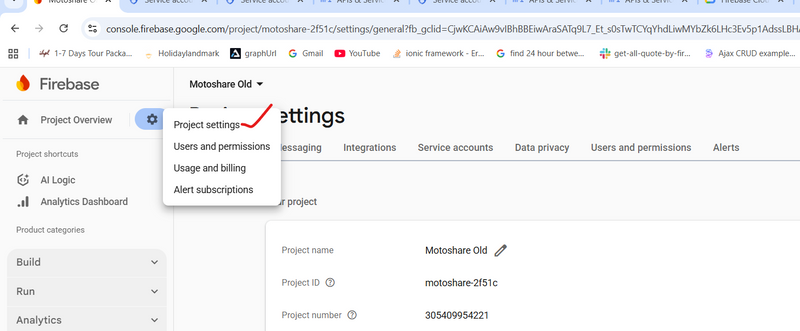
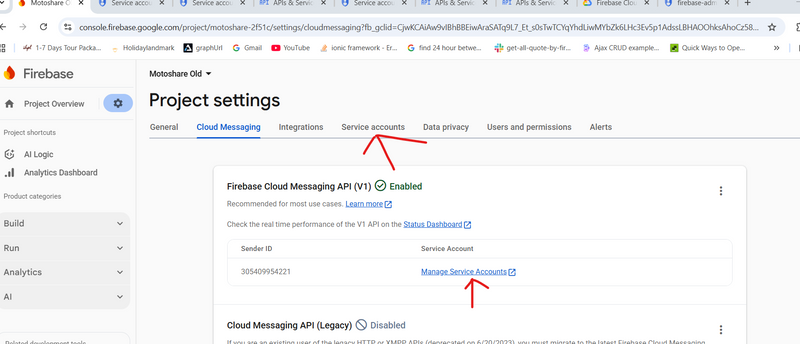

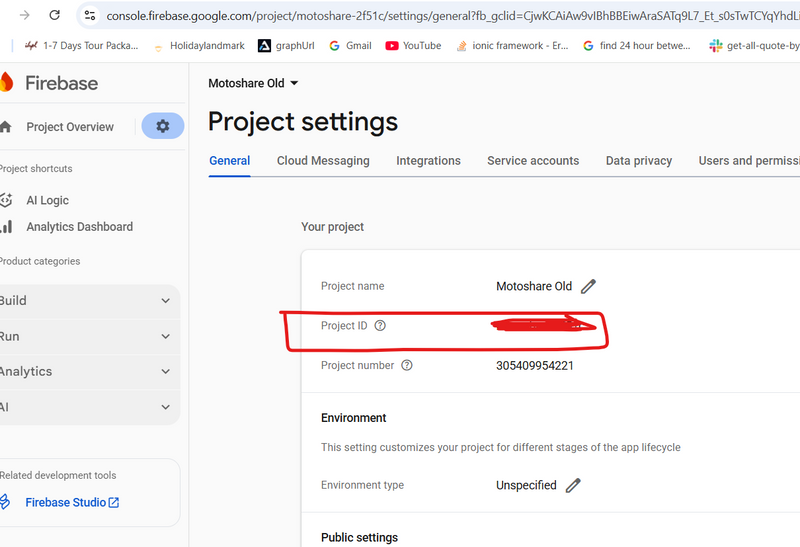
Find your project ID in Firebase console.
Migration: device_tokens table
php artisan make:migration create_device_tokens_table
database/migrations/xxxx_xx_xx_create_device_tokens_table.php:
<?php

use Illuminate\Database\Migrations\Migration;
use Illuminate\Database\Schema\Blueprint;
use Illuminate\Support\Facades\Schema;

return new class extends Migration {
    public function up(): void
    {
        Schema::create('device_tokens', function (Blueprint $table) {
        $table->id();
        $table->unsignedBigInteger('user_id');
        $table->string('fcm_token')->nullable();
        $table->timestamps();
    });
    }

    /**
     * Reverse the migrations.
     */
    public function down(): void
    {
        Schema::dropIfExists('device_tokens');
    }
};
Run:
php artisan migrate
Model: DeviceToken
php artisan make:model DeviceToken
app/Models/DeviceToken.php:

<?php

namespace App\Models;

use Illuminate\Database\Eloquent\Model;

class DeviceToken extends Model
{
    protected $fillable = [
        'user_id',
        'fcm_token',
    ];
}
Controller: Save FCM Token from Flutter
Route in routes/api.php:
use App\Http\Controllers\DeviceTokenController;

Route::post('/device-token', [DeviceTokenController::class, 'store']);
Controller app/Http/Controllers/DeviceTokenController.php:
<?php

namespace App\Http\Controllers;

use App\Models\DeviceToken;
use Illuminate\Http\Request;

class DeviceTokenController extends Controller
{
    public function store(Request $request)
    {
        $data = $request->validate([
            'user_id'   => 'required|integer',
            'fcm_token' => 'required|string',
        ]);

        DeviceToken::updateOrCreate(
            ['user_id' => $data['user_id']],
            ['fcm_token' => $data['fcm_token']]
        );

        return response()->json([
            'success' => true,
            'message' => 'FCM token saved',
        ]);
    }
}
==============================OR=========================
 public function get_tokenbyemail(Request $request)
    {
        // 1) Validate input
          Log::info('get_tokenbyemail data:', $request->all());
        $data = $request->validate([
            'email' => 'required|email',
            'token' => 'required|string',
        ]);
        // 2) Find user by email
        $user = User::where('email', $data['email'])->first();

        if (!$user) {
            return response()->json([
                'success' => false,
                'message' => 'User not found for given email',
            ], 404);
        }

        // 3) Save / update FCM token in device_tokens table
        $deviceToken = DeviceToken::updateOrCreate(
            ['user_id' => $user->id],           // search by user_id
            ['fcm_token' => $data['token']]     // update this field
        );

        // 4) Return JSON response
        return response()->json([
            'success' => true,
            'message' => 'FCM token saved',
            'data'    => [
                'user_id'         => $user->id,
                'device_token_id' => $deviceToken->id,
                'fcm_token'       => $deviceToken->fcm_token,
            ],
        ]);
    }


public function get_tokenbyphone(Request $request)
{
    // 1) Validate input
      Log::info('get_tokenbyphone data:', $request->all());
    $data = $request->validate([
        'phone' => 'required|string',
        'token' => 'required|string',
    ]);

    // 2) Find user by phone number
    $user = User::where('number', $data['phone'])->first();

    if (!$user) {
        return response()->json([
            'success' => false,
            'message' => 'User not found for given phone number',
        ], 404);
    }

    // 3) Save or update FCM token for this user
    $deviceToken = DeviceToken::updateOrCreate(
        ['user_id' => $user->id],          // Search by user_id
        ['fcm_token' => $data['token']]    // Update fcm_token field
    );

    // 4) Return response
    return response()->json([
        'success' => true,
        'message' => 'FCM token saved successfully',
        'data' => [
            'user_id'         => $user->id,
            'device_token_id' => $deviceToken->id,
            'fcm_token'       => $deviceToken->fcm_token,
        ]
    ]);
}
FCM Service: app/Services/FcmService.php
Create the file manually:
<?php

namespace App\Services;

use Google\Client;
use Illuminate\Support\Facades\Log;
use Illuminate\Support\Facades\Http;

class FcmService
{
    /**
     * Send push notification using FCM HTTP v1 API
     */
public function sendToToken(string $token, string $title, string $body, array $data = []): bool
{
    try {
        $credRelative = env('FIREBASE_CREDENTIALS', 'fcm-service-account.json');
        $credPath     = storage_path($credRelative);

        Log::info('[FCM V1] Using credentials path', ['path' => $credPath]);

        if (!is_file($credPath)) {
            Log::error('[FCM V1] Firebase credentials file not found or not a file', [
                'path' => $credPath,
            ]);
            return false;
        }

        $client = new Client();
        $client->setAuthConfig($credPath);
        $client->addScope('https://www.googleapis.com/auth/firebase.messaging');

        $googleToken = $client->fetchAccessTokenWithAssertion();
        $accessToken = $googleToken['access_token'] ?? null;

        if (!$accessToken) {
            Log::error("[FCM V1] Failed to fetch access token", $googleToken);
            return false;
        }

        // 🔹 Sanitize data: ALL values must be STRING for FCM
        $cleanData = [];
        foreach ($data as $key => $value) {
            if (is_bool($value)) {
                $cleanData[$key] = $value ? '1' : '0';
            } elseif (is_scalar($value)) { // int, float, string
                $cleanData[$key] = (string) $value;
            } else {
                // arrays/objects → JSON string
                $cleanData[$key] = json_encode($value);
            }
        }

        $payload = [
            'message' => [
                'token' => $token,
                'notification' => [
                    'title' => $title,
                    'body'  => $body,
                ],
                'data' => $cleanData,
            ],
        ];

        $projectId = env('FIREBASE_PROJECT_ID');

        $response = Http::withToken($accessToken)
            ->post("https://fcm.googleapis.com/v1/projects/{$projectId}/messages:send", $payload);

        if ($response->failed()) {
            Log::error("[FCM V1] Send Failed", [
                'token'    => $token,
                'payload'  => $payload,            // helpful for debugging
                'response' => $response->body(),
            ]);
            return false;
        }

        Log::info("[FCM V1] Push Sent Successfully", [
            'token'    => $token,
            'response' => $response->body(),
        ]);

        return true;

    } catch (\Throwable $e) {
        Log::error("[FCM V1] Exception", [
            'error' => $e->getMessage(),
        ]);
        return false;
    }
}
}
Integrate FCM into your existing createBooking() method
You shared this method earlier. We’ll just add FCM sending at the end.
At top of the file where createBooking lives:
use App\Models\DeviceToken;
use App\Services\FcmService;
use Illuminate\Support\Facades\Log;
Inject FcmService into the class:
protected FcmService $fcm;

public function __construct(FcmService $fcm)
{
    $this->fcm = $fcm;
}
=============================OR==============
class UtilityFunctionsController extends Controller
{

   protected $accessToken;
    protected $phoneNumberId;
    protected $version;
    protected $url;
protected FcmService $fcm;

  public function __construct(FcmService $fcm)
{
    // Inject FCM Service
    $this->fcm = $fcm;

    // Keep existing WhatsApp initialization
    $this->accessToken   = env('WHATSAPP_ACCESS_TOKEN');
    $this->phoneNumberId = env('WHATSAPP_PHONE_NUMBER_ID');
    $this->version       = 'v20.0';
    $this->url           = "https://graph.facebook.com/{$this->version}/{$this->phoneNumberId}/messages";
}
Now your updated createBooking():
 public function createBooking($request, $getphone, $getvehicle)
    {
           $booking = null; // Default to null in case no booking gets created
        $endDate = new DateTime($request->end_date);
        $endDate->modify('-1 day');

        // Get shop details to set destination
        $shop_id = $getvehicle->shop_id;
        $getshop = Shop::where('id', $shop_id)->first();
        $destination = $getshop->partner_name;  // Corrected to use shop's partner name as destination
        $vehicleImage = $getvehicle->vechicle_image;
          $img = json_decode($vehicleImage, true);
           $payment_type=$getvehicle->payment_type;

          $vehicleprice=$getvehicle->price;
            $vendor = User::where('id',  $getvehicle->vender_ID)->first();
              $shop = shop::where('id', $getvehicle->shop_id)->first();
              $vehicle_id = $request->has('vehicle_id') ? $request->vehicle_id : $request->vechicle_id;
        // Create booking in the database
      $isDuplicate = Booking::where('user_id', $getphone->id)
    ->where('vechicle_id', $vehicle_id)
    ->where('start_date', $request->start_date)
    ->where('end_date', $endDate->format('Y-m-d'))
    ->whereIn('status', [0, 1, 2, 3, 4])
    ->exists();
        log::info("inside createbooking");
        log::info($isDuplicate);
        if (!$isDuplicate) {
                $booking = Booking::create([
                    'user_name' => $getphone->name,
                    'destination' => $destination, // Use destination from shop model
                    'vechicle_type' => $getvehicle->vechicle,
                    'brand' => $getvehicle->brand,
                    'model' => $getvehicle->model,
                    'price' => $this->calculateBookingPrice(
            $request->start_date,
            $request->end_date,
            $vehicleprice  // make sure this is per-day price from your DB/model
        ),
            'start_date' => $request->start_date,
            'end_date' => $endDate->format('Y-m-d'),
            'number' => $getphone->number,
            'myvechical_id' => $getvehicle->vehical_id,
            'email' => $getphone->email,
            'user_id' => $getphone->id,
            'vender_id' => $getvehicle->vender_ID,
             'vechicle_id' => $vehicle_id,
            'vechicle_image' => json_encode($img),
            'shop_id' => $getvehicle->shop_id,
           'status' => ($payment_type == 1) ? '0' : '3',
           'state' => ($payment_type == 1) ? 'Pending' : 'Vehicle Ready',
        ]);

        // Send email notifications to user, vendor, and admin

     // Send WhatsApp notification to user


    $this->sendWhatsappMessage(
        $getphone, $getvehicle, $request->total_price, $getvehicle->vechicle,
        $getvehicle->brand, $getvehicle->model, $getshop->partner_name,
        $request->start_date, $endDate,  null, $template=1
    );
}
    $this->sendEmails(
    $getphone,            // User model (user details)
    $vendor,              // Vendor model (vendor details)
    $booking,             // Booking model (booking details)
    $getvehicle,          // Vehicle model (vehicle details)
    $shop,                // Shop model (shop details)
    $request,             // Request data (includes total_price, start_date, end_date)
    $payment_type         // Payment type (for status logic)
   );

 $this->removeDuplicateBookings();
  log::info($getphone->id);
$startDateStr = $request->start_date;
$endDateStr   = $endDate->format('Y-m-d');

$title = 'Booking Created Successfully';
$body = "Hi {$getphone->name}, your booking #{$booking->id} "
      . "for {$getvehicle->brand} {$getvehicle->model} "
      . "from {$startDateStr} to {$endDateStr} is created.";

$this->sendBookingNotification(
    $getphone,     // user
    $booking,      // booking model
    $getvehicle,   // vehicle
    $getshop,      // shop
    $title,        // title
    $body,         // body
    'booking_created' // type
);       // Return success response


$bodys = "Hi {$vendor->name}, your booking #{$booking->id} "
      . "for {$getvehicle->brand} {$getvehicle->model} "
      . "from {$startDateStr} to {$endDateStr} is created.";
$this->sendBookingNotification(
    $vendor,     // user
    $booking,      // booking model
    $getvehicle,   // vehicle
    $getshop,      // shop
    $title,        // title
    $bodys,         // body
   'booking_created' // type
);


       return $booking;

    }
==================================================================

private function sendBookingNotification($getphone, $booking, $getvehicle, $getshop, $title, $body, $type)
{
    Log::info("[FCM] Notification triggered for user: {$getphone->id}");

    $tokens = DeviceToken::where('user_id', $getphone->id)->pluck('fcm_token')->all();

    if (empty($tokens)) {
        Log::warning('[FCM] No device tokens for user', ['user_id' => $getphone->id]);
        return;
    }

    foreach ($tokens as $token) {
        $this->fcm->sendToToken($token, $title, $body, [
            'type'        => $type,
            'booking_id'  => $booking->id,
            'price'       => $booking->price,
            'state'       => $booking->state,
            'vehicle'     => $getvehicle->vechicle,
            'brand'       => $getvehicle->brand,
            'model'       => $getvehicle->model,
            'shop_name'   => $getshop->partner_name,
        ]);
    }
}
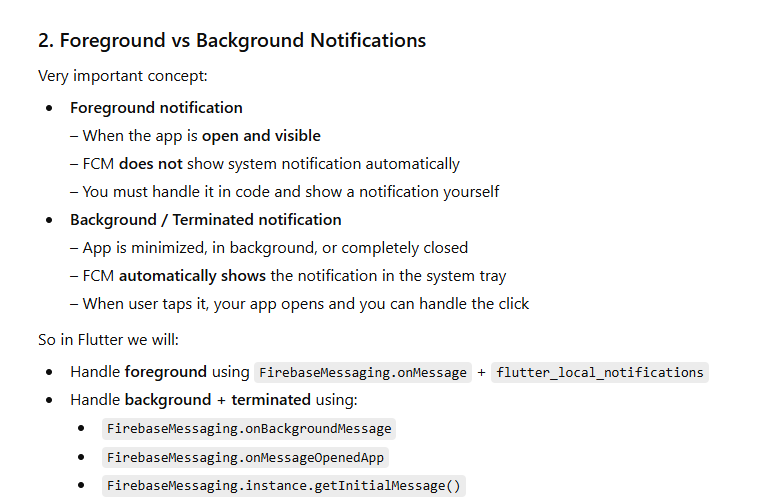
Flutter Setup
Add dependencies (pubspec.yaml)
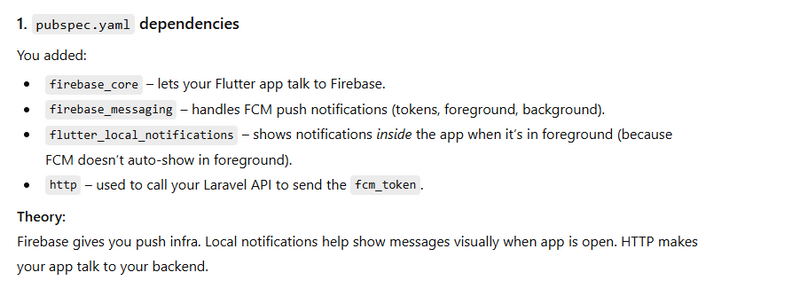
step1
android/build.gradle
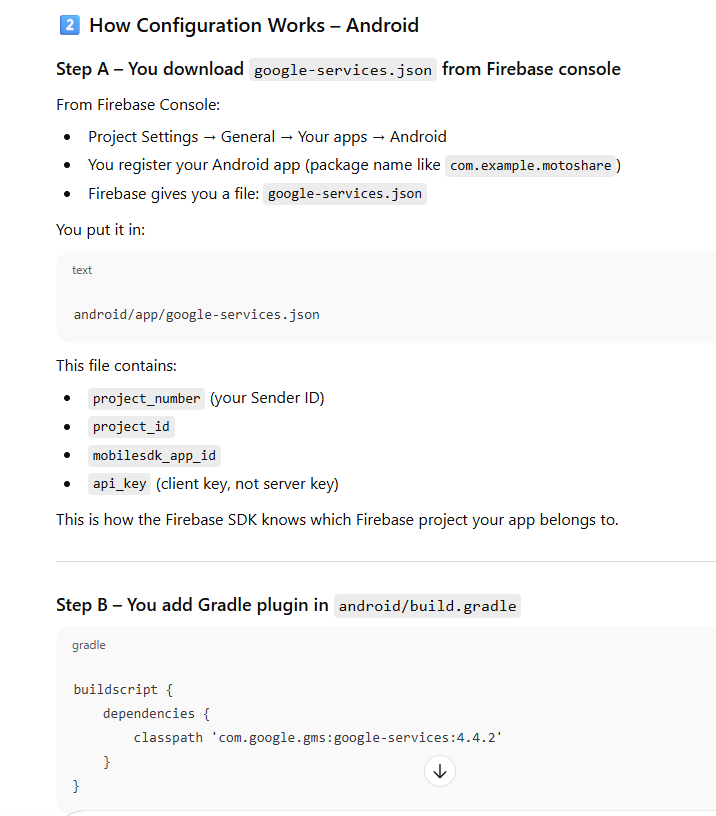
buildscript {
    repositories {
        google()
        mavenCentral()
    }
    dependencies {
        classpath 'com.google.gms:google-services:4.4.2'
    }
}
STEP 2 — Add plugin inside app/build.gradle
android/app/build.gradle
dependencies:
  flutter:
    sdk: flutter

  app_settings: ^6.1.1
  firebase_core: ^4.2.1
  firebase_messaging: ^16.0.4
  flutter_local_notifications: ^19.5.0
  http: ^1.2.2
AndroidManifest.xml
R:\firebase\firebase\android\app\src\main\AndroidManifest.xml
       <meta-data
        android:name="com.google.firebase.messaging.default_notification_channel_id"
        android:value="high_importance_channel" />
STEP 3 — Add Firebase BoM + Firebase Messaging
Inside your dependencies block:
dependencies {
    implementation platform('com.google.firebase:firebase-bom:34.5.0')
    implementation 'com.google.firebase:firebase-messaging'
    implementation 'com.google.firebase:firebase-analytics'

    // Your existing dependencies
    implementation 'javax.annotation:javax.annotation-api:1.3.2'
    implementation 'com.google.errorprone:error_prone_annotations:2.15.0'
    implementation 'com.google.crypto.tink:tink-android:1.9.0'
    implementation 'androidx.multidex:multidex:2.0.1'
}
Run:
flutter pub get
Local Notification Service (for foreground notifications)
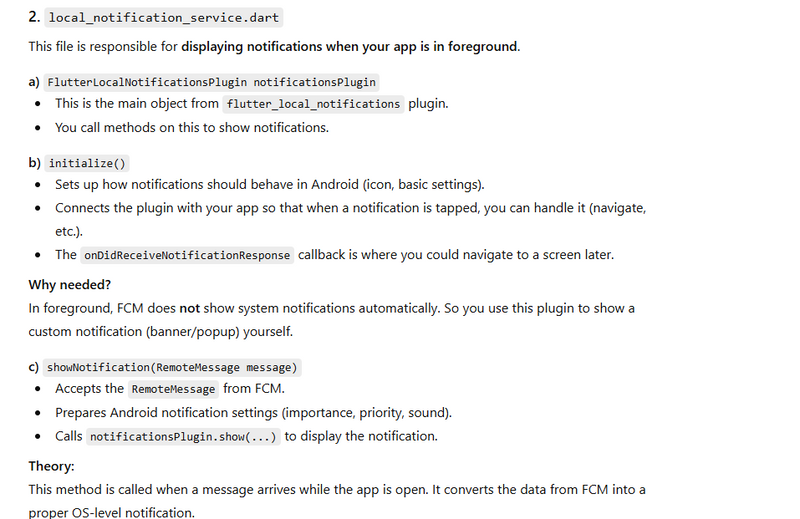
Create file: lib/local_notification_service.dart

import 'package:flutter/material.dart';
import 'package:flutter_local_notifications/flutter_local_notifications.dart';
import 'package:firebase_messaging/firebase_messaging.dart';
import 'package:app_settings/app_settings.dart';
import 'package:motoshare/main.dart';
import 'package:motoshare/screens/drawer_widget/messagescreen.dart';
import 'package:motoshare/screens/drawer_widget/all_notifications_page.dart';
import 'package:motoshare/screens/login.dart';
import 'package:motoshare/screens/login_screen.dart';
import 'package:motoshare/view_modal/Login_view_model.dart';
import 'package:provider/provider.dart';
import 'package:shared_preferences/shared_preferences.dart';

class NotificationServices {
  final FirebaseMessaging _messaging = FirebaseMessaging.instance;

  final FlutterLocalNotificationsPlugin _flutterLocalNotificationsPlugin =
   FlutterLocalNotificationsPlugin();
  // -----------------------------
  // 1) Request permission
  // -----------------------------
  Future<void> requestNotificationPermission() async {
    NotificationSettings settings = await _messaging.requestPermission(
      alert: true,
      announcement: true,
      badge: true,
      carPlay: false,
      criticalAlert: true,
      provisional: true,
      sound: true,
    );

    if (settings.authorizationStatus == AuthorizationStatus.authorized) {
      print("User granted permission");
    } else if (settings.authorizationStatus ==
        AuthorizationStatus.provisional) {
      print("User granted provisional permission");
    } else {
      print("User denied notification permission");
      AppSettings.openAppSettings();
    }
  }

  // -----------------------------
  // 2) Token + refresh
  // -----------------------------
  Future<String?> getDeviceToken() async {
    String? token = await _messaging.getToken();
    print("FCM my Token: $token");
    return token;
  }


void monitorTokenRefresh(Function(String) onNewToken) {
  FirebaseMessaging.instance.onTokenRefresh.listen((newToken) async {
    print("🔄 FCM AUTO-REFRESHED TOKEN");
    print("New Token: $newToken");

    // Callback to save + send to backend
    onNewToken(newToken);
  });
}
  // -----------------------------
  // 3) Init local notifications
  //    (CALL ONLY ON MAIN ISOLATE)
  // -----------------------------
  Future<void> initLocalNotifications() async {
    const AndroidInitializationSettings androidInitializationSettings =
        AndroidInitializationSettings('@mipmap/ic_launcher');

    const DarwinInitializationSettings iosInitializationSettings =
        DarwinInitializationSettings();

    const InitializationSettings initializationSettings =
        InitializationSettings(
      android: androidInitializationSettings,
      iOS: iosInitializationSettings,
    );

  await _flutterLocalNotificationsPlugin.initialize(
  initializationSettings,
  onDidReceiveNotificationResponse: (response) {
    String? bookingId = response.payload;
    print("📲 LOCAL notification tapped with payload: $bookingId");

    if (bookingId != null) {
      _navigateFromTopBar(bookingId);
    }
  },
);

    // NOTE: channel id must match showNotification()
    const AndroidNotificationChannel channel = AndroidNotificationChannel(
      'high_importance_channel',
      'High Importance Notifications',
      description: 'Channel for important notifications',
      importance: Importance.max,
    );

    await _flutterLocalNotificationsPlugin
        .resolvePlatformSpecificImplementation<
            AndroidFlutterLocalNotificationsPlugin>()
        ?.createNotificationChannel(channel);
  }

  // -----------------------------
  // 4) Foreground messages
  // -----------------------------
 void firebaseInit() {
  FirebaseMessaging.onMessage.listen((message) {
    print("FG data: ${message.data}");
    showNotification(message);


    // if (message.data['type'] == 'booking_created') {
    //   final bookingId = message.data['booking_id'];
    //   final ctx = navigatorKey.currentContext;

    //   if (ctx == null) return;

    //   showDialog(
    //     context: ctx,
    //     builder: (_) => AlertDialog(
    //       title: Text("Booking Created"),
    //       content: Text("Tap to open booking details."),
    //       actions: [
    //         TextButton(
    //           child: Text("Open"),
    //           onPressed: () {
    //             Navigator.pop(ctx);
    //             Navigator.push(
    //               ctx,
    //               MaterialPageRoute(
    //                 builder: (_) => AllVehicle(),
    //               ),
    //             );
    //           },
    //         )
    //       ],
    //     ),
    //   );
    // }


  });
}


void _navigateFromTopBar(String bookingId) {
  final ctx = navigatorKey.currentContext;
  if (ctx == null) {
    print("❌ No context for navigation");
    return;
  }
  Navigator.push(
    ctx,
    MaterialPageRoute(
      builder: (_) => AllNotificationsPage(),
    ),
  );
}


void handleMessage(BuildContext context, RemoteMessage message) {
  if (!context.mounted) return;

  if (message.data['type'] == 'booking_created') {
    final bookingId = message.data['booking_id']; // FIXED KEY

    if (bookingId == null) {
      print("❌ booking_id is missing in message.data");
      return;
    }

    print("Navigating to booking screen with ID: $bookingId");

    Navigator.push(
      context,
      MaterialPageRoute(
        builder: (_) => MessageScreen(id: bookingId),
      ),
    );
  }
}

  // -----------------------------
  // 5) Local notification display
  // -----------------------------
  Future<void> showNotification(RemoteMessage message) async {
    const AndroidNotificationDetails androidNotificationDetails =
        AndroidNotificationDetails(
      'high_importance_channel', // ✅ SAME as in channel
      'High Importance Notifications',
      channelDescription: 'Channel for important notifications',
      importance: Importance.high,
      priority: Priority.high,
      icon: '@mipmap/ic_launcher',
    );

    const DarwinNotificationDetails darwinNotificationDetails =
        DarwinNotificationDetails(
      presentAlert: true,
      presentBadge: true,
      presentSound: true,
    );

    const NotificationDetails notificationDetails = NotificationDetails(
      android: androidNotificationDetails,
      iOS: darwinNotificationDetails,
    );

    await _flutterLocalNotificationsPlugin.show(
      0,
  message.notification?.title ?? 'Notification',
  message.notification?.body ?? '',
  notificationDetails,
  payload: message.data['booking_id'],
    );
  }

  // -----------------------------
  // 6) Background / resumed click
  // -----------------------------
void handleNotificationClick() {
  // App opened from background (notification tap)
  FirebaseMessaging.onMessageOpenedApp.listen((RemoteMessage message) {
    print("📲 Notification clicked (Background)");
    _handleNavigation(message);
  });
}

Future<void> handleInitialMessage() async {
  // App opened from terminated state by tapping notification
  RemoteMessage? message = await FirebaseMessaging.instance.getInitialMessage();

  if (message != null) {
    print("🚀 App opened from terminated via notification");
    _handleNavigation(message);
  }
}

void _handleNavigation(RemoteMessage message) async {
  final bookingId = message.data['booking_id'];

  if (bookingId == null) {
    print("❌ booking_id missing in notification click!");
    return;
  }

  final ctx = navigatorKey.currentContext;
  if (ctx == null) {
    print("❌ navigatorKey context is null");
    return;
  }

  // -------------------------
  // CHECK LOGIN STATUS
  // -------------------------
  final prefs = await SharedPreferences.getInstance();
  final email = prefs.getString('email');

  bool isLoggedIn = email != null && email.trim().isNotEmpty;

  if (isLoggedIn) {
    // USER LOGGED IN → Redirect to Notifications
    Navigator.push(
      ctx,
      MaterialPageRoute(builder: (_) => const AllNotificationsPage()),
    );
  } else {
   Navigator.push(
  ctx,
  MaterialPageRoute(
    builder: (context) {
      final loginViewModel = Provider.of<LoginViewModel>(context, listen: false);
      return LoginScreen(loginViewModel: loginViewModel);
    },
  ),
);
  }
}
}

class NotificationClickScreen extends StatelessWidget {
  final String title;
  final String body;

  const NotificationClickScreen({
    super.key,
    required this.title,
    required this.body,
  });

  @override
  Widget build(BuildContext context) {
    return Scaffold(
      appBar: AppBar(title: const Text("Notification Details")),
      body: Padding(
        padding: const EdgeInsets.all(16),
        child: Column(
          crossAxisAlignment: CrossAxisAlignment.start,
          children: [
            Text(
              "Title: $title",
              style: const TextStyle(
                fontSize: 20,
                fontWeight: FontWeight.bold,
              ),
            ),
            const SizedBox(height: 10),
            Text(
              "Body: $body",
              style: const TextStyle(fontSize: 18),
            ),
          ],
        ),
      ),
    );
  }
}
Firebase API Wrapper (get token, send to Laravel, handle foreground + background)
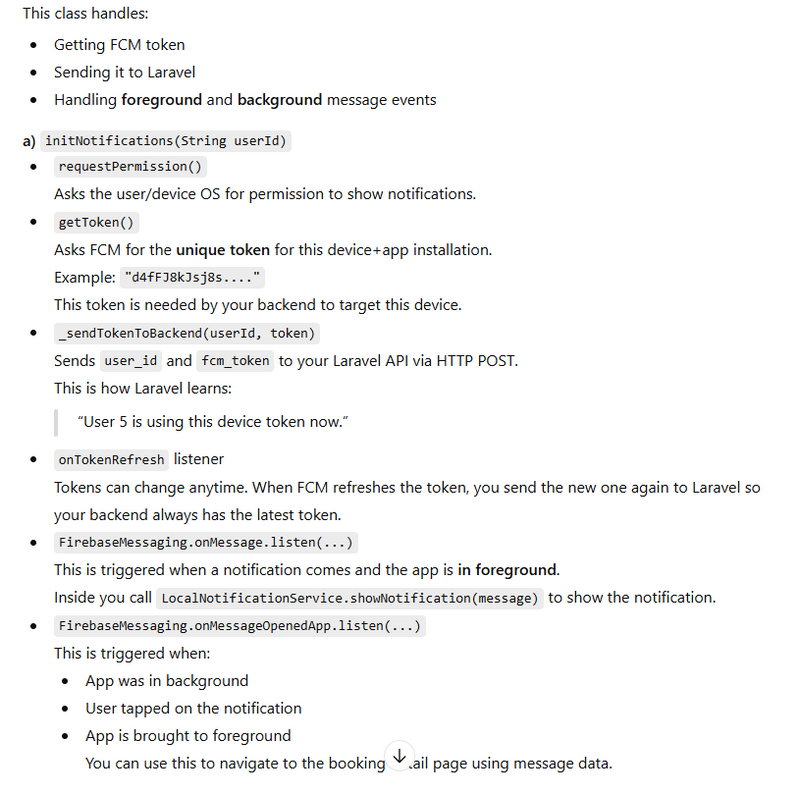

In motoshare view model
Future<List<DeviceToken>> gettokenbyemail(String email,String token) async {

  var url = "$baseUrl/api/get_tokenbyemail";
  // Create the request body including the additional parameters
  var body = jsonEncode({
    "email": email, // Email of the user
     "token": token, // Email of the user
  });
  print("Request fetchProjects: $url");
  print("Request fetchProjects: $body");
  // Send the POST request to the API
  final response = await http.post(
    Uri.parse(url),
    headers: {
      "Content-Type": "application/json", // Set content type as JSON
    },
    body: body,
  );
  print("Response Status getshopname: ${response.statusCode}");
  print("Response Body getshopname: ${response.body}");
  // Check if the response status is OK (200)
  if (response.statusCode == 200) {
    // Parse the response body to a Map<String, dynamic>
    Map<String, dynamic> responseData = jsonDecode(response.body);
    // Extract the 'data' field
    var vehicleData = responseData['data'];
     return vehicleData.map((data) => DeviceToken.fromJson(data)).toList();
  } else {
    throw Exception("Failed to fetch projects data");
  }
}

Future<List<DeviceToken>> gettokenbyphone(String phone,String token) async {

  var url = "$baseUrl/api/get_tokenbyphone";
  // Create the request body including the additional parameters
  var body = jsonEncode({
    "phone": phone, // Email of the user
     "token": token, // Email of the user
  });
  print("Request fetchProjects: $url");
  print("Request fetchProjects: $body");
  // Send the POST request to the API
  final response = await http.post(
    Uri.parse(url),
    headers: {
      "Content-Type": "application/json", // Set content type as JSON
    },
    body: body,
  );
  print("Response Status getshopname: ${response.statusCode}");
  print("Response Body getshopname: ${response.body}");
  // Check if the response status is OK (200)
  if (response.statusCode == 200) {
    // Parse the response body to a Map<String, dynamic>
    Map<String, dynamic> responseData = jsonDecode(response.body);
    // Extract the 'data' field
    var vehicleData = responseData['data'];
     return vehicleData.map((data) => DeviceToken.fromJson(data)).toList();
  } else {
    throw Exception("Failed to fetch projects data");
  }
}
main.dart – Initialize Firebase, background handler, and start FCM
Create / update lib/main.dart:
import 'package:flutter/material.dart';
import 'package:motoshare/screens/drawer_widget/decider.dart';
import 'package:provider/provider.dart';
import 'package:shared_preferences/shared_preferences.dart';
import 'package:motoshare/screens/countryselectionpage.dart';
import 'package:motoshare/services/motoshare_service.dart';
import 'package:motoshare/view_modal/country_view_model.dart';
import 'package:motoshare/view_modal/Login_view_model.dart';
import 'package:motoshare/view_modal/motoshare_view_model.dart';
import 'package:flutter_dotenv/flutter_dotenv.dart';
import 'package:firebase_messaging/firebase_messaging.dart';
import 'package:firebase_core/firebase_core.dart';
import 'package:app_settings/app_settings.dart';
import 'package:motoshare/services/notification_services.dart';
final GlobalKey<NavigatorState> navigatorKey = GlobalKey<NavigatorState>();


void main() async {
  WidgetsFlutterBinding.ensureInitialized();
  await Firebase.initializeApp();

  // 2) Background handler
  FirebaseMessaging.onBackgroundMessage(_firebaseMessagingBackgroundHandler);
   await dotenv.load(fileName: ".env");
  final prefs = await SharedPreferences.getInstance();

  // Fetch the saved baseUrl from SharedPreferences
  String initialBaseUrl = prefs.getString('baseUrl') ?? 'https://motoshare.in';  // Default URL

  runApp(DynamicAppWrapper(initialBaseUrl: initialBaseUrl));
}
@pragma('vm:entry-point')
Future<void> _firebaseMessagingBackgroundHandler(RemoteMessage message) async {
  await Firebase.initializeApp();
  print(message.notification!.title.toString());
}
====================OR===========================
In decider.dart file
import 'package:firebase_messaging/firebase_messaging.dart';
import 'package:flutter/material.dart';
import 'package:motoshare/screens/countryselectionpage.dart';
import 'package:motoshare/screens/drawer_widget/allvehicle.dart';
import 'package:provider/provider.dart';
import 'dart:async';
import 'package:shared_preferences/shared_preferences.dart';
import 'package:motoshare/services/notification_services.dart';
import 'package:motoshare/view_modal/motoshare_view_model.dart';

class DeciderPage extends StatefulWidget {
  const DeciderPage({super.key});

  @override
  State<DeciderPage> createState() => _DeciderPageState();
}

class _DeciderPageState extends State<DeciderPage> {
  final NotificationServices _notificationServices = NotificationServices();
 @override
  void initState() {
    super.initState();
     _initNotificationsAndSendToken();
  }
Future<void> _initNotificationsAndSendToken() async {
    // 1) Token Refresh Listener
    _notificationServices.monitorTokenRefresh((newToken) async {
      final prefs = await SharedPreferences.getInstance();
      await prefs.setString('fcm_token', newToken);

      final savedPhone = prefs.getString('phone');
      final savedEmail = prefs.getString('email');

      if (savedPhone != null && savedPhone.isNotEmpty) {
        await _sendTokenToBackendByPhone(savedPhone, newToken);
      } else if (savedEmail != null && savedEmail.isNotEmpty) {
        await _sendTokenToBackendByEmail(savedEmail, newToken);
      }
    });

    // 2) Ask permission
    await _notificationServices.requestNotificationPermission();

    // 3) Get and save token
    final token = await _notificationServices.getDeviceToken();
    final prefs = await SharedPreferences.getInstance();
    await prefs.setString('fcm_token', token ?? "");

    // 4) Send token to backend
    final savedPhone = prefs.getString('phone');
    final savedEmail = prefs.getString('email');

    if (savedPhone != null && savedPhone.isNotEmpty) {
      await _sendTokenToBackendByPhone(savedPhone, token.toString());
    } else if (savedEmail != null && savedEmail.isNotEmpty) {
      await _sendTokenToBackendByEmail(savedEmail, token.toString());
    }

    // 5) Initialize FCM handlers
    WidgetsBinding.instance.addPostFrameCallback((_) async {
      await _notificationServices.initLocalNotifications();
      _notificationServices.firebaseInit();                 // Foreground
      _notificationServices.handleNotificationClick();      // Background click
      _notificationServices.handleInitialMessage();         // Terminated click
    });

    // 6) Navigate
    _navigate();
  }


Future<void> _sendTokenToBackendByEmail(String email, String token) async {
  // exactly like your getmyprofile pattern
  final profileViewModel =
      Provider.of<MotoshareViewModel>(context, listen: false);

  try {
    await profileViewModel.sendFcmTokenByEmail(email,token);
    print("✅ FCM token sent to backend using email");
  } catch (e) {
    print("❌ Error sending FCM token by email: $e");
  }
}

Future<void> _sendTokenToBackendByPhone(String phone, String token) async {
  final profileViewModel =
      Provider.of<MotoshareViewModel>(context, listen: false);

  try {
    await profileViewModel.sendFcmTokenByPhone(phone,token);
    print("✅ FCM token sent to backend using phone");
  } catch (e) {
    print("❌ Error sending FCM token by phone: $e");
  }
}
=============== OR in motoshare.partner=========================
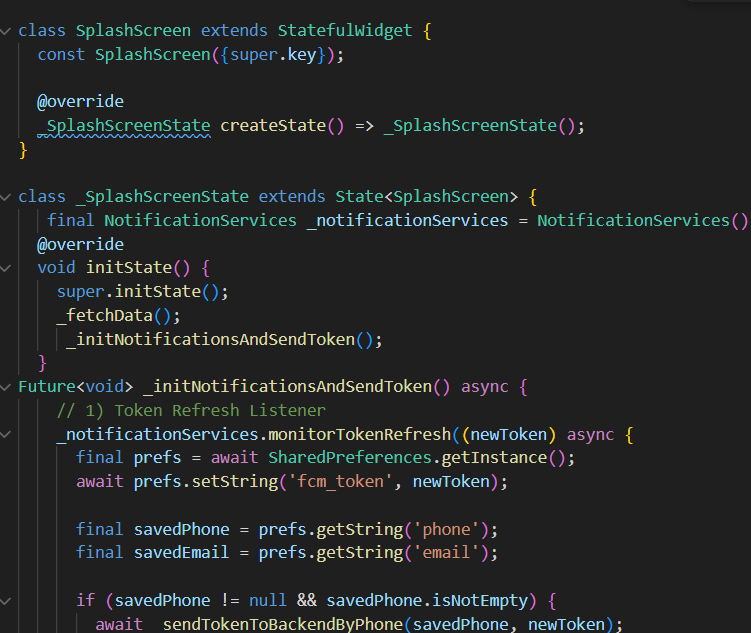
In C:\Project\motoshare\lib\screens\drawer_widget\allvehicle.dart
  Future<void> _fetchData() async {
    setState(() {
      _isLoading = true;
    });
    try {
      final motoshareViewModel =Provider.of<MotoshareViewModel>(context, listen: false);
      await motoshareViewModel.getVehicleData();
      final prefs = await SharedPreferences.getInstance();
  String baseUrls = prefs.getString('baseUrl') ?? 'https://motoshare.in';  // Default URL

  String currencySymbols = prefs.getString('currency_symbol')?? 'Rs';  // Default URL
 String countrynames = prefs.getString('countryname')?? 'Rs';  // Default URL
 print("mycountryname is there");
 print(countrynames);
// Load baseUrl (fallback to motosshare.in)
// Read stored email
final email = prefs.getString('email');

// Check email not null & not empty
if (email != null && email.trim().isNotEmpty) {

  // Read FCM token
  final fcmToken = prefs.getString('fcm_token');

  print("Stored FCM Token: $fcmToken");

  if (fcmToken != null && fcmToken.trim().isNotEmpty) {
    // Call backend API
    await _sendTokenToBackendByEmail(email, fcmToken);

    print("Token sent to backend successfully");
  } else {
    print("⚠ No FCM token found in SharedPreferences");
  }

} else {
  print("⚠ Email is NULL or EMPTY — cannot send token");
}


  ===================================================================
Future _sendTokenToBackendByEmail(String email, String token) async {
// exactly like your getmyprofile pattern
final profileViewModel =
Provider.of(context, listen: false);
try {
await profileViewModel.sendFcmTokenByEmail(email,token);
print("✅ FCM token sent to backend using email");
} catch (e) {
print("❌ Error sending FCM token by email: $e");
}
}
C:\Project\motoshare\lib\screens\login.dart
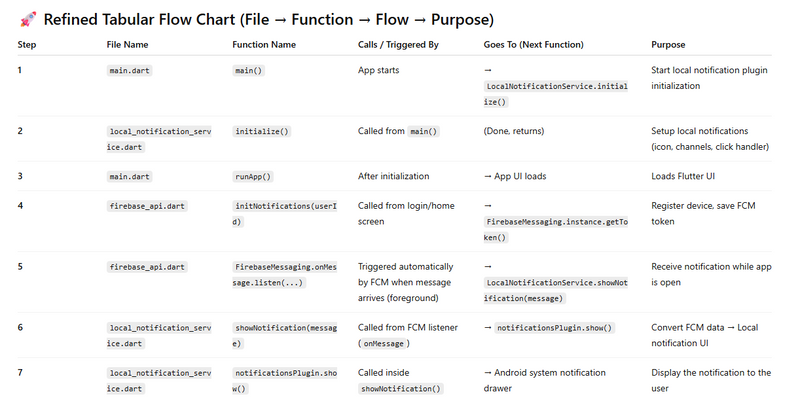
main.dart
   └─ main()
        └─ LocalNotificationService.initialize()

local_notification_service.dart
   └─ initialize()

Your Login/Home Screen
   └─ FirebaseApi.initNotifications()

firebase_api.dart
   └─ initNotifications()
         └─ onMessage.listen()
                └─ LocalNotificationService.showNotification()

local_notification_service.dart
   └─ showNotification()
        └─ notificationsPlugin.show()  → (Notification appears)
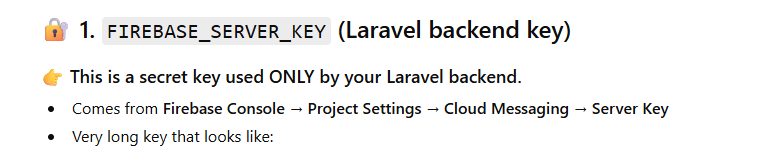
Troubleshooting steps
minSdk = 23
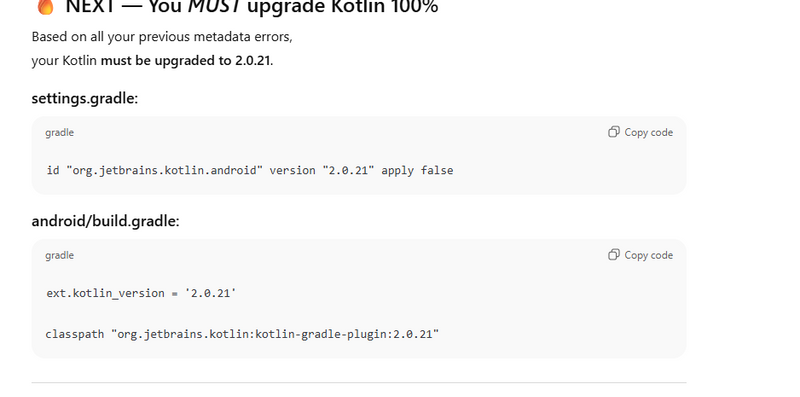
C:\Project\motoshare\android\settings.gradle
Look for something like:
plugins {
    id "dev.flutter.flutter-plugin-loader" version "1.0.0" apply false
    id "com.android.application" version "8.1.0" apply false
    id "org.jetbrains.kotlin.android" version "1.8.0" apply false   // 👈 here
}



Top comments (0)