
What We Are Building
Recommended Folder Structure
Why Use Alpine Store for Pagination?
In Laravel admin panels, one common problem appears again and again: multiple pages need the same pagination UI.
For example, you may have different admin list pages such as:
Countries
Languages
Currencies
Organizers
KYC Documents
Team Members
Service Areas
Trust Badges
Each page needs almost the same pagination features:
Showing 1–10 of 47
Previous button
Next button
Page numbers
Rows per page dropdown
The common mistake is copying the same pagination HTML into every Blade file. At first, this looks simple. But later, when the design changes, you have to update the same code in many places.
A better solution is to create one reusable child pagination component and control it from multiple parent components using an Alpine.js store.
The uploaded file explains this exact pattern using Laravel 11, Livewire 3, Alpine.js, Tailwind CSS, and DaisyUI. The main idea is very simple: the store becomes the contract between parent and child components. Parents and the child component do not directly talk to each other; both communicate through $store.pagination.
What We Are Building
We are building a reusable pagination system where:
Parent Component 1
    ↓
uses same pagination child component

Parent Component 2
    ↓
uses same pagination child component

Parent Component 3
    ↓
uses same pagination child component

Reusable Child Pagination Component
    ↓
controlled by Alpine.store()
The reusable child component will handle:
Row count
Current page
Last page
Previous button
Next button
Page numbers
Per-page dropdown
Visible row calculation
The parent component only needs to do three small things:
- Tell the store how many rows exist.
- Add x-show to each table row.
- Include the reusable pagination component.
Recommended Folder Structure
Use this clean folder structure:
resources/
├── js/
│   ├── app.js
│   └── stores/
│       └── paginationStore.js
│
└── views/
    ├── components/
    │   └── admin/
    │       └── pagination.blade.php
    │
    └── livewire/
        └── admin/
            └── organizers/
                ├── team-members-index.blade.php
                └── organizers-index.blade.php
Here is the role of each file:
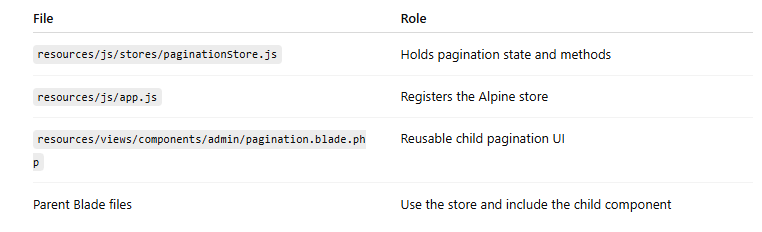
Why Use Alpine Store for Pagination?
Alpine store is useful when multiple components need to share the same state.
In this case:
Parent table rows need to know which rows should be visible.
Child pagination UI needs to know current page, total rows, and per-page value.
Instead of passing many props or duplicating code, both parent and child use:
$store.pagination
That gives a clean structure.
File 1: Alpine Pagination Store
Create this file:
resources/js/stores/paginationStore.js
Add this code:
export default function registerPaginationStore(Alpine) {
    Alpine.store('pagination', {
        currentPage: 1,
        perPage: 5,
        totalRows: 0,
        perPageOptions: [5, 10, 25, 50, 100],

        get lastPage() {
            return Math.max(1, Math.ceil(this.totalRows / this.perPage));
        },

        get from() {
            return this.totalRows === 0 ? 0 : (this.currentPage - 1) * this.perPage + 1;
        },

        get to() {
            return Math.min(this.currentPage * this.perPage, this.totalRows);
        },

        get pages() {
            const last = this.lastPage;
            const windowSize = 5;

            let start = Math.max(1, this.currentPage - Math.floor(windowSize / 2));
            let end = Math.min(last, start + windowSize - 1);

            start = Math.max(1, end - windowSize + 1);

            const arr = [];

            for (let i = start; i <= end; i += 1) {
                arr.push(i);
            }

            return arr;
        },

        get hasPrev() {
            return this.currentPage > 1;
        },

        get hasNext() {
            return this.currentPage < this.lastPage;
        },

        reset(total) {
            const n = Number(total) || 0;

            this.totalRows = n;

            if (this.currentPage > this.lastPage) {
                this.currentPage = this.lastPage;
            }
        },

        shouldShow(index) {
            const i = Number(index);
            const start = (this.currentPage - 1) * this.perPage;

            return i >= start && i < start + this.perPage;
        },

        goTo(page) {
            const p = Number(page);

            this.currentPage = Math.min(this.lastPage, Math.max(1, p));
        },

        next() {
            if (this.hasNext) {
                this.currentPage += 1;
            }
        },

        prev() {
            if (this.hasPrev) {
                this.currentPage -= 1;
            }
        },

        setPerPage(n) {
            const v = Number(n) || 5;

            this.perPage = v;
            this.currentPage = 1;
        },
    });
}
Understanding the Store
This store is the brain of the pagination system.
currentPage
This stores the active page number.
currentPage: 1
perPage
This controls how many rows should be visible per page.
perPage: 5
totalRows
This stores the total number of rows available in the parent table.
totalRows: 0
The parent component updates this value using:
$store.pagination.reset(totalRows)
lastPage
This calculates the last page number.
get lastPage() {
    return Math.max(1, Math.ceil(this.totalRows / this.perPage));
}
Example:
totalRows = 47
perPage = 10
lastPage = 5
from and to
These are used for showing text like:
Showing 11–20 of 47
Code:
get from() {
    return this.totalRows === 0 ? 0 : (this.currentPage - 1) * this.perPage + 1;
}

get to() {
    return Math.min(this.currentPage * this.perPage, this.totalRows);
}
pages
This returns visible page numbers.
get pages() {
    const last = this.lastPage;
    const windowSize = 5;

    let start = Math.max(1, this.currentPage - Math.floor(windowSize / 2));
    let end = Math.min(last, start + windowSize - 1);

    start = Math.max(1, end - windowSize + 1);

    const arr = [];

    for (let i = start; i <= end; i += 1) {
        arr.push(i);
    }

    return arr;
}
This keeps the pagination clean by showing only a small range of page numbers.
Example:
1 2 3 4 5
or:
4 5 6 7 8
shouldShow(index)
This is the most important method.
shouldShow(index) {
    const i = Number(index);
    const start = (this.currentPage - 1) * this.perPage;

    return i >= start && i < start + this.perPage;
}
The parent table row uses this method:
x-show="$store.pagination.shouldShow({{ $loop->index }})"
So the parent does not slice arrays manually. Alpine decides whether each row should be visible.
File 2: Register the Store in app.js
Open:
resources/js/app.js
Add this code:
import './bootstrap';
import registerPaginationStore from './stores/paginationStore';

document.addEventListener('alpine:init', () => {
    registerPaginationStore(window.Alpine);
});
Important Note for Livewire 3
If you are using Livewire 3, do not import Alpine again like this:
import Alpine from 'alpinejs';
Livewire 3 already ships with Alpine. If you import Alpine again, you may accidentally create two Alpine instances. That can cause stores or plugins to fail silently.
Use this approach instead:
document.addEventListener('alpine:init', () => {
    registerPaginationStore(window.Alpine);
});
This registers the store before Alpine starts.
File 3: Create the Reusable Child Pagination Component
Create this file:
resources/views/components/admin/pagination.blade.php
Add this code:
<nav
    x-data
    x-show="$store.pagination.totalRows > 0"
    x-cloak
    class="flex flex-col sm:flex-row items-center justify-between gap-3 mt-4 text-sm"
    aria-label="Table pagination"
>
    {{-- Left: row counter + per-page selector --}}
    <div class="flex items-center gap-3 text-ink-muted-2">
        <span>
            Showing
            <span
                class="font-semibold text-ink"
                x-text="$store.pagination.from"
            ></span>–<span
                class="font-semibold text-ink"
                x-text="$store.pagination.to"
            ></span>
            of
            <span
                class="font-semibold text-ink"
                x-text="$store.pagination.totalRows"
            ></span>
        </span>

        <label class="inline-flex items-center gap-1.5">
            <span class="sr-only">Rows per page</span>

            <select
                class="select select-bordered select-sm min-w-[64px] pr-7"
                :value="$store.pagination.perPage"
                @change="$store.pagination.setPerPage($event.target.value)"
            >
                <template
                    x-for="opt in $store.pagination.perPageOptions"
                    :key="opt"
                >
                    <option
                        :value="opt"
                        :selected="opt == $store.pagination.perPage"
                        x-text="opt"
                    ></option>
                </template>
            </select>

            <span class="text-ink-muted-2 text-xs">/ page</span>
        </label>
    </div>

    {{-- Right: prev / page numbers / next --}}
    <div class="inline-flex items-center gap-1">
        <button
            type="button"
            @click="$store.pagination.prev()"
            :disabled="!$store.pagination.hasPrev"
            :class="$store.pagination.hasPrev
                ? 'btn btn-sm btn-ghost'
                : 'btn btn-sm btn-ghost opacity-30 cursor-not-allowed'"
            aria-label="Previous page"
        >
            Prev
        </button>

        <template x-if="$store.pagination.lastPage > 1">
            <div class="inline-flex items-center gap-1">
                <template
                    x-for="p in $store.pagination.pages"
                    :key="p"
                >
                    <button
                        type="button"
                        @click="$store.pagination.goTo(p)"
                        :class="$store.pagination.currentPage === p
                            ? 'btn btn-sm btn-primary min-w-[2.25rem]'
                            : 'btn btn-sm btn-ghost min-w-[2.25rem]'"
                        :aria-current="$store.pagination.currentPage === p ? 'page' : null"
                        x-text="p"
                    ></button>
                </template>
            </div>
        </template>

        <button
            type="button"
            @click="$store.pagination.next()"
            :disabled="!$store.pagination.hasNext"
            :class="$store.pagination.hasNext
                ? 'btn btn-sm btn-ghost'
                : 'btn btn-sm btn-ghost opacity-30 cursor-not-allowed'"
            aria-label="Next page"
        >
            Next
        </button>
    </div>
</nav>
Why This Child Component Is Reusable
This child component does not know anything about:
Doctors
Organizers
Team members
Countries
Languages
KYC documents
It only reads from:
$store.pagination
That is why the same component can be used on multiple parent pages.
It does not receive row data.
It does not receive props.
It does not contain business logic.
It only displays pagination controls.
Add x-cloak CSS
To avoid UI flickering before Alpine loads, add this CSS:
[x-cloak] {
display: none !important;
}
You can add it in:
resources/css/app.css
Parent Component Example 1: Team Members Page
Now open your parent Blade file:
resources/views/livewire/admin/organizers/team-members-index.blade.php
Before adding reusable pagination, your table may look like this:
<div class="bg-white border border-cream-300 rounded-2xl overflow-x-auto">
    <table class="table">
        <thead>
            ...
        </thead>

        <tbody>
            @forelse ($rows as $m)
                <tr
                    wire:key="tm-{{ $m['id'] }}"
                    class="hover:bg-cream-50"
                >
                    {{-- row cells --}}
                </tr>
            @empty
                <tr>
                    <td colspan="8">
                        No team members.
                    </td>
                </tr>
            @endforelse
        </tbody>
    </table>
</div>

After adding reusable pagination:

<div
    wire:key="tm-pag-{{ count($rows) }}"
    x-data
    x-init="$store.pagination.reset({{ count($rows) }})"
>
    <div class="bg-white border border-cream-300 rounded-2xl overflow-x-auto">
        <table class="table">
            <thead>
                ...
            </thead>

            <tbody>
                @forelse ($rows as $m)
                    <tr
                        wire:key="tm-{{ $m['id'] }}"
                        x-show="$store.pagination.shouldShow({{ $loop->index }})"
                        class="hover:bg-cream-50"
                    >
                        {{-- row cells --}}
                    </tr>
                @empty
                    <tr>
                        <td colspan="8">
                            No team members.
                        </td>
                    </tr>
                @endforelse
            </tbody>
        </table>
    </div>

    <x-admin.pagination />
</div>
The Three Important Parent Lines
The parent needs only three pagination-related additions.
-
Add a wrapper with wire:key
wire:key="tm-pag-{{ count($rows) }}"
This is useful in Livewire because when the row count changes after search or filter, Livewire remounts the wrapper.
-
Reset the store with total row count
x-init="$store.pagination.reset({{ count($rows) }})"
This tells Alpine how many rows exist.
-
Show or hide each row
x-show="$store.pagination.shouldShow({{ $loop->index }})"
This tells Alpine whether this row belongs to the current page.
Finally, include the child component:
<x-admin.pagination />
Parent Component Example 2: Organizers Page
The same child pagination component can be reused on another parent page.
Example:
resources/views/livewire/admin/organizers/organizers-index.blade.php
Code:
<div
    wire:key="org-pag-{{ count($this->organizers) }}"
    x-data
    x-init="$store.pagination.reset({{ count($this->organizers) }})"
>
    <div class="bg-white border border-cream-300 rounded-2xl overflow-x-auto">
        <table class="table">
            <thead>
                <tr>
                    <th>Business</th>
                    <th>Country</th>
                    <th>Level</th>
                    <th>Status</th>
                    <th>Metrics</th>
                    <th>Created</th>
                    <th>Action</th>
                </tr>
            </thead>

            <tbody>
                @forelse ($this->organizers as $o)
                    <tr
                        wire:key="org-{{ $o['id'] }}"
                        x-show="$store.pagination.shouldShow({{ $loop->index }})"
                        class="hover:bg-cream-50"
                    >
                        {{-- organizer cells: business name, badges, metrics --}}
                    </tr>
                @empty
                    <tr>
                        <td colspan="7">
                            No organizers match.
                        </td>
                    </tr>
                @endforelse
            </tbody>
        </table>
    </div>

    <x-admin.pagination />
</div>
Notice that the logic is exactly the same.
Only these things changed:
wire:key prefix changed from tm-pag to org-pag
$rows changed to $this->organizers
Loop variable changed from $m to $o
The store did not change.
The child component did not change.
Only the parent data changed.
That is real component reusability.
How Livewire Re-rendering Stays in Sync
Livewire 3 does not always destroy and recreate DOM elements. It morphs the DOM.
That means this code:
x-init="$store.pagination.reset({{ count($rows) }})"
may not run again if Livewire only updates the existing element.
This can create a stale pagination count after search or filter.
Example:
Before search: 100 rows
After search: 12 rows
But pagination still thinks totalRows = 100
The fix is:
wire:key="tm-pag-{{ count($rows) }}"
When the count changes, the key changes. Livewire treats the wrapper as a new element. Then Alpine runs x-init again and updates the store.
This keeps pagination correct after:
Search
Filter
Status change
Livewire refresh
Data update
When This Pattern Is Best
This pattern is very useful when:
You have admin tables.
Each page shows one main resource.
Rows are already loaded server-side.
You have a few rows to a few hundred rows.
You want the same pagination UI everywhere.
You want minimum code in every parent page.
Good use cases:
Country list
Language list
Currency list
Team member list
Organizer list
KYC document list
Service area list
Trust badge list
Admin user list
When Not to Use This Pattern
Do not use this pattern for very large datasets.
For example:
10,000 users
50,000 bookings
1,00,000 orders
Why?
Because this pattern renders all rows in the DOM and hides most of them using x-show.
For large datasets, use server-side pagination instead:
Livewire WithPagination
Laravel paginate()
Database-level pagination
API-level pagination
This reusable Alpine pagination is best for small to medium admin lists.
Limitation: One Paginated Table Per Page
This store is a singleton:
Alpine.store('pagination', ...)
That means there is one global pagination state on the page.
So this works best when one page has one table.
If you need two paginated tables on the same page, you have two options:
Option 1: Use Alpine.data() so every table gets its own local pagination state.
Option 2: Store pagination data by table ID inside Alpine.store().
Example idea:
Alpine.store('pagination', {
    tables: {
        users: {},
        orders: {},
    }
});
But for most Laravel admin pages, one table per page is normal, so the singleton store is simple and effective.
Why This Is Similar to Reusable Modal Pattern
This pagination pattern is the same idea as reusable modal components.
For modal:
Alpine.store('modal', {
open: false,
title: '',
show() {},
close() {}
});
Parents call:
$store.modal.show(...)
Child modal reads:
$store.modal.open
For pagination:
Alpine.store('pagination', {
currentPage: 1,
perPage: 5,
reset() {},
goTo() {}
});
Parents call:
$store.pagination.reset(...)
Child pagination reads:
$store.pagination.currentPage
The pattern is:
Store = shared contract
Parent = sends data
Child = displays UI
Complete Practical Flow
Here is the full flow:
- Parent Livewire component loads rows.
- Parent wrapper calls $store.pagination.reset(count).
- Each table row calls $store.pagination.shouldShow(index).
- Child pagination component reads $store.pagination.
- User clicks page number, Prev, Next, or per-page dropdown.
- Store updates currentPage or perPage.
- Alpine automatically updates visible rows and pagination UI. Final Code Summary Store resources/js/stores/paginationStore.js
Handles:
currentPage
perPage
totalRows
lastPage
from
to
pages
reset()
shouldShow()
goTo()
next()
prev()
setPerPage()
App Boot
resources/js/app.js
Registers the store:
document.addEventListener('alpine:init', () => {
registerPaginationStore(window.Alpine);
});
Child Component
resources/views/components/admin/pagination.blade.php
Reusable component:
Parent Component
Example:
<div
wire:key="tm-pag-{{ count($rows) }}"
x-data
x-init="$store.pagination.reset({{ count($rows) }})"
<table>
    <tbody>
        @foreach ($rows as $row)
            <tr x-show="$store.pagination.shouldShow({{ $loop->index }})">
                ...
            </tr>
        @endforeach
    </tbody>
</table>
<x-admin.pagination />
Final Conclusion
Reusable child components become very powerful when combined with Alpine.js store.
For pagination, this approach gives you:
One pagination store
One child pagination component
Same UI across all admin pages
Very small parent integration
No duplicate pagination markup
Cleaner Laravel Blade files
Better long-term maintainability



Top comments (0)