
Complete Step-by-Step Guide with Commands
HolidayLandmark was affected by SEO spam injection, where thousands of unwanted spam URLs were created under paths like:
/assets/fonts/
/assets/
/uploads/
These URLs may include gambling, casino, Vietnamese spam, betting, or other harmful pages. This type of issue can damage SEO, Google ranking, website trust, and user safety.
This guide explains how to clean, secure, and protect the HolidayLandmark website step by step.
Understand the Problem
What happened?
Attackers may have injected spam pages or malicious files into the website. These spam URLs can look like:
https://holidaylandmark.com/assets/fonts/casino-page
https://holidaylandmark.com/assets/fonts/vietnamese-gambling-url
https://holidaylandmark.com/assets/fonts/betting-spam-page
Normally, /assets/fonts/ should only contain font files like:
.woff
.woff2
.ttf
.eot
.css
It should not contain PHP files, HTML spam pages, casino pages, gambling content, or SEO spam pages.
Take Full Backup Before Cleanup
Before deleting or changing anything, take backup of website files and database.
Backup website files
cd /opt/lampp/htdocs
tar -czvf holidaylandmark-backup-$(date +%F).tar.gz holiday-new
Backup PostgreSQL database
Replace holidaylandmark with your actual database name if different.
pg_dump -U holiday_user -d holidaylandmark > holidaylandmark-db-backup-$(date +%F).sql
If password is asked, enter PostgreSQL password.
Find Suspicious PHP Files Inside Assets / Uploads
Assets folders should not contain executable PHP files.
Run:
cd /opt/lampp/htdocs/holiday-new
find . -path "*/assets/*" -type f \( -name "*.php" -o -name "*.phtml" -o -name "*.phar" -o -name "*.php5" -o -name "*.php7" -o -name "*.php8" \)
Also check upload folders:
find . -path "/uploads/" -type f ( -name ".php" -o -name ".phtml" -o -name ".phar" -o -name ".php5" -o -name ".php7" -o -name ".php8" )
If you find PHP files inside assets/uploads, they are highly suspicious.
Example suspicious output:
./public/assets/fonts/index.php
./public/assets/images/cache.php
./public/uploads/shell.php
Search Spam Keywords in Project Files
Run this command to find gambling/spam keywords:
grep -RniE "casino|betting|gambling|vietnam|viet|slot|slots|บาคาร่า|แทงบอล|สล็อต" /opt/lampp/htdocs/holiday-new
If result appears inside assets, fonts, images, uploads, cache, or unknown PHP files, inspect carefully.
Find Recently Modified Files
If infection happened recently or files were changed suspiciously, check modified files.
For last 30 days:
find /opt/lampp/htdocs/holiday-new -type f -mtime -30
For last 1 year:
find /opt/lampp/htdocs/holiday-new -type f -mtime -365
For last 4 years:
find /opt/lampp/htdocs/holiday-new -type f -mtime -1500
Suspicious names may include:
shell.php
cache.php
mailer.php
autoload.php
wp-config.php
class.php
index.php
admin.php
chosen.php
Especially if they are inside:
/assets/
/fonts/
/images/
/uploads/
/storage/
/cache/
Remove Malware Files Carefully
Do not delete blindly. First inspect the file:
nano /path/to/suspicious-file.php
or:
cat /path/to/suspicious-file.php
If file contains encoded or suspicious code like:
eval(base64_decode(...))
gzinflate(...)
str_rot13(...)
shell_exec(...)
passthru(...)
system(...)
then it is likely malware.
Move suspicious file to quarantine first:
mkdir -p /root/holidaylandmark-quarantine

mv /path/to/suspicious-file.php /root/holidaylandmark-quarantine/
Do not keep malicious files in public folders.
Return 410 Gone for Spam URLs
For hacked spam URLs, do not redirect to homepage.
Correct response:
410 Gone
Why?
Because 410 Gone tells Google:
This URL is permanently removed. Remove it from index.
Apache .htaccess rule
Open your Laravel/public .htaccess file:
nano /opt/lampp/htdocs/holiday-new/holidaylandmark/public/.htaccess
Add these rules before Laravel rewrite rules:
<IfModule mod_rewrite.c>
    RewriteEngine On

    # Return 410 Gone for known hacked spam folders
    RewriteRule ^assets/fonts/.*$ - [G,L]
    RewriteRule ^assets/font/.*$ - [G,L]

    # Return 410 Gone for spam keyword URLs
    RewriteCond %{REQUEST_URI} "(casino|betting|gambling|slot|slots|vietnam|viet|บาคาร่า|แทงบอล|สล็อต)" [NC]
    RewriteRule ^.*$ - [G,L]
</IfModule>
Save and restart Apache:
sudo /opt/lampp/lampp restart
Test:
curl -I https://www.holidaylandmark.com/assets/fonts/spam-url
Expected result:
HTTP/1.1 410 Gone
- Block PHP Execution Inside Assets and Upload Folders
Create .htaccess inside assets folder:
nano /opt/lampp/htdocs/holiday-new/holidaylandmark/public/assets/.htaccess
Add:
Options -Indexes
<FilesMatch "\.(php|phtml|phar|php3|php4|php5|php7|php8)$">
    Require all denied
</FilesMatch>
If upload folder exists:
nano /opt/lampp/htdocs/holiday-new/holidaylandmark/public/uploads/.htaccess
Add same code:
Options -Indexes
<FilesMatch "\.(php|phtml|phar|php3|php4|php5|php7|php8)$">
    Require all denied
</FilesMatch>
This protects your site from uploaded PHP shells.
Fix File and Folder Permissions
Never use 777 permission on the whole project.
Wrong:
chmod -R 777 /opt/lampp/htdocs/holiday-new
Correct:
find /opt/lampp/htdocs/holiday-new -type d -exec chmod 755 {} \;
find /opt/lampp/htdocs/holiday-new -type f -exec chmod 644 {} \;
For Laravel writable folders only:
chmod -R 775 /opt/lampp/htdocs/holiday-new/holidaylandmark/storage
chmod -R 775 /opt/lampp/htdocs/holiday-new/holidaylandmark/bootstrap/cache
Protect .env, .git, Backup Files and Config Files
Sensitive files should never be public.
Add this to Apache vhost or .htaccess:
<FilesMatch "^\.env|composer\.(json|lock)|package\.json|vite\.config\.js|webpack\.mix\.js">
    Require all denied
</FilesMatch>

RedirectMatch 404 /\.git
RedirectMatch 404 /storage/logs
RedirectMatch 404 /(.*)\.sql$
RedirectMatch 404 /(.*)\.zip$
RedirectMatch 404 /(.*)\.tar$
RedirectMatch 404 /(.*)\.gz$
Restart Apache:
sudo /opt/lampp/lampp restart
Test:
curl -I https://www.holidaylandmark.com/.env
Expected:
403 Forbidden
or:
404 Not Found
Secure Laravel Environment
Open .env:
nano /opt/lampp/htdocs/holiday-new/holidaylandmark/.env
Make sure:
APP_ENV=production
APP_DEBUG=false
APP_URL=https://www.holidaylandmark.com
Then clear and rebuild Laravel cache:
cd /opt/lampp/htdocs/holiday-new/holidaylandmark
php artisan config:clear
php artisan route:clear
php artisan cache:clear
php artisan view:clear

php artisan config:cache
php artisan route:cache
12.
Update Composer and NPM Packages
Check Composer vulnerabilities:
cd /opt/lampp/htdocs/holiday-new/holidaylandmark
composer audit
Check outdated packages:
composer outdated
For NPM:
npm audit
npm outdated
Do not update directly on production without testing.
Recommended flow:
Local/Staging test → Git commit → Deploy to production
Add Security Headers
In Apache config or vhost, add:
Header always set X-Frame-Options "SAMEORIGIN"
Header always set X-Content-Type-Options "nosniff"
Header always set Referrer-Policy "strict-origin-when-cross-origin"
Header always set Permissions-Policy "camera=(), microphone=(), geolocation=()"
Header always set Strict-Transport-Security "max-age=31536000; includeSubDomains"
Enable Apache headers module if needed:
sudo a2enmod headers
sudo systemctl restart apache2
For XAMPP Apache, make sure mod_headers is enabled in:
/opt/lampp/etc/httpd.conf
Then restart:
sudo /opt/lampp/lampp restart
- Add Admin and OTP Protection
For login, OTP, admin, organizer dashboard, apply rate limit.
Laravel route example:
Route::middleware(['throttle:10,1'])->group(function () {
    Route::post('/send-otp', [OtpController::class, 'send']);
});
For stronger OTP protection:
Maximum 3 OTP per 10 minutes per phone/email
OTP expiry: 5 minutes
Maximum 5 wrong OTP attempts
Block suspicious IP temporarily
Log all OTP requests
Admin security:
Use Keycloak login
Enable 2FA
Use strong passwords
Disable shared admin accounts
Restrict admin by role
Add audit log
Cloudflare Protection
Use Cloudflare free plan for basic protection.
Recommended Cloudflare settings:
SSL/TLS: Full Strict
Always Use HTTPS: ON
Bot Fight Mode: ON
WAF Managed Rules: ON
Auto Minify: CSS/JS/HTML optional
Cache static assets
Create firewall rules:
If URI Path contains "/assets/fonts/" and does not end with .woff, .woff2, .ttf, .css → Block
Spam keyword rule:
URI contains casino OR betting OR gambling OR slot OR viet → Block
Clean Sitemap
Your sitemap should include only real published pages.
Do not include:
Spam URLs
Thin pages
Draft pages
Search result pages
Admin pages
Login pages
Asset URLs
Generate clean sitemap only for valid pages.
Example:
/trips
/trips/india
/trips/india/rajasthan
/organizers
/blog
/contact
Spam URLs should return:
410 Gone
Thin pages should be:
Draft or noindex
Google Search Console Cleanup
After cleanup:
Submit new clean sitemap.
Check indexed spam URLs.
Use removal tool only for urgent spam results.
Let spam URLs return 410.
Monitor indexing report.
Important:
Do not redirect spam URLs to homepage.
Do not add spam URLs to sitemap.
Do not publish thin pages.
Daily Security Monitoring Script
Create script:
nano /root/holidaylandmark-security-scan.sh
Add:
#!/bin/bash

SITE="/opt/lampp/htdocs/holiday-new"
LOG="/var/log/holidaylandmark-security-scan.log"

echo "======================================" >> $LOG
echo "Scan started: $(date)" >> $LOG

echo "Checking PHP files inside assets/uploads..." >> $LOG
find $SITE -path "*/assets/*" -type f \( -name "*.php" -o -name "*.phtml" -o -name "*.phar" \) >> $LOG
find $SITE -path "*/uploads/*" -type f \( -name "*.php" -o -name "*.phtml" -o -name "*.phar" \) >> $LOG

echo "Checking spam keywords..." >> $LOG
grep -RniE "casino|betting|gambling|vietnam|viet|slot|slots|บาคาร่า|แทงบอล|สล็อต" $SITE >> $LOG

echo "Scan finished: $(date)" >> $LOG
echo "======================================" >> $LOG
Make executable:
chmod +x /root/holidaylandmark-security-scan.sh
Run manually:
/root/holidaylandmark-security-scan.sh
Add cron:
crontab -e
Add:
0 2 * * * /root/holidaylandmark-security-scan.sh
Check log:
tail -100 /var/log/holidaylandmark-security-scan.log
Final Recommended Security Checklist
Backup complete
Malware scan complete
Suspicious PHP files removed
Spam URLs return 410
Assets/uploads PHP execution blocked
File permission fixed
APP_DEBUG=false
.env protected
.git protected
Composer/NPM audit done
Admin login secured
OTP rate limit added
Security headers added
Cloudflare enabled
Clean sitemap submitted
Google Search Console monitored
Daily security scan cron enabled
Conclusion
HolidayLandmark should not only migrate old content. It must migrate safely.
The most important security rule is:
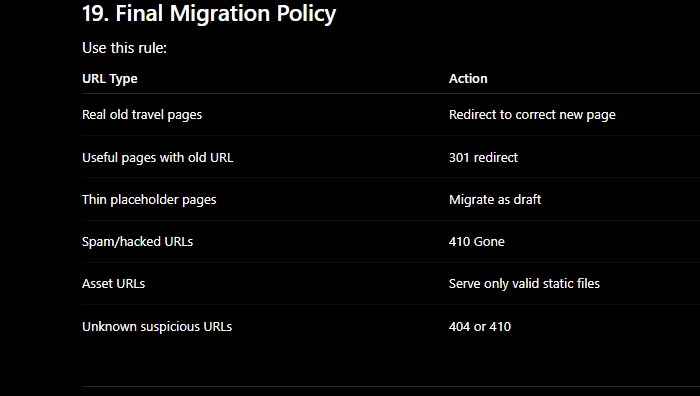
Good pages → migrate or redirect
Thin pages → keep draft
Spam pages → 410 Gone
Assets/uploads → never execute PHP
Admin/OTP → rate limit and protect
Server → no 777 permissions



Top comments (0)