
Basic JSON Restructuring: Wrapping Existing Images Under
Advanced JSON Normalization: Ensuring admin and partner Are Always Arrays
Generate a unique SEO-friendly slug for every user whose slug is NULL, based on their
Refer here
Requirement
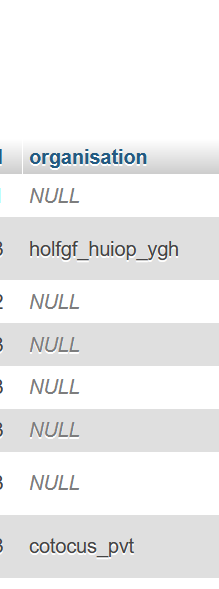
Solution
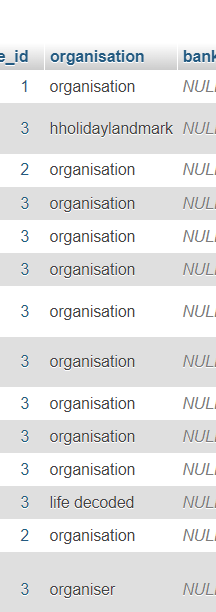
UPDATE `users` SET `organisation` = 'organisation' WHERE `users`.`organisation` is NULL
UPDATE `trips` SET `title` = 'Splendid Kashmir Tours' WHERE `trips`.`id` = 1;
SELECT * FROM `trips` WHERE `trips`.`id` = 1;
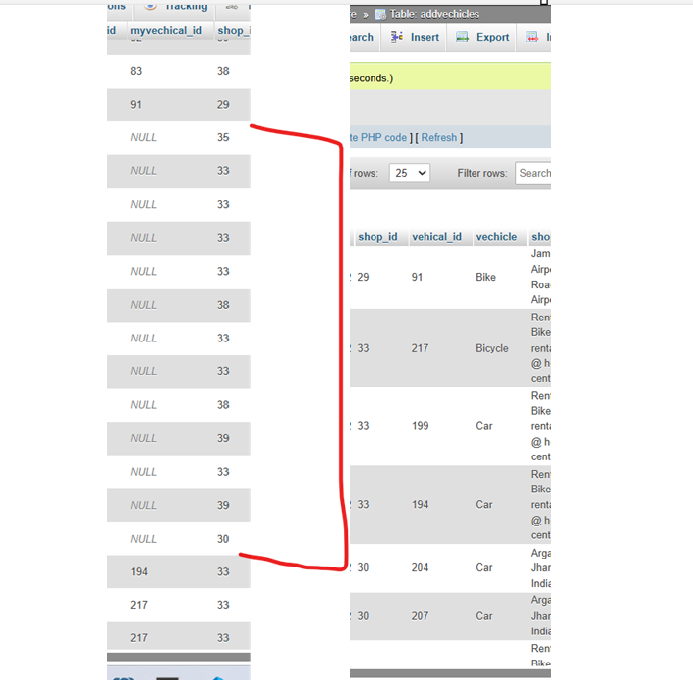
UPDATE `bookings` c
JOIN `addvechicles` o ON c.`vechicle_id`= o.`id`
SET c.`myvechical_id` = o.`vehical_id`
WHERE c.`myvechical_id` IS NULL;
In postgress mysql pgmyadmin
UPDATE "Command" c
SET category_id = o.id
FROM "Category" o
WHERE c.category_id IS NULL
AND c.category = o.category;  -- Match category name between the two tables
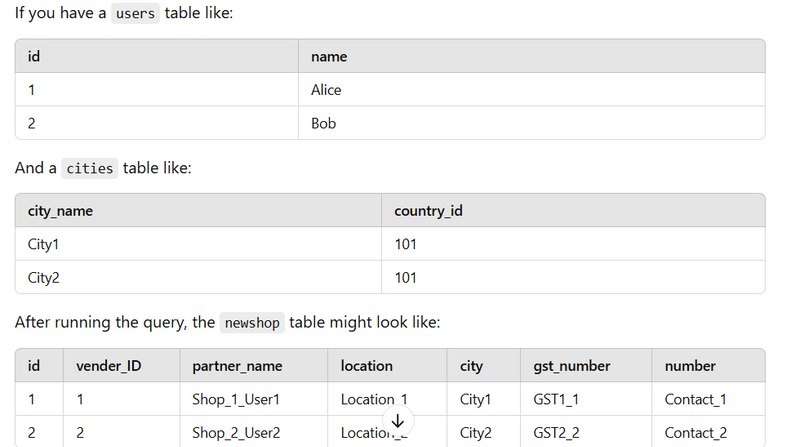
Inserting Data into newshop
INSERT INTO newshop (id, vender_ID, partner_name, location, city, gst_number, number)
SELECT
    NULL,  -- This allows AUTO_INCREMENT to work
    u.id AS vender_ID,
    CONCAT('Shop_', ROW_NUMBER() OVER (ORDER BY u.id), '_User', u.id) AS partner_name,
    CONCAT('Location_', ROW_NUMBER() OVER (ORDER BY u.id)) AS location,
    c.city_name AS city,  -- Assigning a unique city
    CONCAT('GST', ROW_NUMBER() OVER (ORDER BY u.id), u.id) AS gst_number,
    CONCAT('Contact_', ROW_NUMBER() OVER (ORDER BY u.id)) AS number
FROM users u
JOIN (
    SELECT city_name, ROW_NUMBER() OVER (ORDER BY city_name) AS rownum
    FROM cities
    WHERE country_id = 101
    LIMIT 3844
) AS c
ON c.rownum <= 3844
LIMIT 3844;
Explanation:
- This query inserts records into the newshop table.
- It generates values for each column by using the SELECT statement.
- For vender_ID, it pulls the id from the users table.
- For partner_name, it generates a string like Shop_1_User101 using ROW_NUMBER().
- For location, it generates a name like Location_1.
- The city, gst_number, and number are also generated dynamically using ROW_NUMBER() and user.id .
Inserting Data into addvehicles
INSERT INTO addvehicles (vender_ID, shop_id, vehical_id, vehicale)
SELECT
    u.id AS vender_ID,
    s.id AS shop_id,
    v.id AS vehical_id,
    v.vehical AS vehicale
FROM (
    SELECT id FROM users ORDER BY RAND() LIMIT 3843
) AS u
JOIN (
    SELECT id FROM shops ORDER BY RAND() LIMIT 3843
) AS s
JOIN (
    SELECT id, vehical FROM addvehical_byadmins WHERE vehical = 'car' ORDER BY RAND() LIMIT 11529
) AS v
ON 1=1
UNION ALL
SELECT
    u.id AS vender_ID,
    s.id AS shop_id,
    v.id AS vehical_id,
    v.vehical AS vehicale
FROM (
    SELECT id FROM users ORDER BY RAND() LIMIT 3843
) AS u
JOIN (
    SELECT id FROM shops ORDER BY RAND() LIMIT 3843
) AS s
JOIN (
    SELECT id, vehical FROM addvehical_byadmins WHERE vehical = 'bike' ORDER BY RAND() LIMIT 11529
) AS v
ON 1=1;
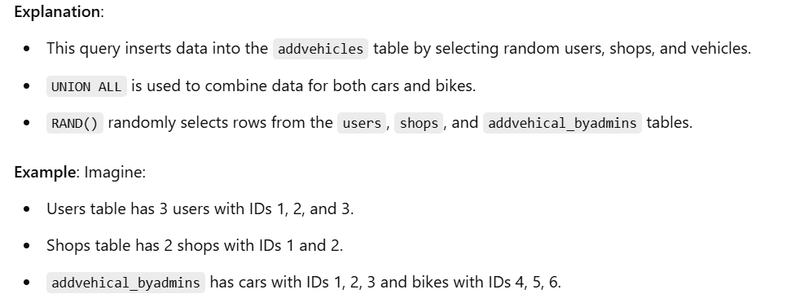

Updating Data in shops
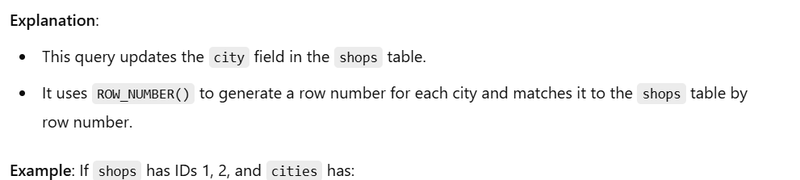
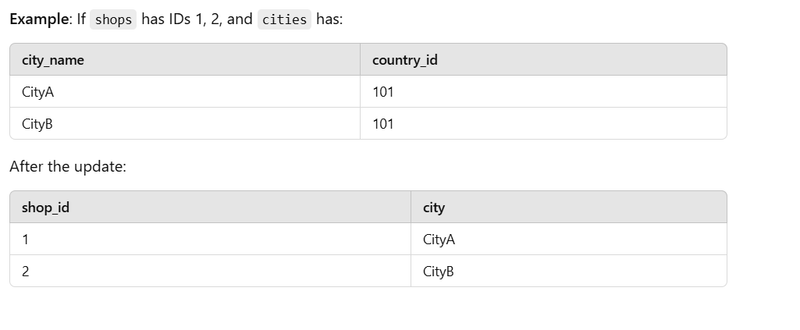
UPDATE shops s
JOIN (
    SELECT city_name, ROW_NUMBER() OVER () AS rn
    FROM cities
    WHERE country_id = 101
) c
ON s.id = c.rn
SET s.city = c.city_name;
Inserting into africa_states
INSERT INTO africa_states (
    id, state_name, country_id, country_code, fips_code, iso2,
    created_at, updated_at, flag, wikiDataId
)
SELECT
    s.id, s.state_name, c.id AS country_id, c.country_code, c.dial_code, c.iso3 AS iso2,
    s.created_at, s.updated_at, c.flag, c.wikiDataId
FROM states s
JOIN countries c ON s.country_id = c.id
WHERE c.id IN (5, 7, 24, 28, 35, 36, ...);

Inserting into asia_cities
INSERT INTO asia_cities (
    city_name, state_id, country_id, country_code, latitude, longitude,
    created_at, updated_on, flag, wikiDataId
)
SELECT
    c.city_name, s.id AS state_id, co.id AS country_id, co.country_code,
    c.latitude, c.longitude, c.created_at, c.updated_on, co.flag, co.wikiDataId
FROM cities c
JOIN states s ON c.state_id = s.id
JOIN countries co ON s.country_id = co.id
WHERE co.id IN (12, 16, 18, 19, ...);
Explanation:
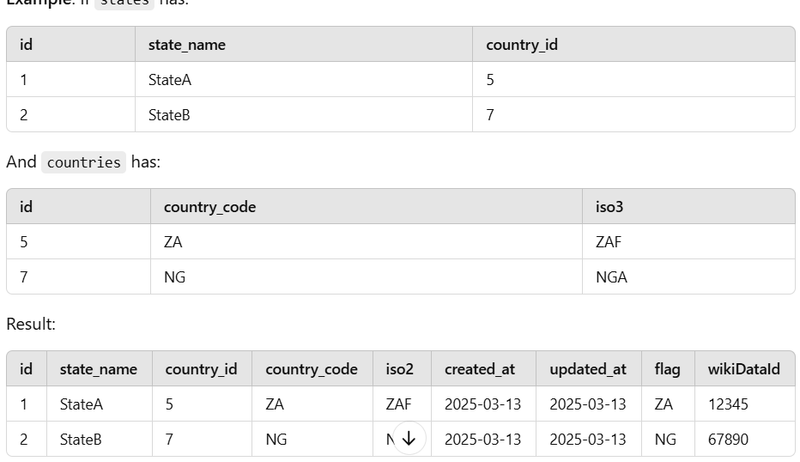
Similar to the previous query but for cities in Asia.
It selects cities from the cities, states, and countries tables for specific countries.
Example: If cities has:
========================
SELECT
    ec.id,
    ec.errorcategory,
    ec.api_section,
    et.error_type_name
FROM
    public."Error_category" ec
JOIN
    public."ErrorType" et
ON
    ec.error_type = et.id
ORDER BY
    ec.id ASC;
===============================================
INSERT INTO `users` (`id`, `name`, `email`, `email_verified_at`, `number_verified_at`, `password`, `role`, `number`, `address`, `main_location`, `state`, `city`, `driving_lic`, `qrcode`, `profile_img`, `adhar`, `company_details`, `status`, `sms_notification`, `email_notification`, `whatsapp_notification`, `remember_token`, `created_at`, `updated_at`) VALUES ('1', 'maruti', 'kumarmaruti.cotocus@gmail.com', '2025-05-02 08:49:58', '2025-05-02 08:49:58', NULL, 'admin', '917079488616', 'bokaro', NULL, NULL, NULL, NULL, NULL, NULL, NULL, NULL, 'active', '1', '1', '1', NULL, NULL, NULL);
===============================================
SELECT *
FROM bookings
WHERE vender_id = 3002
  AND status = 5;
SELECT
  b.*,
  s.location
FROM
  bookings b
LEFT JOIN
  shops s ON b.shop_id = s.id
WHERE
  b.vender_id = 3002
  AND b.status = 5;
============================================================
Here’s how to write your query using both INNER JOIN and OUTER JOIN (LEFT JOIN), as requested, for vender_id = 3002 and status = 5:
- INNER JOIN This will return only bookings that have a matching shop (i.e., bookings where shop_id matches an id in shops):
SELECT
  b.*,
  s.location
FROM
  bookings b
INNER JOIN
  shops s ON b.shop_id = s.id
WHERE
  b.vender_id = 3002
  AND b.status = 5;
Result: Only bookings that have a related shop will be returned.
- OUTER JOIN (LEFT JOIN) This will return all bookings for the vendor, including those that do not have a matching shop (in which case location will be NULL):
SELECT
  b.*,
  s.location
FROM
  bookings b
LEFT JOIN
  shops s ON b.shop_id = s.id
WHERE
  b.vender_id = 3002
  AND b.status = 5;
======================================
SELECT addvechicles.*
FROM addvechicles
JOIN shops ON addvechicles.shop_id = shops.id
WHERE shops.city = 'Bokaro';
Basic JSON Restructuring: Wrapping Existing Images Under
UPDATE addvechicles
SET vechicle_image = JSON_OBJECT(
  'admin', JSON_EXTRACT(vechicle_image, '$'),
  'partner', NULL
);
What this query does
Takes the existing JSON value in vechicle_image
Moves it entirely under the admin key
Adds a new partner key, explicitly set to null
Example transformation
Before
["vechile_image1279910975.webp","vechile_image1102904534.webp"]
After
{
  "admin": [
    "vechile_image1279910975.webp",
    "vechile_image1102904534.webp"
  ],
  "partner": null
}
Why this is useful
Quick migration from old array format to object format
Safe when you only care about admin images
Ideal as a first-step normalization query
Advanced JSON Normalization: Ensuring admin and partner Are Always Arrays
UPDATE addvechicles
SET vechicle_image = CONCAT(
  '{"admin":',
  CASE
    WHEN JSON_TYPE(vechicle_image) = 'ARRAY'
      THEN vechicle_image
    WHEN JSON_TYPE(JSON_EXTRACT(vechicle_image, '$.admin')) = 'ARRAY'
      THEN JSON_EXTRACT(vechicle_image, '$.admin')
    ELSE
      JSON_UNQUOTE(JSON_EXTRACT(vechicle_image, '$.admin'))
  END,
  ',"partner":',
  CASE
    WHEN JSON_EXTRACT(vechicle_image, '$.partner') IS NULL
      THEN '[null]'
    WHEN JSON_TYPE(JSON_EXTRACT(vechicle_image, '$.partner')) = 'ARRAY'
      THEN JSON_EXTRACT(vechicle_image, '$.partner')
    ELSE
      JSON_UNQUOTE(JSON_EXTRACT(vechicle_image, '$.partner'))
  END,
  '}'
);
output
{"admin":["vechile_image627923892.webp","vechile_image2042323002.webp","vechile_image1487771173.webp"],"partner":[null]}
Generate a unique SEO-friendly slug for every user whose slug is NULL, based on their
UPDATE users u
JOIN (
  SELECT
    id,
    CONCAT(
      LOWER(
        TRIM(
          REGEXP_REPLACE(
            REGEXP_REPLACE(name, '[^a-zA-Z0-9 ]', ''),  -- remove special chars
            '[[:space:]]+', '-'                         -- spaces -> hyphen
          )
        )
      ),
      '-',
      ROW_NUMBER() OVER (
        PARTITION BY LOWER(
          TRIM(
            REGEXP_REPLACE(
              REGEXP_REPLACE(name, '[^a-zA-Z0-9 ]', ''),
              '[[:space:]]+', '-'
            )
          )
        )
        ORDER BY id
      )
    ) AS new_slug
  FROM users
  WHERE slug IS NULL OR slug = ''
) x ON x.id = u.id
SET u.slug = x.new_slug;
======================================================================
MariaDB-compatible UPDATE (with dummy_data = 1)
Assumption (based on your screenshot):
addvehical_byadmins.images is stored like: ["img1.jpg","img2.jpg"]
UPDATE addvechicles av
JOIN addvehical_byadmins aba
  ON aba.id = av.vehical_id
SET av.vechicle_image = CONCAT(
  '{"admin":',
  /* admin images come from addvehical_byadmins.images */
  CASE
    WHEN aba.images IS NULL THEN '[null]'
    WHEN JSON_VALID(aba.images) = 1 THEN aba.images
    ELSE CONCAT('[', JSON_QUOTE(aba.images), ']')
  END,
  ',"partner":',
  /* keep partner from existing av.vechicle_image if present */
  CASE
    WHEN av.vechicle_image IS NULL THEN '[null]'

    /* if old value itself is array, treat it as partner */
    WHEN JSON_VALID(av.vechicle_image) = 1 AND JSON_TYPE(av.vechicle_image) = 'ARRAY'
      THEN av.vechicle_image

    WHEN JSON_EXTRACT(av.vechicle_image, '$.partner') IS NULL THEN '[null]'

    WHEN JSON_TYPE(JSON_EXTRACT(av.vechicle_image, '$.partner')) = 'ARRAY'
      THEN JSON_EXTRACT(av.vechicle_image, '$.partner')

    /* if partner stored as string like '["a.jpg"]' */
    WHEN JSON_TYPE(JSON_EXTRACT(av.vechicle_image, '$.partner')) = 'STRING'
      THEN JSON_UNQUOTE(JSON_EXTRACT(av.vechicle_image, '$.partner'))

    ELSE '[null]'
  END,
  '}'
)
WHERE av.vehical_id IS NOT NULL
  AND av.dummy_data = 1;
SELECT DISTINCT av.vehical_id FROM addvechicles av LEFT JOIN addvehical_byadmins aba ON av.vehical_id = aba.id WHERE aba.id IS NULL AND av.vehical_id IS NOT NULL;
SELECT DISTINCT brand, model
FROM addvehical_byadmins
WHERE brand IS NOT NULL
  AND model IS NOT NULL
ORDER BY brand, model;
===========================================
SELECT * FROM shops WHERE city REGEXP '[^\\x00-\\x7F]';
UPDATE shops
SET city =
    REPLACE(
    REPLACE(
    REPLACE(
    REPLACE(
    REPLACE(
    REPLACE(
    REPLACE(
    REPLACE(
    REPLACE(
    REPLACE(
    REPLACE(
    REPLACE(
        city,
        'ā','a'),
        'Ā','A'),
        'ē','e'),
        'Ē','E'),
        'ī','i'),
        'Ī','I'),
        'ō','o'),
        'Ō','O'),
        'ū','u'),
        'Ū','U'),
        'ñ','n'),
        'Ñ','N')
WHERE city REGEXP '[^\\x00-\\x7F]';
================================================================
query for shop slug
UPDATE shops s
JOIN (
    SELECT
        id,
        CASE
            WHEN rn = 1 THEN base_slug
            ELSE CONCAT(base_slug, '-', rn - 1)
        END AS final_slug
    FROM (
        SELECT
            id,
            LOWER(REPLACE(TRIM(partner_name), ' ', '-')) AS base_slug,
            ROW_NUMBER() OVER (
                PARTITION BY LOWER(REPLACE(TRIM(partner_name), ' ', '-'))
                ORDER BY id
            ) AS rn
        FROM shops
        WHERE partner_name IS NOT NULL
          AND partner_name != ''
    ) x
) y ON s.id = y.id
SET s.shop_slug = y.final_slug;
for user table slug is
UPDATE users u
JOIN (
    SELECT
        id,
        CASE
            WHEN rn = 1 THEN base_slug
            ELSE CONCAT(base_slug, '-', rn - 1)
        END AS final_slug
    FROM (
        SELECT
            id,
            LOWER(REPLACE(TRIM(name), ' ', '-')) AS base_slug,
            ROW_NUMBER() OVER (
                PARTITION BY LOWER(REPLACE(TRIM(name), ' ', '-'))
                ORDER BY id
            ) AS rn
        FROM users
        WHERE name IS NOT NULL
          AND name != ''
    ) x
) y ON u.id = y.id
SET u.slug = y.final_slug;
git stash push -u -m "backup before pull on motoshare.us"

git pull origin main
first run 3 sql query in user table,shop table ,addvehicle table

Set env credential


then npm run build



Oldest comments (0)