
Role of OCR
Role of OpenCV
Verify image content using ocr and opencv
Verify image content using google cloud vision
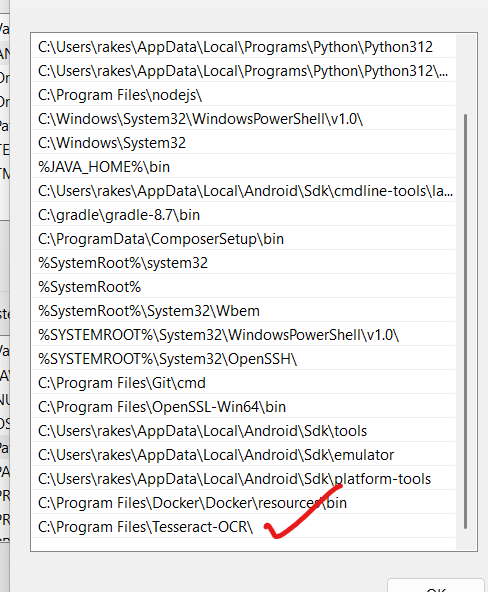
Installing Tesseract on Windows (Very Easy)
OCR (Optical Character Recognition) is a technology that converts images containing text—such as scanned documents, photographs of signs, or printed pages—into machine-readable text data. This allows for the digitization of printed or handwritten information, making it possible to electronically search, edit, or process the captured text. Common applications of OCR include document digitization, automated data entry, and extracting information from invoices or receipts.
OpenCV (Open Source Computer Vision Library) is a powerful, open-source set of tools and algorithms focused on real-time computer vision and image processing. Its primary purpose is to manipulate images and videos through operations like filtering, resizing, object detection, and feature extraction. In the context of OCR, OpenCV is often used for preprocessing images—such as noise removal, contrast enhancement, and perspective correction—to improve the accuracy of text recognition engines like Tesseract
Key Purposes
OCR: Turns images containing text into editable and searchable text by recognizing characters and words in various languages and fonts. This is crucial for automating data entry, making physical documents machine-accessible, and supporting technologies used by the visually impaired.
OpenCV: Provides a toolkit for handling and transforming images or video frames. It is widely used in applications like object detection, feature matching, face recognition, and preprocessing steps for OCR. OpenCV can improve OCR results by preparing images (e.g., cleaning up noise or correcting orientation) before text extraction.
How to verify image content
requirements.txt
flask
flask-cors
opencv-python
pytesseract
Pillow
pip install -r requirements.txt
config.py
import os

class Config:
    SQLALCHEMY_DATABASE_URI = 'postgresql://postgres:root@localhost:5433/flask_database'
    SQLALCHEMY_TRACK_MODIFICATIONS = False

    SECRET_KEY = "dev-key"

    BASE_DIR = os.path.dirname(os.path.abspath(__file__))
    UPLOAD_FOLDER = os.path.join(BASE_DIR, "uploads")
    MAX_CONTENT_LENGTH = 10 * 1024 * 1024  # 10 MB

    # ✅ Add this line for Windows OCR
    TESSERACT_CMD = r"C:\Program Files\Tesseract-OCR\tesseract.exe"
3) app.py
from flask import Flask
from flask_cors import CORS
from config import Config
from views import register_blueprints
import os

def create_app():
    app = Flask(__name__)
    app.config.from_object(Config)

    # create uploads dir if missing
    os.makedirs(app.config["UPLOAD_FOLDER"], exist_ok=True)

    CORS(app, resources={r"/*": {"origins": "*"}})

    register_blueprints(app)

    @app.get("/")
    def home():
        return "Flask OK. Open /image/hello"

    return app

if __name__ == "__main__":
    app = create_app()
    app.run(debug=True)
4) views/init.py
from .image_views import image_bp

def register_blueprints(app):
    app.register_blueprint(image_bp, url_prefix="/image")
5) views/image_views.py
import os
import cv2
import pytesseract
from flask import Blueprint, jsonify, request, render_template, current_app
from werkzeug.utils import secure_filename

image_bp = Blueprint("image_bp", __name__)

ALLOWED_EXT = {"png", "jpg", "jpeg", "webp", "bmp", "tif", "tiff"}

def allowed(filename: str) -> bool:
    return "." in filename and filename.rsplit(".", 1)[1].lower() in ALLOWED_EXT

def preprocess_for_ocr(path: str):
    """Basic CV pipeline: grayscale -> denoise -> threshold -> (optional) morphology."""
    img = cv2.imread(path)
    if img is None:
        return None
    gray = cv2.cvtColor(img, cv2.COLOR_BGR2GRAY)
    # slight denoise
    gray = cv2.bilateralFilter(gray, 9, 75, 75)
    # adaptive threshold helps with variable lighting
    th = cv2.adaptiveThreshold(gray, 255,
                               cv2.ADAPTIVE_THRESH_GAUSSIAN_C,
                               cv2.THRESH_BINARY, 31, 9)
    return th

def run_ocr(image_mat):
    # you can tune config; good defaults for ID/card-like docs:
    config = "--oem 3 --psm 6"
    text = pytesseract.image_to_string(image_mat, config=config)
    # normalize whitespace
    return "\n".join([line.strip() for line in text.splitlines() if line.strip()])

def verify_text_rules(txt: str, doc_type: str):
    """Very simple rule checks per document type. Expand as needed."""
    t = txt.lower()

    result = {"doc_type": doc_type, "checks": []}

    def add(name, ok):
        result["checks"].append({"name": name, "ok": bool(ok)})

    if doc_type == "insurance":
        add("mentions 'insurance'", "insurance" in t)
        add("has policy/policy no", ("policy" in t) or ("policy no" in t) or ("policy number" in t))
        add("has date", any(k in t for k in ["date", "valid", "expiry", "exp", "validity"]))
    elif doc_type == "pollution":
        add("mentions 'pollution' or 'PUC'", ("pollution" in t) or ("puc" in t))
        add("has 'certificate'", "certificate" in t)
        add("has validity/date", any(k in t for k in ["valid", "expiry", "exp", "date"]))
    elif doc_type == "rc":
        add("mentions 'registration' or 'RC'", ("registration" in t) or ("rc" in t))
        add("has 'vehicle'/'owner'", ("vehicle" in t) or ("owner" in t))
        add("has number/id", any(k in t for k in ["no", "number", "regn", "id"]))
    else:
        # generic
        add("text present", len(t) > 10)

    result["ok"] = all(c["ok"] for c in result["checks"]) and len(result["checks"]) > 0
    return result

# ---------- Routes ----------

@image_bp.get("/hello")
def hello_flask():
    return render_template("index.html", message="Upload a document to verify")

@image_bp.post("/verify")
def verify_image():
    # Accept both HTML form and raw API
    doc_type = request.form.get("doc_type") or request.args.get("doc_type") or "insurance"
    f = None

    # 1) multipart form upload
    if "image" in request.files:
        f = request.files["image"]

    # 2) raw JSON base64 (optional future)
    # elif request.is_json:
    #   ...

    if not f or f.filename == "":
        err = "No file uploaded. Field name must be 'image'."
        if request.accept_mimetypes.accept_html:
            return render_template("index.html", message=err, extracted_text="", result=None), 400
        return jsonify({"ok": False, "error": err}), 400

    if not allowed(f.filename):
        err = "Unsupported file type."
        if request.accept_mimetypes.accept_html:
            return render_template("index.html", message=err, extracted_text="", result=None), 400
        return jsonify({"ok": False, "error": err}), 400

    filename = secure_filename(f.filename)
    dest = os.path.join(current_app.config["UPLOAD_FOLDER"], filename)
    f.save(dest)

    # Optional: on Windows set Tesseract binary if configured
    tcmd = getattr(current_app.config, "TESSERACT_CMD", None) or current_app.config.get("TESSERACT_CMD")
    if tcmd:
        pytesseract.pytesseract.tesseract_cmd = tcmd

    mat = preprocess_for_ocr(dest)
    if mat is None:
        err = "Failed to read image."
        if request.accept_mimetypes.accept_html:
            return render_template("index.html", message=err, extracted_text="", result=None), 400
        return jsonify({"ok": False, "error": err}), 400

    text = run_ocr(mat)
    result = verify_text_rules(text, doc_type)

    # If the request is HTML form, render page with results
    if request.accept_mimetypes.accept_html:
        return render_template("index.html",
                               message="Verification complete",
                               extracted_text=text,
                               result=result)

    # Else, return JSON for API clients (e.g., Laravel)
    return jsonify({
        "ok": True,
        "filename": filename,
        "doc_type": doc_type,
        "extracted_text": text,
        "result": result
    })
templates/index.html
<!doctype html>
<html>
<head>
  <meta charset="utf-8" />
  <title>Document Verification</title>
  <style>
    body { font-family: system-ui, -apple-system, Segoe UI, Roboto, Arial, sans-serif; margin: 40px; }
    .card { max-width: 720px; padding: 20px; border: 1px solid #ddd; border-radius: 12px; }
    h1 { margin-top: 0; }
    label { display:block; margin: 12px 0 6px; font-weight: 600; }
    .row { display:flex; gap:12px; align-items:center; }
    .btn { padding: 10px 16px; border: 0; border-radius: 8px; cursor: pointer; }
    .btn-primary { background: #0ea5e9; color: #fff; }
    pre { white-space: pre-wrap; background: #fafafa; padding: 12px; border-radius: 8px; border: 1px solid #eee; }
    .checks { margin-top: 8px; }
    .ok { color: #16a34a; }
    .bad { color: #dc2626; }
  </style>
</head>
<body>
  <div class="card">
    <h1>Verify Document</h1>
    {% if message %}<p><strong>{{ message }}</strong></p>{% endif %}

    <form action="/image/verify" method="post" enctype="multipart/form-data" accept="text/html">
      <label for="doc_type">Document Type</label>
      <select id="doc_type" name="doc_type">
        <option value="insurance">Insurance</option>
        <option value="pollution">Pollution Certificate</option>
        <option value="rc">RC Document</option>
      </select>

      <label for="image">Upload Image</label>
      <input id="image" type="file" name="image" required />

      <div class="row" style="margin-top: 16px;">
        <button class="btn btn-primary" type="submit">Verify</button>
      </div>
    </form>

    {% if extracted_text is defined %}
      <h3>Extracted Text</h3>
      <pre>{{ extracted_text }}</pre>
    {% endif %}

    {% if result is defined %}
      <h3>Checks ({{ result.doc_type | capitalize }})</h3>
      <div class="checks">
        {% for c in result.checks %}
          <div>
            <strong>{{ c.name }}:</strong>
            <span class="{{ 'ok' if c.ok else 'bad' }}">{{ 'OK' if c.ok else 'Missing' }}</span>
          </div>
        {% endfor %}
        <p><strong>Overall:</strong> <span class="{{ 'ok' if result.ok else 'bad' }}">{{ 'PASS' if result.ok else 'FAIL' }}</span></p>
      </div>
    {% endif %}
  </div>
</body>
</html>
Run
# in your venv (myenv)
pip install -r requirements.txt

# Windows: install Tesseract (see below), then:
python app.py
# Visit: http://127.0.0.1:5000/image/hello
Installing Tesseract on Windows (Very Easy)
Download installer:
https://github.com/UB-Mannheim/tesseract/wiki

Install (Next → Next → Finish)

Note down install path:
Step 1: Open Environment Variables
Press Windows Key
Search “Environment Variables”
Open Edit the system environment variables
Click Environment Variables
Step 2: Edit the PATH
Under System variables, select Path
Click Edit
Click New
Paste this:
C:\Program Files\Tesseract-OCR\
Step 3: Save & Close (OK → OK → OK)
Step 4: Confirm success
Open PowerShell and run:
tesseract --version
Verify image content using google cloud vision
✅ Step 1 — Go to Google Cloud Console
Open:
https://console.cloud.google.com/
Make sure you are logged into your Google account.
✅ Step 2 — Create / Select a Project
Top-left → Project Selector
If you already have project → Select it
Else → Click New Project → Give name → Create → Select it.
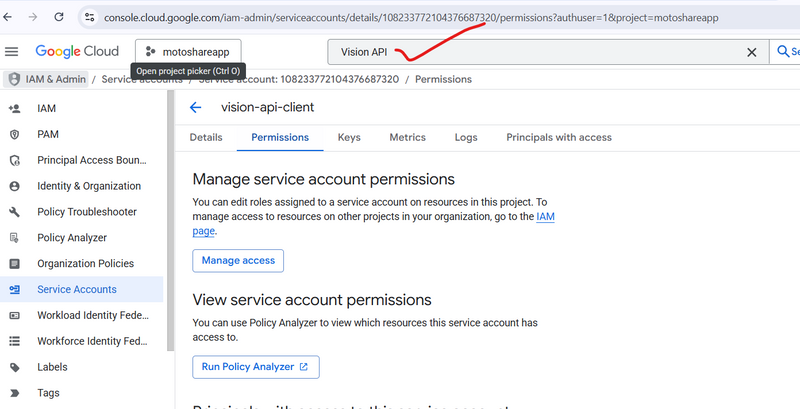
✅ Step 3 — Enable Google Vision API
In top search box type:
Vision API


Click Cloud Vision API → Click Enable
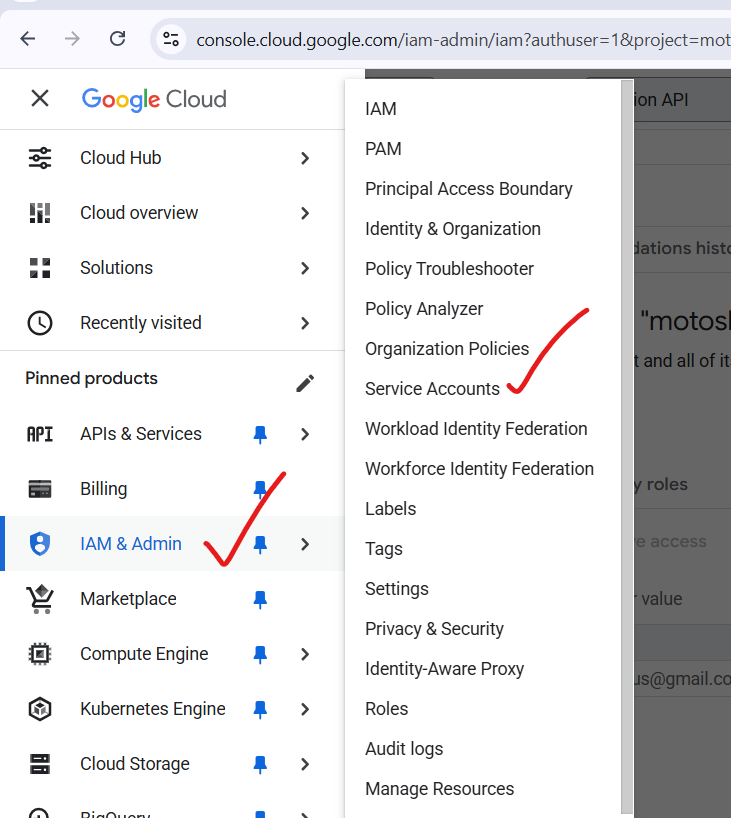
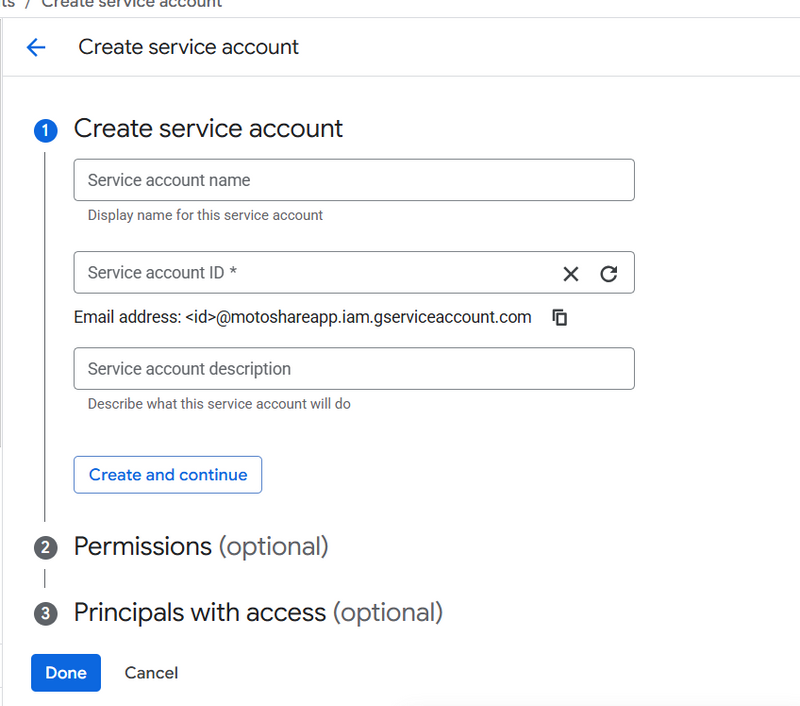
✅ Step 4 — Create Service Account
Menu → IAM & Admin → Service Accounts
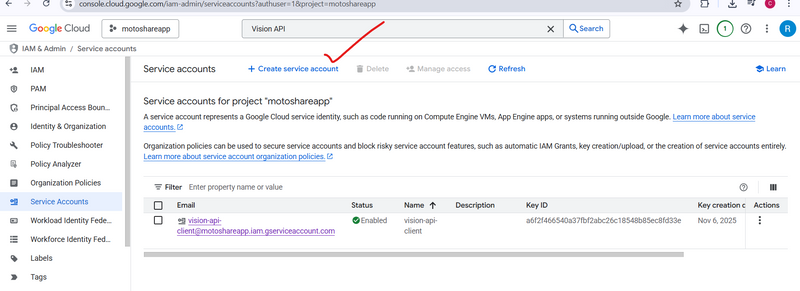
Click:

+ CREATE SERVICE ACCOUNT


Name it:

vision-api-client


Click Create and Continue

Now in Grant this service account access select role:

Project → Editor


Click Continue → Done
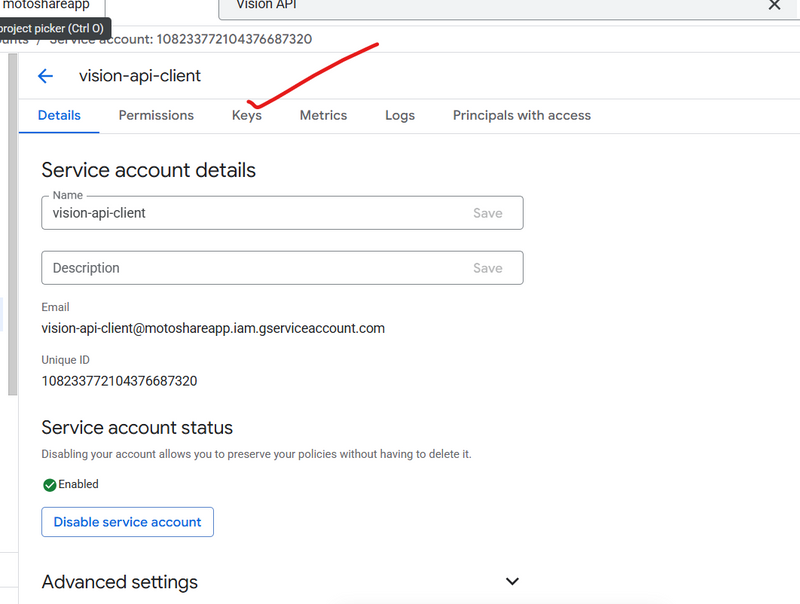
Step 5 — Generate JSON Key
Click the service account you just created.
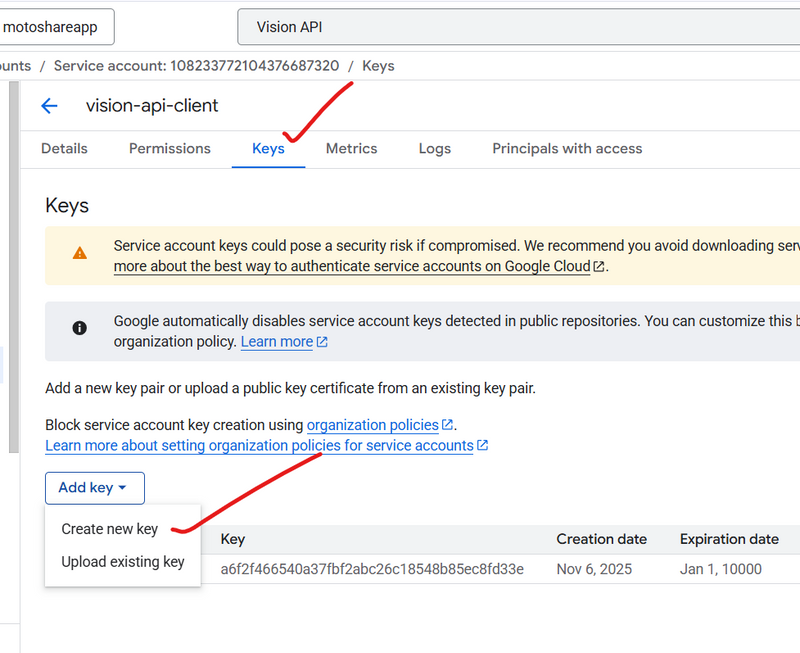
Tab: Keys
Click:

ADD KEY → Create New Key → JSON


It will download a file like:

vision-api-client-12345abcd.json


👉 This is your credential JSON.
✅ Step 6 — Move JSON file into your Laravel project
Move the file to your app root:

/laravel-project-root/gcp-service.json


Rename if you want:

gcp-service.json
Install package
composer require google/cloud-vision guzzlehttp/guzzle
We’ll use the REST transport so you don’t need the gRPC PHP extension.
1) Credentials
Place your downloaded JSON key at:
Windows: C:\xampp\htdocs\motoshare-web\gcp-service.json
Linux: /opt/lampp/htdocs/motoshare-web/gcp-service.json
Add to .env:
GOOGLE_APPLICATION_CREDENTIALS=/absolute/path/to/gcp-service.json
Example Windows:
GOOGLE_APPLICATION_CREDENTIALS=C:\xampp\htdocs\motoshare-web\gcp-service.json
Example Linux:
GOOGLE_APPLICATION_CREDENTIALS=/opt/lampp/htdocs/motoshare-web/gcp-service.json
2) Service class
Create: app/Services/VisionService.php
<?php

namespace App\Services;

use Google\Cloud\Vision\V1\ImageAnnotatorClient;

class VisionService
{
    /** Return plain OCR text for a local image path */
    public function ocr(string $absolutePath): string
    {
        if (!getenv('GOOGLE_APPLICATION_CREDENTIALS')) {
            putenv('GOOGLE_APPLICATION_CREDENTIALS=' . env('GOOGLE_APPLICATION_CREDENTIALS'));
        }

        $client = new ImageAnnotatorClient(['transport' => 'rest']);
        try {
            $img = file_get_contents($absolutePath);
            $resp = $client->documentTextDetection($img);

            if ($resp->getError() && $resp->getError()->getMessage()) {
                return '';
            }

            $ann = $resp->getFullTextAnnotation();
            return $ann ? trim($ann->getText()) : '';
        } finally {
            $client->close();
        }
    }

    /** Extract Indian vehicle registration number from OCR text (best-effort) */
  public function extractRegistrationNumber(?string $text): ?string
{
    if (!$text) return null;

    // Uppercase but keep original spacing for line-wise parsing
    $t = strtoupper($text);

    // 1) Prefer the line that mentions "REGISTRATION"/"REGN"
    $lines = preg_split('/\R/u', $t) ?: [];
    foreach ($lines as $line) {
        if (preg_match('/REG(ISTRATION)?\s*(NO|NUMBER)?/u', $line)) {
            // Look ONLY for a plate token on that line
            if (preg_match('/\b([A-Z]{2}\s*\d{1,2}\s*[A-Z]{0,3}\s*\d{4})\b/u', $line, $m)) {
                return preg_replace('/\s+/', '', $m[1]); // normalize: remove spaces -> MH47CD0440
            }
        }
    }

    // 2) Fallback: search anywhere in the text for a plate-shaped token
    if (preg_match('/\b([A-Z]{2}\s*\d{1,2}\s*[A-Z]{0,3}\s*\d{4})\b/u', $t, $m)) {
        return preg_replace('/\s+/', '', $m[1]);
    }

    return null;
}
}
3) Controller
Create: app/Http/Controllers/ImageAnalyzeController.php
public function handleDocumentUploads($request)
{
    Log::info("here handleDocumentUploads");
    Log::info($request->except(['rcDocument', 'insuranceCertificate', 'pollutionCertificate'])); // avoid dumping files

    /** @var VisionService $vision */
    $vision = app(VisionService::class);

    $uploadedFiles = [];

    // 1) Insurance
    if ($request->hasFile('insuranceCertificate')) {
        $res = $this->uploadFile($request->file('insuranceCertificate'), 'insurance');
        $res['text'] = $vision->ocr($res['absolute_path'] ?? $res['path'] ?? '');
        $val = $this->validateDocText($res['text'] ?? '', 'insurance');
        $res['ok'] = ($res['ok'] ?? true) && $val['ok'];
        $res['validator'] = $val;
        if (!$res['ok']) {
            Log::warning("❌ Insurance document failed validation", $res);
            return [
                'ok' => false,
                'failed_doc' => 'insurance',
                'error' => 'Invalid insurance document.',
                'details' => $res,
            ];
        }
        $uploadedFiles['insurance'] = $res;
    }

    // 2) Pollution

    // 3) RC (registration certificate)
    if ($request->hasFile('rcDocument')) {
        // Note: use docType "rc" for internal checks even if your storage key is 'rc_document'
        $res = $this->uploadFile($request->file('rcDocument'), 'rc');
        log::info("myrctext");
         log::info($res);
        $res['text'] = $vision->ocr($res['absolute_path'] ?? $res['path'] ?? '');

        // Validate looks like an RC
        $val = $this->validateDocText($res['text'] ?? '', 'rc');
        $res['validator'] = $val;
        $res['ok'] = ($res['ok'] ?? true) && $val['ok'];

        // Try to extract registration number from OCR
        $extracted = $vision->extractRegistrationNumber($res['text'] ?? '');
        $res['registration_number_ocr'] = $extracted;
         log::info($extracted);
        // Normalize input rcNumber from request
        $inputRc = preg_replace('/[^A-Z0-9]/', '', strtoupper((string) ($request->rcNumber ?? '')));
         log::info($inputRc);
        // If both present and mismatch, force fail
        if ($inputRc && $extracted && $inputRc !== $extracted) {
            Log::warning("❌ RC number mismatch", ['input' => $inputRc, 'ocr' => $extracted]);
            $res['ok'] = false;
            $res['message'] = "RC Number mismatch (input={$inputRc}, ocr={$extracted})";
        }

        if (!$res['ok']) {
            Log::warning("❌ RC document failed validation", $res);
            return [
                'ok' => false,
                'failed_doc' => 'rc_document',
                'error' => $res['message'] ?? 'Invalid RC document.',
                'details' => $res,
            ];
        }

        $uploadedFiles['rc_document'] = $res;
    }

        if ($request->hasFile('pollutionCertificate')) {
        $res = $this->uploadFile($request->file('pollutionCertificate'), 'pollution');
        $res['text'] = $vision->ocr($res['absolute_path'] ?? $res['path'] ?? '');
        $val = $this->validateDocText($res['text'] ?? '', 'pollution');
        $res['ok'] = ($res['ok'] ?? true) && $val['ok'];
        $res['validator'] = $val;
        if (!$res['ok']) {
            Log::warning("❌ Pollution certificate failed validation", $res);
            return [
                'ok' => false,
                'failed_doc' => 'pollution',
                'error' => 'Invalid pollution certificate.',
                'details' => $res,
            ];
        }
        $uploadedFiles['pollution'] = $res;
    }

    Log::info("✅ All uploaded documents valid", $uploadedFiles);

    return [
        'ok' => true,
        'files' => $uploadedFiles,
    ];
}

protected function uploadFile(UploadedFile $file, string $folder): array
{
    // Store file in storage/app/public/<folder>/<filename>
    $path = $file->store($folder, 'public');

    // Absolute path for processing (OCR / validation)
    $absolutePath = storage_path('app/public/' . $path);

    return [
        'ok'            => true, // initial status (will be updated after validation)
        'stored_path'   => $path,
        'absolute_path' => $absolutePath,
        'mime'          => $file->getClientMimeType(),
        'size'          => $file->getSize(),
        'doc_type'      => $folder, // rc, insurance, pollution
    ];
}

private function validateDocText(string $text, string $docType): array
{
    $t = strtoupper($text);
    $ok = false; $checks = [];

    $has = fn($needle) => (bool) preg_match('/\b'.preg_quote(strtoupper($needle), '/').'\b/u', $t);

    if ($docType === 'rc') {
        $checks[] = ['name' => 'has "Registration"',   'ok' => $has('Registration')];
        $checks[] = ['name' => 'has "Certificate"',    'ok' => $has('Certificate')];
        $checks[] = ['name' => 'has "Chassis" or "Engine"', 'ok' => ($has('Chassis') || $has('Engine'))];
        $ok = $checks[0]['ok'] && $checks[1]['ok'];
    } elseif ($docType === 'pollution') {
        $checks[] = ['name' => 'has "PUC" or "Pollution"', 'ok' => ($has('PUC') || $has('Pollution'))];
        $checks[] = ['name' => 'has "Certificate"',        'ok' => $has('Certificate')];
        $checks[] = ['name' => 'has "Valid" or "Validity"', 'ok' => ($has('Valid') || $has('Validity'))];
        $ok = $checks[0]['ok'] && $checks[1]['ok'];
    } elseif ($docType === 'insurance') {
        $checks[] = ['name' => 'has "Insurance"',     'ok' => $has('Insurance')];
        $checks[] = ['name' => 'has "Policy" or "Policy No"', 'ok' => ($has('Policy') || $has('Policy No'))];
        $checks[] = ['name' => 'has "Valid"',         'ok' => $has('Valid')];
        $ok = $checks[0]['ok'] && $checks[1]['ok'];
    }

    return ['ok' => $ok, 'checks' => $checks];
}
public function addvehical(Request $request)
        {
            log::info("addvehical by vendor");
            log::info("request");
            log::info($request);
            $useremail = Auth()->user()->email;
            log::info($useremail);
            // Save the Traccar device (if IMEI is provided)
            // Check if vehicle number or RC number already exists
            $this->utilityController->checkIfVehicleExists($request->vehicleNumber, $request->rcNumber);
            // Handle document uploads (insurance, pollution, RC)
            $uploadedFiles = $this->utilityController->handleDocumentUploads($request);
            log::info("my uploaded file is");
             log::info($uploadedFiles);


     if (isset($uploadedFiles['ok']) && $uploadedFiles['ok'] === false) {
    return response()->json([
        'success'    => false,
        'failed_doc' => $uploadedFiles['failed_doc'], // ← specifies which document failed
        'message'    => $uploadedFiles['error'],      // ← clear reason
        'details'    => $uploadedFiles['details'] ?? null,
    ]);
}

}
4) Route
routes/api.php (or routes/web.php):
use App\Http\Controllers\ImageAnalyzeController;

Route::post('/analyze-image', [ImageAnalyzeController::class, 'analyze']);
5) Quick test (Postman/cURL)
Body → form-data
Key: image (type: File) → choose any JPG/PNG
Optional key: rcNumber → MH07CD0840
curl -X POST http://your-host.test/api/analyze-image \
-F "image=@/full/path/to/rc-image.png" \
-F "rcNumber=MH07CD0840"
You’ll get JSON like:
{
  "ok": true,
  "file": { "stored_path": "...", "absolute_path": "...", "mime": "image/png", "size": 253872 },
  "vision": {
    "text": "Registration Number: MH07CD0840 ...",
    "labels": [ { "description": "Document", "score": 0.95 }, ... ],
    "objects": [ { "name": "Person", "score": 0.87, "box": [ ... ] } ],
    "web": { "entities": [ ... ], "bestGuessLabels": [ "vehicle registration" ] },
    "safeSearch": { "adult": "VERY_UNLIKELY", "violence": "UNLIKELY", ... }
  },
  "rc": { "input": "MH07CD0840", "extracted": "MH07CD0840", "matched": true }
}
6) Common pitfalls
If you see auth errors, double-check the absolute path in .env and that the JSON file is readable by PHP.
If you’re on Windows, backslashes in .env are fine as long as the full path is correct.
If memory is tight, big images can be downscaled before calling Vision.



Top comments (0)