
What is CLAUDE.md and Why Every Software Project Needs It
How CLAUDE.md Helps Developers Save Time and Reduce Coding Mistakes
CLAUDE.md vs Normal Prompt: What is the Difference?
How to Use Claude Code for Large Software Product Development
Best Folder Structure for Claude AI in Multi-Repo Projects
How to Create a Perfect CLAUDE.md File for Laravel Projects
Using Claude AI as a Coding Assistant for Old Legacy Projects
How Claude Code Helps in Microservices Development
How to Write Better Prompts for Claude Code
CLAUDE.md for Product Development: A Complete Beginner’s Guide
How to Use Claude AI for Keycloak Integration in Laravel Projects
Claude Code Best Practices for Safe Software Development
How to Build Project Documentation for Claude AI
Why AI Coding Tools Need Project Memory
Claude AI for Developers: How to Use It Without Breaking Existing Code
How to Use Claude Code with GitHub, Laravel, and Microservices
Common Mistakes Developers Make While Using Claude Code
How CLAUDE.md Improves Team Collaboration in Software Projects
Claude Code Workflow: Analyze, Plan, Implement, Test, and Report
How to Use Claude AI for Product Planning, Architecture, and Development
Best prompt for Claude
You are working on the HolidayLandmark project.
First read the project documentation before doing anything:
1. CLAUDE.md
2. docs/PRODUCT_REQUIREMENTS.md
3. docs/FEATURES.md
4. docs/AI_FEATURES.md
5. docs/ADMIN_PANEL.md
6. docs/ARCHITECTURE.md
7. docs/DATABASE_SCHEMA.md
8. docs/TESTING_CHECKLIST.md

Rules:
- Do not start coding immediately.
- First summarize the product, modules, current architecture, and development rules.
- Identify which files/modules are related to my task.
- Prepare a safe implementation plan.
- Mention risks before coding.
- Wait for my approval before making changes.
- Do not edit .env.
- Do not remove existing code without explaining why.
- Do not run migrations without asking.
- Keep existing functionality safe.

My task is:
[WRITE YOUR TASK HERE]
Another
You are working in my Motoshare Flutter project.
Before making any change, please read and follow:
1. /CLAUDE.md for global project safety rules
2. /lib/CLAUDE.md because this task is inside Flutter app code
Best workflow
Step 1: Read docs
Step 2: Understand existing project
Step 3: Summarize what you understood
Step 4: Create plan
Step 5: Ask approval
Step 6: Implement
Step 7: Test
Step 8: Final report
Use of CLAUDE.md while developing a software product
- Gives Claude project context
It explains:
What is this product?
Which technology is used?
Which folders are important?
Which APIs, services, and modules exist?
Example:
This is a Laravel-based travel booking platform.
Users can browse trips, organizers can create packages, and admins manage bookings.
This helps Claude understand the product before changing code.
- Prevents Claude from breaking existing logic
You can write rules like:
Do not remove existing routes.
Do not change database columns without migration.
Do not modify production .env files.
Do not break old login flow while adding Keycloak SSO.
This is very useful in old projects where existing functionality must stay safe.
- Defines coding standards
You can tell Claude:
Use Laravel best practices.
Follow existing controller-service-repository pattern.
Keep Blade UI responsive.
Use proper validation.
Do not duplicate code.
So the output becomes more consistent and professional.
- Helps in large product development
For products like Motoshare, MyHospitalNow, HolidayLandmark, DevOpsSchool, one codebase may have many modules.
CLAUDE.md can explain:
Admin module
User module
Booking module
Payment module
Notification module
SEO module
API module
Then Claude can understand where to work instead of randomly editing files.
- Improves AI-generated prompts and implementation
Without CLAUDE.md, Claude needs full explanation every time.
With CLAUDE.md, you can simply say:
Fix the booking status issue as per project rules.
Claude will already know the architecture, rules, commands, testing steps, and safety limits.
- Useful for team development
If you commit CLAUDE.md in GitHub, every developer using Claude gets the same project instructions. Anthropic’s docs also mention that project Claude files can be committed to Git so the team can share them.
Best use in software product development
You should create CLAUDE.md in your project root:
/opt/lampp/htdocs/your-project/CLAUDE.md
Example sections:
# Product Overview
# Tech Stack
# Folder Structure
# Database Rules
# Authentication Rules
# API Rules
# UI/UX Rules
# SEO Rules
# Testing Commands
# Deployment Safety Rules
# Do Not Touch
Simple meaning
CLAUDE.md works like a developer guide for Claude.
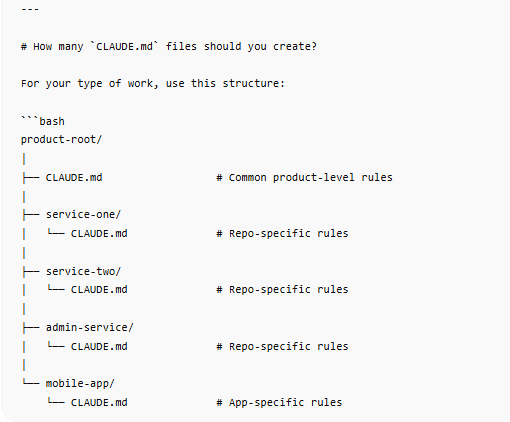
Levels of claude.md file

- Root CLAUDE.md
Use this when you have multiple related repositories/microservices.
Example path:
/opt/lampp/htdocs/myhospitalnow/CLAUDE.md
/opt/lampp/htdocs/motoshare/CLAUDE.md
/opt/lampp/htdocs/devopsschool/CLAUDE.md
Content of root CLAUDE.md
This file should contain information that is common for the full product.

# Product Overview

This product is a multi-service Laravel-based platform.
It contains multiple microservices that work together for user, admin, booking, notification, payment, and authentication flows.

# System Architecture

Explain how all repositories are connected.

Example:
- main-web handles public website and customer-facing pages.
- admin-ms handles admin management.
- user-ms handles user profile and login-related data.
- notification-ms handles email, SMS, and WhatsApp notifications.
- file-management-ms handles uploaded documents and images.
- Keycloak is used as centralized identity provider.

# Cross-Repo Workflow

When a feature affects more than one repo, first analyze all impacted services before coding.

Example:
- Login issue may affect frontend, backend API, Keycloak, and user database.
- Booking issue may affect web, admin, payment, and notification services.

# Shared Coding Rules

- Do not break existing functionality.
- Do not remove old fields unless explicitly asked.
- Do not modify production `.env`.
- Do not run database migrations without confirmation.
- Keep backward compatibility.
- Use safe migrations only.
- Always check existing routes, controllers, models, and database columns before changing logic.

# Shared Git Rules

- Create small, meaningful commits.
- Do not push directly to production branch unless instructed.
- Show changed files before final response.
- Mention testing commands performed.

# Shared Tech Stack

- Laravel
- MySQL / MariaDB
- Blade
- REST APIs
- Keycloak SSO
- Apache / LAMPP
- GitHub
- Flutter app if applicable

# Shared Security Rules

- Never expose secrets.
- Never print client secrets, database passwords, or API keys.
- Do not commit `.env`.
- Validate all user input.
- Protect admin routes.
- Maintain authentication and authorization checks.

# Shared Testing Commands

Before final report, run when applicable:
bash
php -l path/to/changed/file.php
php artisan route:list
php artisan config:clear
php artisan cache:clear
composer dump-autoload
git diff --stat
git diff
Final Response Format
After every implementation, provide:
Files changed
Logic changed
Commands run
Testing checklist
Rollback steps
Pending issues
# 2. Per-repo `CLAUDE.md`

Use this inside each specific repository.

Example:
bash
/opt/lampp/htdocs/myhospitalnow/doc-core-ma/CLAUDE.md
/opt/lampp/htdocs/myhospitalnow/mydoc-doctors-ms/CLAUDE.md
/opt/lampp/htdocs/motoshare.in/motoshare-web/CLAUDE.md
/opt/lampp/htdocs/devopsschool/ds-student-ms/CLAUDE.md
Content of per-repo CLAUDE.md
This file should explain only that repo.
# Repository Overview

This repository is responsible for [specific module name].

Example:
This repo handles doctor listing, doctor profile, doctor login, doctor dashboard, and doctor-related APIs.

# Folder Structure

Important folders:

- app/Http/Controllers
- app/Models
- app/Services
- routes/web.php
- routes/api.php
- resources/views
- database/migrations
- public
- config

# Main Entry Points

Mention important files:

- routes/web.php contains web routes.
- routes/api.php contains API routes.
- DoctorController handles doctor profile logic.
- AuthController handles login and callback logic.
- resources/views/pages contains frontend Blade pages.

# Repo-Specific Rules

- Do not change unrelated modules.
- Follow existing controller and service pattern.
- Keep old login working while improving SSO.
- Do not remove legacy columns.
- Add migration only if column is missing.
- Check existing database structure before writing new query.

# Authentication Rules

Example:
- Public listing pages should remain open.
- Dashboard pages require authentication.
- Keycloak user ID should be preferred where available.
- Legacy email/user_id fallback should remain for old data.

# Database Rules

- Do not rename existing columns directly.
- Use nullable columns for safe backward compatibility.
- Always check `Schema::hasColumn()` in safe migrations.
- Never run migration without user approval.

# API Rules

- Keep existing API response format.
- Do not break mobile app compatibility.
- Add new fields without removing old fields.
- Validate request parameters.

# UI/UX Rules

- Keep existing layout functional.
- Improve design without breaking Blade variables.
- Mobile responsive design is mandatory.
- Do not remove existing form fields unless instructed.

# Performance Rules

- Avoid duplicate queries.
- Use eager loading where needed.
- Cache only safe public data.
- Do not cache user-specific sensitive data incorrectly.

# Local Commands


bash
php artisan route:list
php artisan config:clear
php artisan cache:clear
php artisan view:clear
composer dump-autoload
Known Gotchas
Example:
Storage permission issues may cause view/log errors.
.env should not be edited directly.
Some old users may not have keycloak_user_id.
Some APIs are used by mobile app, so response format must remain stable.
Final Report Required
Claude must always provide:
Summary of changes
Files changed
Commands run
Testing result
Risk areas
Rollback steps
prompt
first read this blog https://aiopsschool.com/blog/category/claude/ and also read parntthread https://chatgpt.com/c/6a168024-2a58-83a2-8518-00c2c330482d then this blogWhat is CLAUDE.md and Why Every Software Project Needs It this is my blog topic iwant full heading point wise advantage wh form what one blog content should be
CLAUDE.md file for writing any blog topic
# CLAUDE.md

## Purpose of This File

This CLAUDE.md file is created to guide Claude while writing professional, SEO-friendly, humanized, and well-structured blog content on any topic.

Claude must follow this file whenever creating, rewriting, improving, or expanding blog content.

The goal is to produce blog content that is:

- Easy to understand
- Humanized and professional
- SEO-friendly
- Well-structured
- Informative and detailed
- Useful for readers
- Suitable for publishing on websites
- Written in simple language
- Free from unnecessary complexity
- Original and plagiarism-free

---

# General Blog Writing Rules

## 1. Writing Tone

Claude must write in a simple, professional, humanized, and reader-friendly tone.

The blog should feel natural, not robotic.

Avoid overly complex words unless the topic requires them. If technical words are used, explain them in simple language.

The content should be suitable for beginners, students, professionals, business owners, and general readers depending on the blog topic.

## 2. Content Quality

Every blog must provide real value to the reader.

Claude should not write thin, generic, or repetitive content.

Each section should explain the topic clearly with practical details, examples, benefits, use cases, and important points.

## 3. SEO Guidelines

Every blog must include:

- Meta Title
- Meta Description
- SEO-friendly Introduction
- Proper heading structure
- Clear subheadings
- Naturally placed keywords
- Helpful explanation
- FAQs if required
- Final conclusion

Do not overuse keywords.

Use keywords naturally inside the content.

## 4. Formatting Rules

Use clean markdown formatting.

Use:

- H1 for the main title
- H2 for major sections
- H3 for sub-sections
- Bullet points only where useful
- Tables where comparison or structured explanation is needed
- Bold text for important highlights

Do not use icons or emojis.

Do not add unnecessary decorative symbols.

## 5. Originality Rules

The blog must be unique and original.

Do not copy content from other websites.

Do not repeat the same paragraph idea again and again.

If multiple blogs are requested on the same topic, each blog must have a unique title, different structure, different examples, and different wording.

---

# Mandatory Blog Structure

Claude should follow this structure for most blog topics unless the user gives a different format.

---

## Meta Title

Create a short, SEO-friendly meta title.

Rules:

- Keep it clear and attractive
- Include the main keyword
- Avoid clickbait
- Prefer 50–60 characters if possible

Example:

What is CLAUDE.md and Why Every Software Project Needs It

---

## Meta Description

Create a short meta description.

Rules:

- 150–160 characters preferred
- Include the main keyword naturally
- Explain what the reader will learn
- Make it useful and clear

Example:

Learn what CLAUDE.md is, why it matters, how it helps Claude understand projects, and why every software team should use it.

---

## Introduction

Write a strong introduction.

The introduction should:

- Start with the reader’s problem or curiosity
- Explain why the topic matters
- Give a simple overview of what the blog will cover
- Be engaging and easy to understand
- Avoid unnecessary long background

The introduction should make the reader feel that the blog will answer their question properly.

---

## What is [Topic]?

Explain the main topic clearly.

Rules:

- Give a simple definition
- Avoid too much technical language
- Explain the meaning in a practical way
- Mention where it is used
- Mention why people should know about it

Example for CLAUDE.md:

CLAUDE.md is a markdown file used to give Claude project-specific instructions, rules, context, and workflow guidance.

---

## [Topic] in Simple Language

Explain the topic in very simple words.

This section should be useful for beginners.

Use real-life comparisons if helpful.

Example:

Think of CLAUDE.md as a project instruction notebook for Claude. Just like a new developer needs onboarding, Claude also needs project guidance before working properly.

---

## Why Was [Topic] Needed?

Explain the problem that created the need for this topic.

Cover:

- What problem existed before
- Why the topic became important
- What issues it solves
- What happens if people ignore it

Example points:

- Repeated explanation
- Lack of consistency
- More mistakes
- Poor documentation
- Confusion in large projects

---

## The Main Purpose of [Topic]

Explain the core objective of the topic.

This section should answer:

- What is the main goal?
- Who benefits from it?
- What does it improve?
- Why should someone care?

Keep this section clear and direct.

---

## WH Form Explanation of [Topic]

Explain the topic using WH questions.

Include:

### What is [Topic]?

Explain the basic meaning.

### Why is [Topic] Important?

Explain its value.

### Who Should Use [Topic]?

Mention the target users.

### Where is [Topic] Used?

Explain common use cases or environments.

### When Should You Use [Topic]?

Explain the right time or situation.

### How Does [Topic] Work?

Explain the working process simply.

---

## Key Advantages of [Topic]

Create a detailed advantages section.

Each advantage should have:

- A clear heading
- Simple explanation
- Practical value
- Example if useful

Possible advantage sections:

### 1. Saves Time

Explain how the topic reduces repeated work.

### 2. Reduces Mistakes

Explain how it improves accuracy.

### 3. Improves Consistency

Explain how it keeps output or process stable.

### 4. Helps Beginners

Explain how it makes the topic easier to understand or use.

### 5. Improves Productivity

Explain how users can work faster.

### 6. Supports Team Collaboration

Explain how it helps teams follow the same process.

### 7. Improves Quality

Explain how it improves final output.

### 8. Makes Work More Organized

Explain how it creates better structure.

Add more advantages based on the topic.

---

## What Should Be Included in [Topic]?

Explain the important components.

For example, if the topic is CLAUDE.md, include:

- Project Overview
- Technology Stack
- Folder Structure
- Development Rules
- UI/UX Rules
- Security Rules
- Testing Commands
- Git Rules
- Reporting Format
- Do Not Touch Section

For other topics, customize this section according to the subject.

---

## Types, Levels, or Structure of [Topic]

Use this section when the topic has multiple types or levels.

For CLAUDE.md, explain:

### Root CLAUDE.md

Used for global project rules.

### Folder-Level CLAUDE.md

Used for specific module or folder rules.

For other topics, explain the relevant types, categories, or levels.

---

## Best Practices for [Topic]

Write practical best practices.

Rules:

- Make each point useful
- Avoid generic advice
- Explain why each best practice matters
- Keep language simple

Example:

### Keep It Clear

A clear instruction file is easier for Claude to follow.

### Keep It Updated

Outdated instructions can confuse the AI and create wrong output.

### Avoid Unnecessary Complexity

The file should guide Claude, not confuse it.

---

## Common Mistakes While Using or Creating [Topic]

Explain mistakes users should avoid.

Each mistake should include:

- What the mistake is
- Why it is a problem
- How to avoid it

Example mistakes:

### Making It Too Long

Too much unnecessary content can reduce clarity.

### Not Updating It

Old instructions can cause wrong implementation.

### Giving Generic Instructions

Instructions like “write good code” are not enough. Specific rules work better.

---

## Recommended Workflow

Give a step-by-step workflow.

The workflow should explain how to use the topic practically.

Example for CLAUDE.md:

1. Create the root CLAUDE.md file.
2. Add project overview and rules.
3. Add folder-level CLAUDE.md files if needed.
4. Ask Claude to read the file before working.
5. Start with analysis before implementation.
6. Review the plan.
7. Allow implementation.
8. Test the changes.
9. Update CLAUDE.md when project rules change.

For other topics, customize the workflow.

---

## Example Prompt Using [Topic]

Provide a practical prompt that users can copy and use.

Rules:

- Make the prompt clear
- Include role, task, rules, and output expectation
- Mention safety rules if relevant
- Keep it useful for real work

Example:
text
Read the CLAUDE.md file first.
I want you to write a complete blog on the topic: "[Blog Topic]".
Follow the blog structure, SEO rules, tone, formatting, and quality guidelines from CLAUDE.md.
The blog should include:
- Meta Title
- Meta Description
- Introduction
- What is the topic?
- Simple explanation
- Why it is needed
- Advantages
- Best practices
- Common mistakes
- Recommended workflow
- Final thoughts
Write in simple, humanized, professional language.
Do not use icons or emojis.
Do not copy content from other websites.
Make the content detailed and publish-ready.



Top comments (0)