
Defination and examples
How to perform transformation for resize, normalize, convert to tensor, data augmentation using dataset,
Key Benefits
Dataset and DataLoader
Why We Need Dataset and DataLoader in PyTorch
Why Training the Whole Data at Once Is Memory Inefficient
Difference between manual approach and datsewith dataloader
Defination and examples

Defination
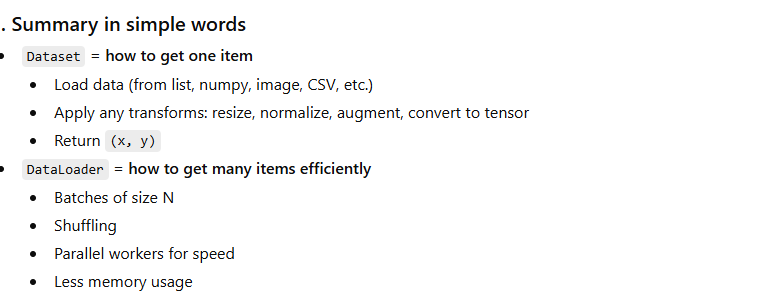
Dataset
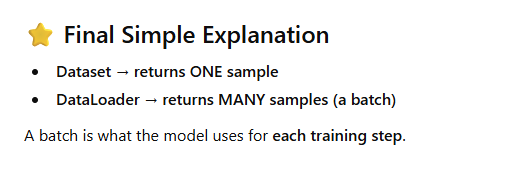
We use Dataset to organize and retrieve samples, and DataLoader to efficiently feed data in mini-batches with shuffling and parallel loading, which reduces memory usage and improves convergence during training.
from torch.utils.data import Dataset

class NumberDataset(Dataset):
    def __init__(self):
        self.data = [1, 2, 3, 4, 5]      # our data
        self.labels = [0, 0, 1, 1, 1]    # labels

    def __len__(self):
        return len(self.data)           # total samples = 5

    def __getitem__(self, index):
        x = self.data[index]            # one sample
        y = self.labels[index]          # its label
        return x, y
Using the Dataset
dataset = NumberDataset()

print(dataset[0])   # output: (1, 0)
print(dataset[2])   # output: (3, 1)
print(len(dataset)) # output: 5
Another EXample
from torch.utils.data import Dataset, DataLoader

class CustomDataset(Dataset):

  def __init__(self, features, labels):

    self.features = features
    self.labels = labels

  def __len__(self):

    return len(self.features)

  def __getitem__(self, idx):

    return self.features[idx], self.labels[idx]
train_dataset = CustomDataset(X_train_tensor, y_train_tensor)
test_dataset = CustomDataset(X_test_tensor, y_test_tensor)
dataset = NumberDataset()
Dataloader
the main role of a DataLoader in PyTorch is to automatically load your data in small groups (called batches), shuffle the order (if needed), and prepare
Step 1: Simple Dataset
from torch.utils.data import Dataset

class NumberDataset(Dataset):
    def __init__(self):
        self.data = [1, 2, 3, 4, 5, 6]
        self.labels = [0, 0, 1, 1, 0, 1]

    def __len__(self):
        return len(self.data)

    def __getitem__(self, index):
        return self.data[index], self.labels[index]
Step 2: Use DataLoader to create batches
from torch.utils.data import DataLoader
dataset = NumberDataset()

loader = DataLoader(
    dataset,
    batch_size=2,   # each batch contains 2 samples
    shuffle=True
)
Step 3: Training-style loop — fetching batches
for batch_data, batch_labels in loader:
    print(batch_data, batch_labels)
Example Output:
tensor([2, 5]) tensor([0, 0])
tensor([1, 6]) tensor([0, 1])
tensor([3, 4]) tensor([1, 1])
✔ Data comes in batches
✔ Each batch has 2 items
✔ Order is shuffled
Another Example
train_loader = DataLoader(train_dataset, batch_size=32, shuffle=True)
test_loader = DataLoader(test_dataset, batch_size=32, shuffle=True)
for epoch in range(epochs):

  for batch_features, batch_labels in train_loader:
How to perform transformation for resize, normalize, convert to tensor, data augmentation using dataset
EXAMPLE1
from torch.utils.data import Dataset

class NumberDataset(Dataset):
    def __init__(self, transform=None):
        self.data = [1, 2, 3, 4, 5]
        self.labels = [0, 0, 1, 1, 1]
        self.transform = transform        # <- can be None or a function

    def __len__(self):
        return len(self.data)

    def __getitem__(self, index):
        x = self.data[index]
        y = self.labels[index]

        # apply transform if given
        if self.transform is not None:
            x = self.transform(x)

        return x, y
Example: a simple transform (multiply by 10)
def times_ten(x):
    return x * 10

dataset = NumberDataset(transform=times_ten)

print(dataset[0])   # (x, y)
print(dataset[2])
print(len(dataset))
Expected output:
(10, 0)   # 1 * 10, label 0
(30, 1)   # 3 * 10, label 1
5         # length
EXAMPLE 2
Normalizing numeric data (like features)
import numpy as np

class NormalizedNumberDataset(Dataset):
    def __init__(self):
        self.data = np.array([1, 2, 3, 4, 5], dtype=np.float32)
        self.labels = np.array([0, 0, 1, 1, 1], dtype=np.int64)

        # compute mean and std
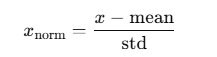
        self.mean = self.data.mean()
        self.std = self.data.std()

    def __len__(self):
        return len(self.data)

    def __getitem__(self, index):
        x = self.data[index]
        y = self.labels[index]

        # normalize
        x_norm = (x - self.mean) / self.std
        return x_norm, y
Usage:
dataset = NormalizedNumberDataset()

for i in range(len(dataset)):
    print(f"index {i} -> {dataset[i]}")
Example output (approx):
index 0 -> (-1.4142135, 0)
index 1 -> (-0.70710677, 0)
index 2 -> (0.0000000, 1)
index 3 -> (0.70710677, 1)
index 4 -> (1.4142135, 1)
Now your dataset returns normalized values instead of raw ones.
EXAMPLE3
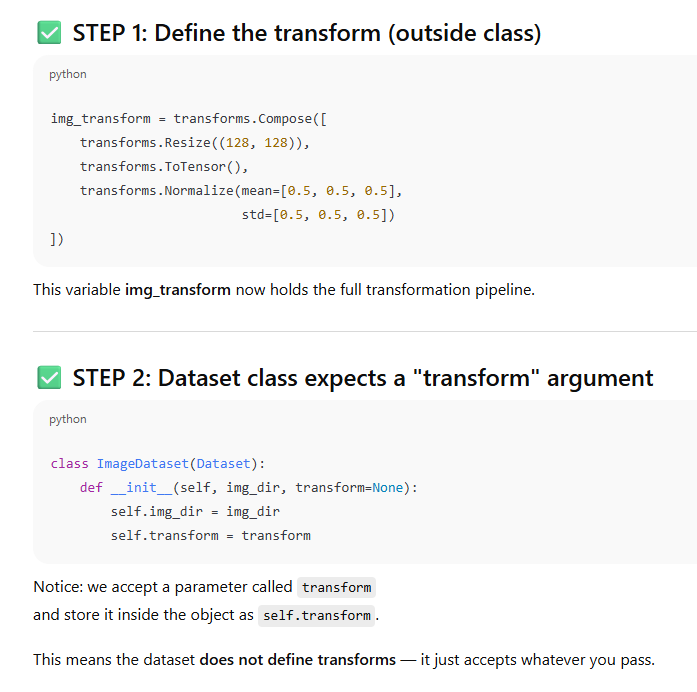
Typical image use-case: resize + tensor + normalize
In real projects, Dataset is most often used with images:
Load image from disk
Resize
Convert to tensor
Normalize (e.g. to mean/std of ImageNet)
We usually use torchvision.transforms for this.
⚠️ This example assumes you have PIL and torchvision installed.
from torch.utils.data import Dataset
from PIL import Image
import os
import torch
from torchvision import transforms

Define the transform pipeline
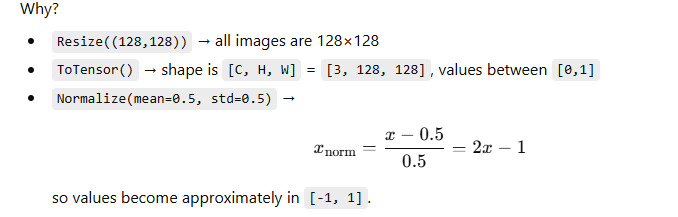
img_transform = transforms.Compose([
    transforms.Resize((128, 128)),                 # resize to 128x128
    transforms.ToTensor(),                         # convert to tensor [C,H,W], values [0,1]
    transforms.Normalize(mean=[0.5, 0.5, 0.5],     # normalize per channel
                         std=[0.5, 0.5, 0.5])
])
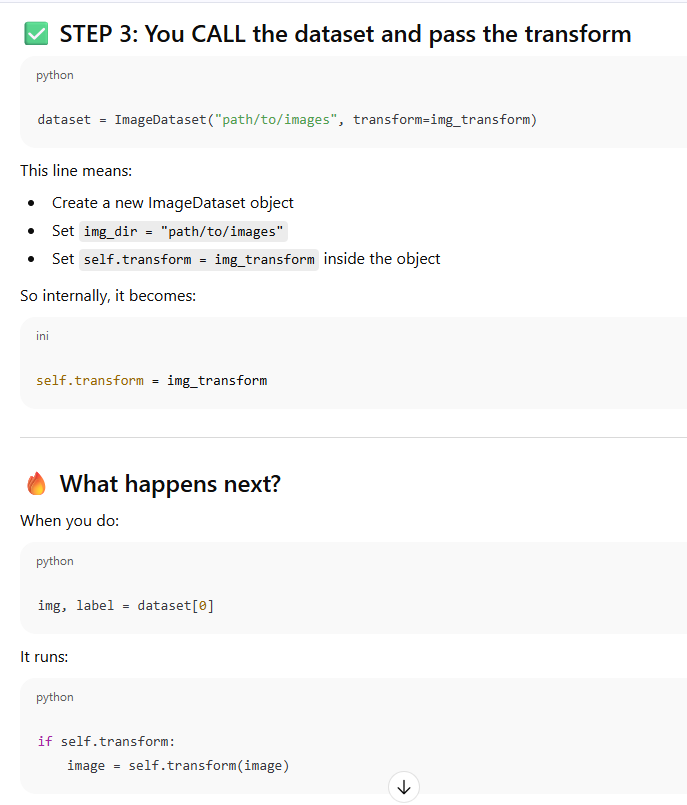
Define an ImageDataset that uses this transform
class ImageDataset(Dataset):
    def __init__(self, img_dir, transform=None):
        self.img_dir = img_dir
        self.transform = transform
        self.image_files = [
            f for f in os.listdir(img_dir)
            if f.lower().endswith(('.png', '.jpg', '.jpeg'))
        ]

    def __len__(self):
        return len(self.image_files)

    def __getitem__(self, index):
        img_name = self.image_files[index]
        img_path = os.path.join(self.img_dir, img_name)

        # open image
        image = Image.open(img_path).convert("RGB")

        # apply transform
        if self.transform:
            image = self.transform(image)

        # dummy label (for example)
        label = 0

        return image, label
Using the dataset
dataset = ImageDataset("path/to/images", transform=img_transform)

img_tensor, label = dataset[0]

print("Image tensor shape:", img_tensor.shape)
print("Min value:", img_tensor.min().item())
print("Max value:", img_tensor.max().item())
print("Label:", label)
Expected kind of output:
Image tensor shape: torch.Size([3, 128, 128])
Min value: -1.0something
Max value:  1.0something
Label: 0
Combining with DataLoader
The magic happens when you plug this Dataset into a DataLoader.
from torch.utils.data import DataLoader

loader = DataLoader(
    dataset,
    batch_size=4,
    shuffle=True,
    num_workers=2  # parallel loading
)

for batch_idx, (images, labels) in enumerate(loader):
    print("Batch", batch_idx)
    print("  images shape:", images.shape)  # [B, C, H, W]
    print("  labels shape:", labels.shape)
    break  # just first batch
Sample output:
Batch 0
  images shape: torch.Size([4, 3, 128, 128])
  labels shape: torch.Size([4])
Explanation
EXAMPLE 4
Resize + ToTensor() + Normalize()
We resize a fake image, convert to tensor, then normalize it.
import torch
from torchvision import transforms
from torch.utils.data import Dataset

class FakeImageDataset(Dataset):
    def __init__(self):
        # create 3 images, each 64×64 with 3 channels (RGB)
        self.data = torch.rand(3, 3, 64, 64)   # [N, C, H, W]

        # transform: resize → tensor → normalize
        self.transform = transforms.Compose([
            transforms.Resize((32, 32)),                # resize to 32×32
            transforms.Normalize(mean=[0.5]*3, std=[0.5]*3)
        ])

    def __len__(self):
        return len(self.data)    # total samples = 3

    def __getitem__(self, index):
        x = self.data[index]     # image tensor
        x = self.transform(x)    # apply resize + normalize
        label = index            # dummy label
        return x, label


# Using the Dataset
dataset = FakeImageDataset()

img0, label0 = dataset[0]
img1, label1 = dataset[1]

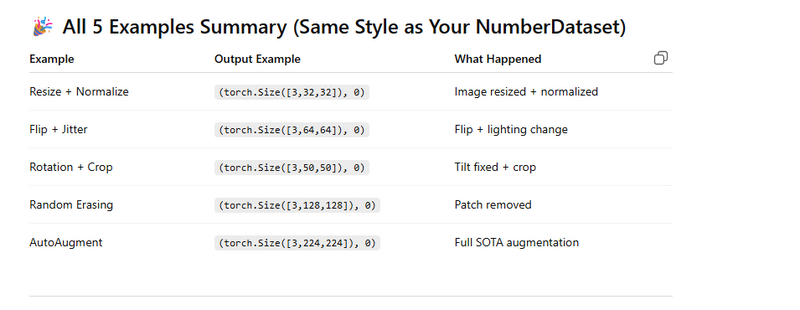
print(img0.shape)     # output: torch.Size([3, 32, 32])
print(label0)         # output: 0

print(img1.shape)     # output: torch.Size([3, 32, 32])
print(label1)         # output: 1

print(len(dataset))   # output: 3
EXAMPLE 5
Random Horizontal Flip + ColorJitter
We apply augmentations to show how outputs change.
import torch
from torchvision import transforms
from torch.utils.data import Dataset

class RotationCropDataset(Dataset):
    def __init__(self):
        self.data = torch.rand(1, 3, 100, 100)

        self.transform = transforms.Compose([
            transforms.RandomRotation(30),      # rotate ±30 deg
            transforms.CenterCrop((50, 50))     # crop center 50×50
        ])

    def __len__(self):
        return 1

    def __getitem__(self, index):
        img = self.data[index]
        return self.transform(img), index


dataset = RotationCropDataset()

img, label = dataset[0]

print(img.shape)      # output: torch.Size([3, 50, 50])
print(label)          # output: 0
EXAMPLE 6
Random Erasing (Cutout Augmentation)
Randomly erases part of the image.
import torch
from torchvision import transforms
from torch.utils.data import Dataset

class ErasingDataset(Dataset):
    def __init__(self):
        self.data = torch.rand(1, 3, 128, 128)

        self.transform = transforms.Compose([
            transforms.ToTensor(),
            transforms.RandomErasing(p=1.0, scale=(0.1, 0.2))
        ])

    def __len__(self):
        return 1

    def __getitem__(self, index):
        img = self.data[index]
        return self.transform(img), index


dataset = ErasingDataset()
img, label = dataset[0]

print(img.shape)      # output: torch.Size([3, 128, 128])
print(label)          # output: 0


Explanation:

Shape stays the same

A random region is erased (filled with 0 or noise)
EXAMPLE 7
AutoAugment (ImageNet Policy)
Powerful augmentations used in SOTA models.
import torch
from torchvision import transforms
from torchvision.transforms import AutoAugment, AutoAugmentPolicy
from torch.utils.data import Dataset

class AutoAugmentDataset(Dataset):
    def __init__(self):
        self.data = torch.rand(1, 3, 224, 224)

        self.transform = transforms.Compose([
            AutoAugment(policy=AutoAugmentPolicy.IMAGENET),
        ])

    def __len__(self):
        return 1

    def __getitem__(self, index):
        img = self.data[index]
        img = self.transform(img)
        return img, index


dataset = AutoAugmentDataset()

img, label = dataset[0]

print(img.shape)       # output: torch.Size([3,224,224])
print(label)           # output: 0
AutoAugment randomly applies:
rotation

shear

color jitter

posterize

solarize

equalize
Explanation:
Shape stays the same, but pixel values change due to flip + color jitter.
Let’s pretend your data are simple numbers but you want to normalize them
Key Benefits
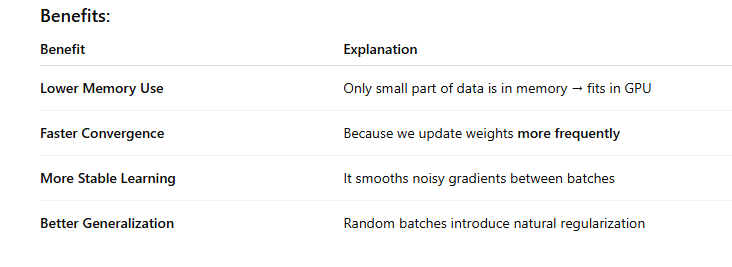
Memory Efficient → Only small batches are processed at a time, not the full dataset.
Faster & Smoother Convergence → Because weights are updated multiple times per epoch.
Better Training Performance → Avoids slow & unstable full-batch gradient descent.
Clean & Modular Code → Dataset + DataLoader neatly separates data storage and data feeding.
Dataset
Stores input data and labels in an organized structure.
Allows easy access to any sample using an index (dataset[i]).
Helps handle custom data sources (images, sensors, CSV, video frames, etc.)
Makes it easy to apply transformations (augmentations, normalization).
Supports scalability, since data does not need to be loaded in memory all at once.
DataLoader
Loads data in mini-batches instead of all at once → prevents memory overflow.
Shuffles data to prevent the model from learning order patterns.
Enables parallel data loading using workers → speeds up training.
Feeds data to the model sequentially & efficiently each training step.
Essential for mini-batch gradient descent, which improves convergence and training stability.
Why We Need Dataset and DataLoader in PyTorch
Example

If you have 10GB dataset, you cannot load all of it into GPU memory at once.
So DataLoader loads only a small batch at a time → avoiding memory overflow.
from torch.utils.data import DataLoader, Dataset
class MyDataset(Dataset):
    def __init__(self, X, y):
        self.X = X
        self.y = y

    def __len__(self):
        return len(self.X)

    def __getitem__(self, idx):
        return self.X[idx], self.y[idx]

dataset = MyDataset(X, y)
loader = DataLoader(dataset, batch_size=32, shuffle=True)
Why Training the Whole Data at Once Is Memory Inefficient
This method is called Batch Gradient Descent.
We compute loss on entire dataset before updating weights.
If dataset is huge → GPU RAM will overflow
Also 1 update per full data = slow learning
So this is BAD for deep learning.
✅ Why We Use Mini-Batch Gradient Descent (with DataLoader)
Mini-Batch means:
Process small chunks (like 32, 64 samples)
Update weights after each batch
⭐ Key Point About Better Convergence
You said:
"we are not updating weights after backward frequently so we use mini batch"
Actually the correct version is:
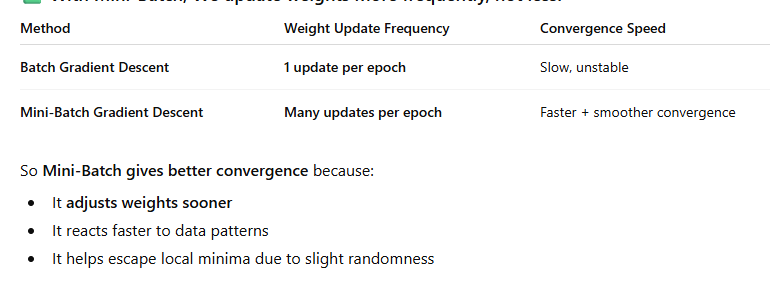
DataLoader loads data in mini-batches so the model can train without loading everything into memory.
Mini-batch gradient descent updates weights more frequently, which leads to faster and smoother convergence than batch gradient descent.
This also avoids memory overflow and improves training stability.
🎯 One-Line Answer
Dataset organizes data, DataLoader feeds it in mini-batches to avoid memory issues. Mini-batches allow frequent weight updates, which gives faster and more stable convergence in training.
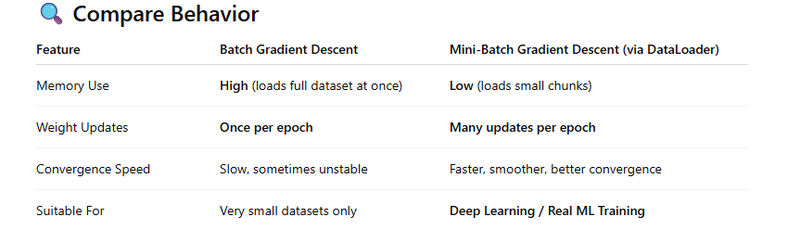
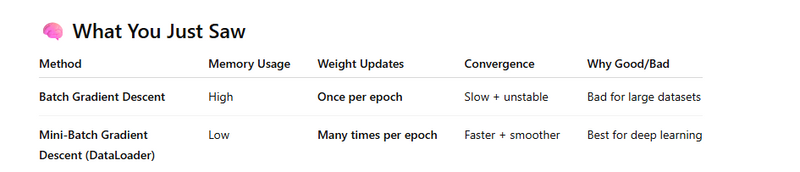
Batch Gradient Descent (memory inefficient, slow convergence)
Mini-Batch Gradient Descent using DataLoader (memory efficient, faster convergence)
🧠 Step 1: Create a Synthetic Dataset
import torch
from torch.utils.data import Dataset, DataLoader

# Creating Fake Dataset (1000 samples, each sample has 3 features)
X = torch.randn(1000, 3)
y = (X.sum(dim=1) > 0).long()   # Binary labels based on feature sum

class MyDataset(Dataset):
    def __init__(self, X, y):
        self.X = X
        self.y = y

    def __len__(self):
        return len(self.X)

    def __getitem__(self, idx):
        return self.X[idx], self.y[idx]

dataset = MyDataset(X, y)
🚫 Case 1: Batch Gradient Descent (All data at once → Memory inefficient)
# Simple model
model = torch.nn.Sequential(
    torch.nn.Linear(3, 2)
)

loss_fn = torch.nn.CrossEntropyLoss()
optimizer = torch.optim.SGD(model.parameters(), lr=0.1)

# Training using *full batch*
for epoch in range(5):
    # forward on entire dataset
    y_pred = model(X)
    loss = loss_fn(y_pred, y)

    optimizer.zero_grad()
    loss.backward()   # compute gradients
    optimizer.step()  # update weights (only once per epoch)

    print(f"Epoch {epoch+1}: Loss = {loss.item():.4f}")
❗ Problem:
Loads all 1000 samples into GPU for each computation
Only 1 update per epoch → slow learning → bad convergence
✅ Case 2: Mini-Batch Gradient Descent using DataLoader (Efficient + Better Convergence)
# Make DataLoader to load mini-batches of 32 samples
loader = DataLoader(dataset, batch_size=32, shuffle=True)

model = torch.nn.Sequential(
    torch.nn.Linear(3, 2)
)

loss_fn = torch.nn.CrossEntropyLoss()
optimizer = torch.optim.SGD(model.parameters(), lr=0.1)

# Training using mini-batches
for epoch in range(5):
    for batch_X, batch_y in loader:
        y_pred = model(batch_X)
        loss = loss_fn(y_pred, batch_y)

        optimizer.zero_grad()
        loss.backward()   # gradients calculated per batch
        optimizer.step()  # weights updated many times per epoch

    print(f"Epoch {epoch+1}: Last Batch Loss = {loss.item():.4f}")
FULL CODING
import torch
from torch.utils.data import Dataset, DataLoader

# =========================
# 1) Create Synthetic Dataset
# =========================
# 1000 samples, each with 3 features
X = torch.randn(1000, 3)
y = (X.sum(dim=1) > 0).long()   # Label 1 if sum > 0 else 0

# Custom Dataset Class
class MyDataset(Dataset):
    def __init__(self, X, y):
        self.X = X
        self.y = y

    def __len__(self):
        return len(self.X)

    def __getitem__(self, idx):
        return self.X[idx], self.y[idx]

dataset = MyDataset(X, y)

# Simple Model for Demonstration
def create_model():
    return torch.nn.Sequential(
        torch.nn.Linear(3, 2)   # 3 input features → 2 output classes
    )


# =============================================
# 2) TRAINING USING BATCH GRADIENT DESCENT (BAD)
# =============================================
print("\n===== TRAINING WITH BATCH GRADIENT DESCENT (Memory Inefficient, Slow Updates) =====")

model = create_model()
loss_fn = torch.nn.CrossEntropyLoss()
optimizer = torch.optim.SGD(model.parameters(), lr=0.1)

for epoch in range(5):
    y_pred = model(X)            # Forward on **entire dataset at once**
    loss = loss_fn(y_pred, y)

    optimizer.zero_grad()
    loss.backward()              # Compute gradients
    optimizer.step()             # Update weights **only once per epoch**

    print(f"Epoch {epoch+1}: Loss = {loss.item():.4f}")

# Explanation:
# - Uses whole dataset each step -> HIGH memory usage
# - Weight updates happen rarely -> Slow convergence


# ===============================================
# 3) TRAINING USING MINI-BATCH WITH DATALOADER (GOOD)
# ===============================================
print("\n===== TRAINING WITH MINI-BATCH GRADIENT DESCENT (Efficient + Better Convergence) =====")

# Create DataLoader to load small batches (32 samples per batch)
loader = DataLoader(dataset, batch_size=32, shuffle=True)

model = create_model()    # Reset model
loss_fn = torch.nn.CrossEntropyLoss()
optimizer = torch.optim.SGD(model.parameters(), lr=0.1)

for epoch in range(5):
    for batch_X, batch_y in loader:
        y_pred = model(batch_X)
        loss = loss_fn(y_pred, batch_y)

        optimizer.zero_grad()
        loss.backward()   # Gradients for this batch
        optimizer.step()  # Weights updated **multiple times per epoch**

    print(f"Epoch {epoch+1}: Last Batch Loss = {loss.item():.4f}")

# Explanation:
# - Loads only **a small batch at a time** -> Saves memory
# - Weight updates happen MANY times per epoch -> Faster & smoother convergence


# =========================
# Final Takeaway (Printed)
# =========================
print("\n================= SUMMARY =================")
print("Batch Gradient Descent: High memory use + slow convergence (only 1 update per epoch).")
print("Mini-Batch using DataLoader: Low memory use + faster convergence (many updates per epoch).")
print("Thus DataLoader helps training deep models efficiently and stably.")
Difference between manual approach and datsewith dataloader
Side-by-Side Comparison (with Coding Examples)
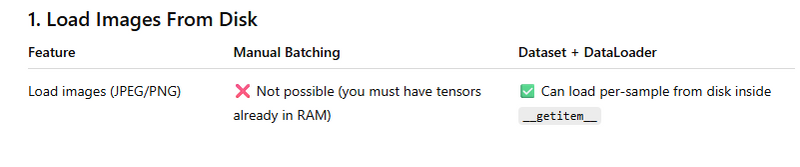
❌ Manual Approach (Impossible)
Manual batching requires X_train_tensor already in memory
You CANNOT do this:
img = Image.open("dog.jpg") # cannot load inside slicing
✅ Dataset + DataLoader Approach
class MyDataset(Dataset):
    def __getitem__(self, index):
        img_path = self.paths[index]
        image = Image.open(img_path).convert("RGB")   # load from disk
        return image



Top comments (0)